Godot Version
v4.5.1.stable.official
Question
During testing, I noticed the movement of the camera would continue to “move” beyond the edges of the screen. The longer I “move” beyond the edge of the screen, the longer it would take to move back into the screen. How do I limit the position of the camera so it cannot increase nor decrease in value beyond a certain value? I tried if_else statements in the “_process()” method, but that didn’t seem to work.
extends Camera2D

var zoom_speed := 0.005
var min_zoom := 0.25
var max_zoom := 2.0

var default_camera_speed: int = 5
var camera_speed: int = 5

func _input(event: InputEvent):
	if event is InputEventMouseButton:
		if event.button_index == MOUSE_BUTTON_WHEEL_DOWN:
			zoom = Vector2.ONE * max(min_zoom, zoom.x - zoom_speed)
		if event.button_index == MOUSE_BUTTON_WHEEL_UP:
			zoom = Vector2.ONE * min(max_zoom, zoom.x + zoom_speed)

func _process(_delta):
	if Input.is_action_pressed("CAMERA_MOVE_LEFT"):
		position.x -= camera_speed
	if Input.is_action_pressed("CAMERA_MOVE_RIGHT"):
		position.x += camera_speed
	if Input.is_action_pressed("CAMERA_MOVE_UP"):
		position.y -= camera_speed
	if Input.is_action_pressed("CAMERA_MOVE_DOWN"):
		position.y += camera_speed
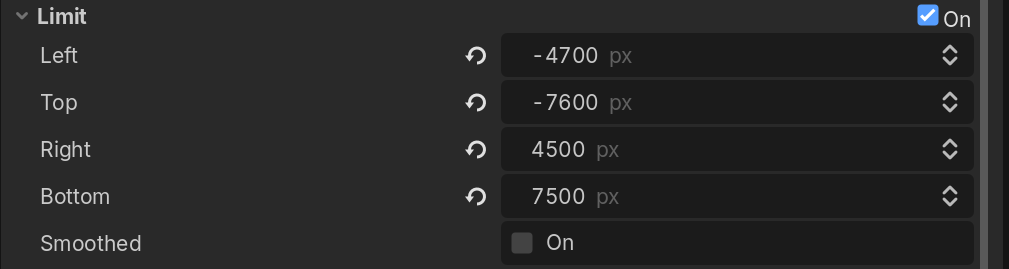
The camera has a “Limit” property, you can adjust the limits of where it can go there.
If you don’t want to hard code it, I just finished a Camera 2D Plugin that will do it for you if you use a TileMapLayer You just assign the TileMapLayer to the Camera2DLimit component and it limits it to the area you’ve covered with tiles. If you making it bigger or smaller, it adjusts. You can also pass it a Rect2i.
Hi, this helped. However, I noticed that if I held down the camera’s direction key beyond the “borders”, it would take time for the camera to move back within the borders when I press the direction key in the opposite direction. In other words, it’s like as if the “camera” was moving beyond the borders, despite the actual camera staying within the borders (similar to how the main character of a game moving beyond the borders of the game). I tried to use if statements on x and y positions to make the camera_speed zero if it goes beyond the borders, but that didn’t work.
Yes, because camera position is not the same as the ‘shown’ position, if you limit the view by Limit property. But it’s easy to overcome the issue you are having.
In your code where you are changing the position of the camera, I’m pretty sure you are doing something like this..
position = position + change_delta
instead do this:
position = get_screen_center_position() + change_delta
Here is the note about it:
Note that the Camera2D node’s Node2D.global_position doesn’t represent the actual position of the screen, which may differ due to applied smoothing or limits. You can use get_screen_center_position() to get the real position. Same for the node’s Node2D.global_rotation which may be different due to applied rotation smoothing. You can use get_screen_rotation() to get the current rotation of the screen.
PS: I just realized that you shared your code. So as I suspected, you are using position not get_screen_center_position.
I’d do something like this, to make it cleaner:
func _process(_delta):
	var move_input: Vector2
	if Input.is_action_pressed("CAMERA_MOVE_LEFT"):
		move_input.x -= 1
	if Input.is_action_pressed("CAMERA_MOVE_RIGHT"):
		move_input.x += 1
	if Input.is_action_pressed("CAMERA_MOVE_UP"):
		move_input.y -= 1
	if Input.is_action_pressed("CAMERA_MOVE_DOWN"):
		move_input.y += 1

	position = get_screen_center_position() + move_input.normalized() * camera_speed * delta / (Engine.time_scale * zoom)
Note that I added:
delta: to make sure camera movement speed it’s not frame dependent.
Engine.time_scale: to make sure if you change time_scale, it doesn’t effect the movement speed. You can omit this if you think you won’t need it. But this is probably needed with most of the games.
zoom: To make sure movement has the same ‘offset’ by same amount of ‘keyboard press’ in different zooms. You can also omit this if you think you don’t need it.
Thank you for your suggestion. I tried your recommended clean code (I had to remove the underscore before the delta since I was getting an error message otherwise), but now the camera just stays in place. It does not respond to the key inputs for some reason. I tried to tinker with the code, but I am unable to figure out why this happens.
The origin of your camera is in the middle, and while the limit value prevents it from moving outside the bounds, the position still changes. Simply clamp your position each frame.
I appreciate your feedback. I did some more tinkering and research online and accidentally found a way to optimize my code, haha. Below is what I found works:
func _process(_delta):
	var direction: Vector2 = Input.get_vector("CAMERA_MOVE_LEFT", "CAMERA_MOVE_RIGHT", "CAMERA_MOVE_UP", "CAMERA_MOVE_DOWN")
	position += direction * camera_speed
	position.x = clamp(position.x, 550, 2000)
	position.y = clamp(position.y, 400, 1500)
I understand it’s not the same approach you recommended, but your feedback helped lead me to this solution nevertheless.