Godot 4.6.2
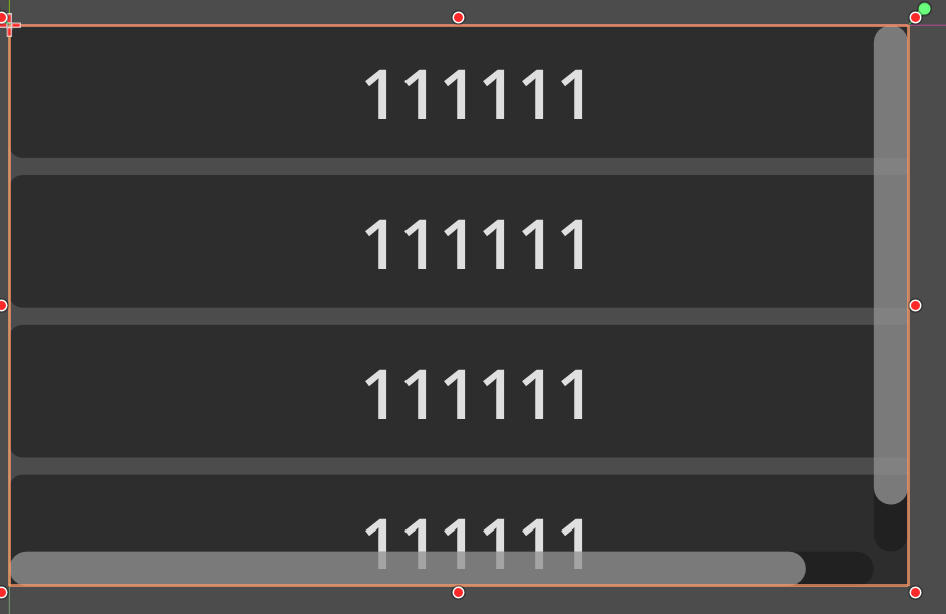
For example, a VBoxContainer as a child, several buttons in VBox
I want to put the bars away, so it won’t hide the content.
I changed the param “Scrollbar H&V separation” in theme, it did not change anything. Also, i tried scroll mode Reserve, it was the same.
I am confused, why it has no effect? Is there anything I have misunderstood?
mrcdk
July 23, 2026, 12:15pm
2
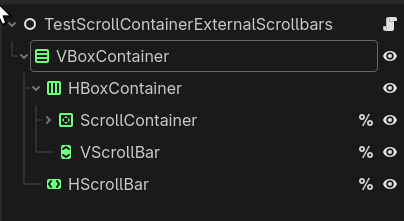
As far as I know it’s not possible to do what you want with a ScrollContainer alone. You can add HScrollBar and VScrollBar and use Range.share()ScrollContainer scrollbars with them like:
extends Node


@onready var v_scroll_bar: VScrollBar = %VScrollBar
@onready var h_scroll_bar: HScrollBar = %HScrollBar
@onready var scroll_container: ScrollContainer = %ScrollContainer


func _ready() -> void:
	scroll_container.vertical_scroll_mode = ScrollContainer.SCROLL_MODE_SHOW_NEVER
	scroll_container.horizontal_scroll_mode = ScrollContainer.SCROLL_MODE_SHOW_NEVER
	scroll_container.get_v_scroll_bar().share(v_scroll_bar)
	scroll_container.get_h_scroll_bar().share(h_scroll_bar)