I have a project that uses GDExtension and I’ve been able to export it for windows perfectly fine but I’m running into issues trying to export it for the web. I can run the build and all the GDScripts work fine, but none of GDExtension classes are there.
If Extensions Support is enabled, GDExtensions will be able to be loaded. Note that GDExtensions still need to be specifically compiled for the web platform to work. Like thread support, enabling this feature requires the use of cross-origin isolation headers.
I have Extensions Support and “Ensure Cross Origin Isolation Headers“ enabled, so I assume that I need to make a seperate build of my GDExtension library for web, but I don’t know how to do that. This page The .gdextension file — Godot Engine (4.4) documentation in English has examples of how to link up libraries for macos, windows, and linux, and it lists web as another system you can use but doesn’t provide an example.
I don’t have much experience with building libraries, I know how to build a .lib and a .dll in visual studios and I’ve used SCons like once while setting up GDExtension, but other than I don’t really know much, so any help would be highly appreciated
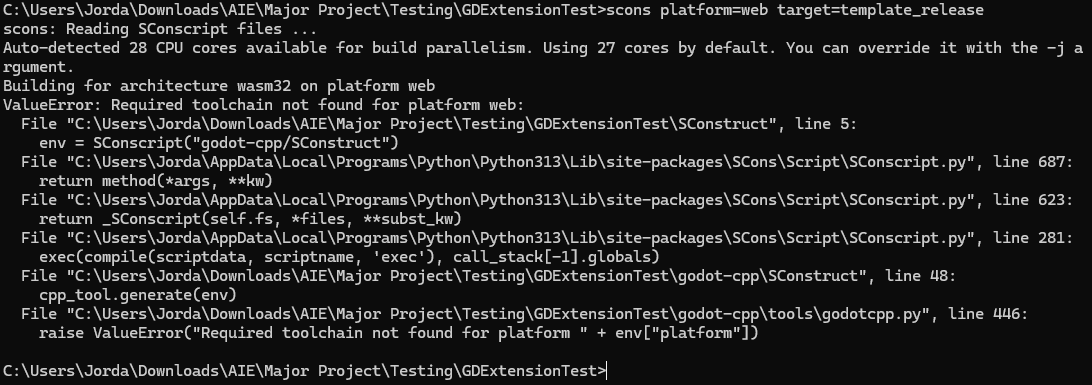
Hi, thanks for your response, I’ve tried following your instructions but I’ve run into some issues and I’m a bit confused. I had a look at the godot-cpp template but I don’t really know which part I’m supposed to be looking at. I also tried following the “Compiling for web” tutorial, but it came up with the following errors:
I’ve downloaded python and emscripten so I’m not sure what I’m missing or if it’s something with the path being setup incorrectly or something?
Also, I noticed that the tutorial you sent is for Compiling for web, rather than Exporting for web. I don’t really understand how those things are different but the page says they are so I wanted to double check if following this tutorial would actually help me make a html build. For reference this is something I’m trying to upload on itch.io, sorry for not mentioning that in the initial post
You need to setup the emscripten compiler correctly. From the documentation page linked above:
Before starting, confirm that emcc is available in your PATH. This is usually configured by the Emscripten SDK, e.g. when invoking emsdk activate and source ./emsdk_env.sh/emsdk_env.bat.
Yes, it’s the compiling for the web one because it has instructions to setup the compiler correctly.
You’ll also need to compile the export templates for the web with GDExtension support because the official ones don’t have.
I had run emsdk activate, but I must’ve closed the console at some point after that. Calling emsdk activate --permanent fixed it. Thank you!
I managed to compile the library as a .wasm, but I can’t figure out how to include it in the .gdextension file. My instinct was to add them in like this:
But this caused the build to get stuck on the loading screen every time I tried to run it. I then tried renaming them/ compressing them into .zip files since that’s what the tutorial says they’re supposed to be, and renaming them to the specific name in the tutorial (web_dlink_release/ web_dlink_debug) but that didn’t work either. I assume it’s just a syntax error or something on my end but I can’t find any examples of what the full line in the .gdextension file should look like. Either that or I’m running the command wrong but I copy pasted it directly from the GDExtension section so that seems unlikely
The template I posted above has a .gdextension example file:
Make sure that the names of the files are correct.
Also, as said before, are you building your export templates with GDExtension support and using those instead of the official ones? The official ones don’t have support for GDExtension.
Oh, sorry I completely missed that, thank you!
I have figured out the issue, I did have the file names correct but the command in the GDExtension section of the tutorial doesn’t include “threads=no”. Including that fixed it
Thank you so much for your help!