How to correct handle cursor entered on nodes (2D)

Godot Version

Godot 4.5.1

Question

Hello, I made a fun simple card game. Look at this video for understanding of my problem:


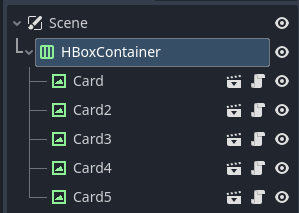
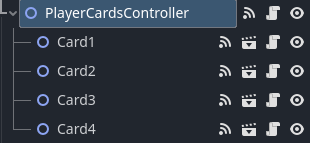
Nodes at scene tree:


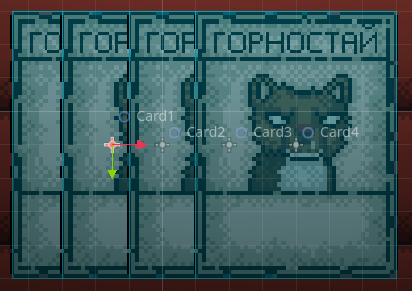
Nodes at 2D scene:

I have:

  • CardBase class with hover functionality (up and down card);
  • CardInputComponent class which registers the cursor hover and sends a EventBus signal about it with an indication of the card;
  • PlayerCardsController class for handle signals about cursor entering on card.

Current PlayerCardsController code:

## Is the cursor currently hovering over card
var _is_card_hovered: bool = false


## When the cursor is placed on card
func _on_card_cursor_entered(card: CardBase) -> void:
	if _is_card_hovered:
		return
	if card.state != Global.CardState.IN_HAND:
		return
	
	EventBus.card_hover_started.emit(card)
	_is_card_hovered = true


## When the cursor left card
func _on_card_cursor_exited(card: CardBase) -> void:
	if not _is_card_hovered:
		return
	if card.state != Global.CardState.IN_HAND_HOVERED:
		return
	
	EventBus.card_hover_stopped.emit(card)
	_is_card_hovered = false


## Connect methods to EventBus signals
func _connect_to_signals() -> void:
	EventBus.card_cursor_entered.connect(_on_card_cursor_entered)
	EventBus.card_cursor_exited.connect(_on_card_cursor_exited)

2 questions:

  1. Maybe you see incorrect hover of cards by order? How to correct handle cursor enter in that situation?
  2. What I can use for detect another card and hover it when cursor left from current card?

If you need to more info, please let me know. Thanks for any help!

What’s catching the entered event? Areas? If yes, they are not sorted according to scene tree order and, by default, their order may change between frames. Either use control nodes instead or enable main viewport’s physics_object_picking_sort and if needed physics_object_picking_first_only

3 Likes

Why not make your cards TextureRect instead? (or anything that extends Control)
This is the effect I can achieve with just a few lines of code:

This is the code on the Card node:

extends TextureRect


var tween: Tween


func _ready() -> void:
	mouse_entered.connect(_tween_position.bind(-50.0))
	mouse_exited.connect(_tween_position.bind(0.0))


func _tween_position(target_y: float) -> void:
	if tween and tween.is_running():
		tween.kill()
	tween = create_tween()
	tween.set_ease(Tween.EASE_OUT)
	tween.set_trans(Tween.TRANS_SINE)
	tween.tween_property(self, "position:y", target_y, 0.5)
3 Likes

Yes, Area2D node catching that. At my previous variant of that project I tried to manipulating with physics for fix that, but it’s hard code. I try way with Control nodes, that look’s like simple.

Ok, thanks you, I try that.

What do you mean by that? You just need to switch those two flags to true via script code at startup. It’s literally two trivial lines of code.

I mean that:

func _ready() -> void:
	get_viewport().physics_object_picking = true
	get_viewport().physics_object_picking_first_only = true
	get_viewport().physics_object_picking_sort = true


## Returns node or null at current cursor position
func get_node_on_mouse_pos() -> Node:
	var space_state = get_world_2d().direct_space_state

	var params := PhysicsPointQueryParameters2D.new()
	params.canvas_instance_id = get_canvas_layer_node().get_instance_id()
	params.position = get_global_mouse_position()
	params.collide_with_areas = true

	var result = space_state.intersect_point(params)
	if result.size() > 0:
		var collider: Area2D = result[0]["collider"]
		var node: Node = collider.get_parent()
		return node

	return null


## Returns card node or null at current cursor position
func get_card_node_on_mouse_pos() -> Card:
	var node: Node = get_node_on_mouse_pos()
	if node is Card:
		return node

	return null

You shouldn’t do this by querying physics state. What’s the benefit of doing it this way? Just let the mouse_entered and mouse_exited signals do the job. This will obey the sorting order.

It’s old code for fix card to card cursor hover (when crusor exit from Card1 to Card2). In that code it’s using:

## When cursor exited from card
func on_card_cursor_exited(card: Card) -> void:
	if game_state_machine.cur_state.name != "player_turn":
		return
	if card.state != Global.CardState.IN_HAND:
		return
	if _selected_card:
		return

	highlight_card(card, false)

	var another_card: Card = input_manager.get_card_node_on_mouse_pos()
	if another_card != null:
		highlight_card(another_card, true)
		_hovered_card = another_card
		return

	_hovered_card = null

Ok, I try @normalized method and it’s fix only my first question.
Before I try to redo everything on Control, I want to ask: can I use gui_input for hanlde player mouse clicks on Card?

Yes, you can use gui_input signal instead of mouse_entered and mouse_exited.

2 Likes

You need to use area’s mouse_entered and mouse_exited signals. The logic will be exactly the same as with control nodes. I’d prefer using controls over areas though, but both should work equally well given that those viewport flags are set for areas.
2 Likes

Yes, it’s work correctly. But I have a desire to do this using Control.

1 Like

As I said, it’d always opt for controls over areas for this, so yeah, by all means, make a controls version.

2 Likes

@normalized, @wchc thank you so much for help!

2 Likes