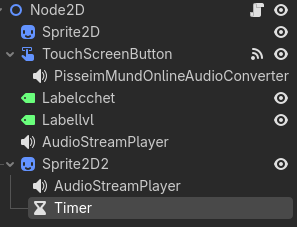
Godot Version
4
Question
I need the screamer to disappear when the 0.5 c timer expires
if clic == 26:
		$Sprite2D2/AudioStreamPlayer.play()
		$Sprite2D2.show()

	????????
		$Sprite2D2.hide()
4
I need the screamer to disappear when the 0.5 c timer expires
if clic == 26:
$Sprite2D2/AudioStreamPlayer.play()
$Sprite2D2.show()
????????
$Sprite2D2.hide()
A Timer node can emit a signal after some time. Your code might look like this, if you connect the signal through the editor
	if clic == 26:
		$Sprite2D2/AudioStreamPlayer.play()
		$Sprite2D2.show()
		$HideTimer.start()

func _on_hide_timer_timeout() -> void:
$Sprite2D2.hide()it doesn’t work, the picture doesn’t disappear:
if clic == 26:
$Sprite2D2/AudioStreamPlayer.play()
$Sprite2D2.show()
$Sprite2D2/Timer.start()
func _on_hide_timer_timeout() → void:
$Sprite2D2.hide()
Try .visible = true/false instead of visible() and hide() unless you created those methods.
It doesn’t look like you connected the signal. Click the Timer, in the “Signals” tab you need to connect to “timeout” and then apply your hiding code.
As @gertkeno states, before start the timer add $Sprite2D2/Timer.timeout.connect(_on_hide_timer_timeout)