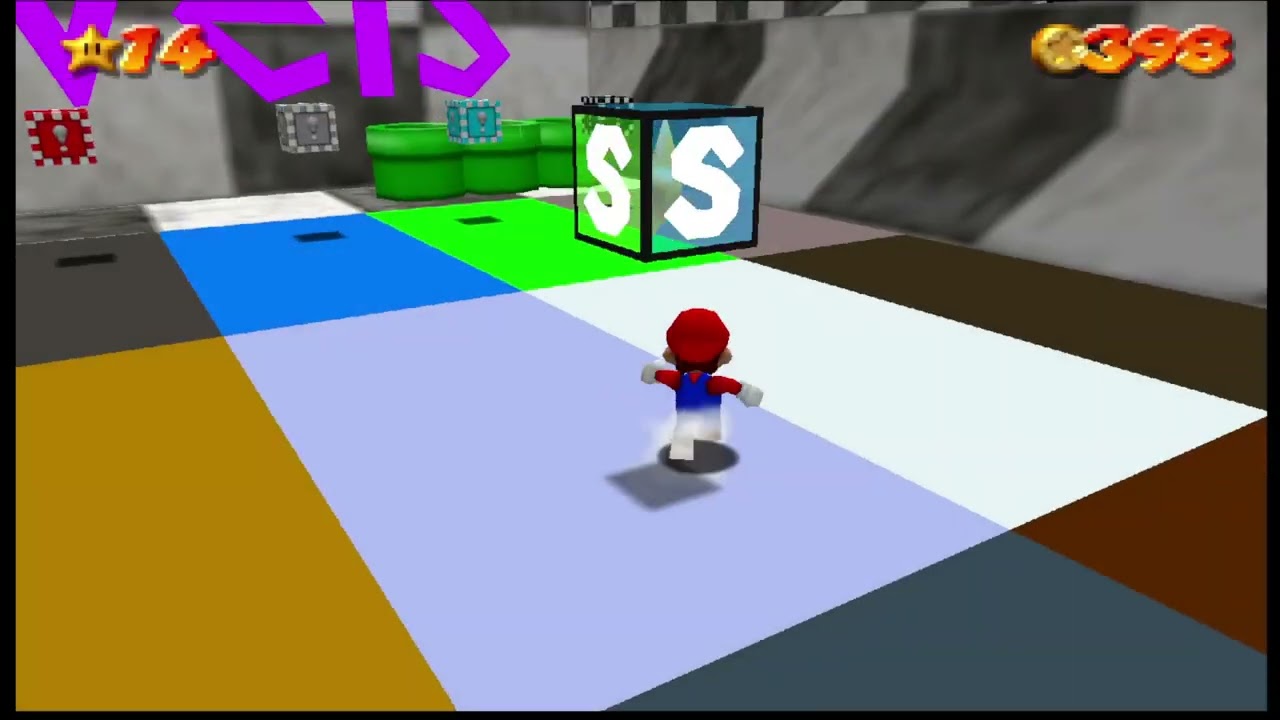
I don’t know if this effect has an official name but does anyone here know how to create that little “snap-back” effect you see when a character starts moving fast? Its most notable in stuff like 2D sonic when you start spin-dashing or in Mario 64 when you start a long jump. Here**'**s also a video example if that helps
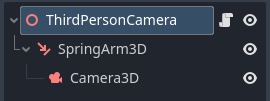
for more detail I**‘m specifically looking to implement this in 3D. Also here’**s how my camera is set-up if that changes anything.
just to double check before I test anything. If I were to lock my Camera3D Node’s global position, would that cause its local position to update as well? cause if so then that simplifies a lot of this
What do you mean by “lock”? There’s only one position. Global/local are just numbers that represent that same position in different coordinate spaces. So what you want to do is not update camera position for a short time. It doesn’t matter via which coordinate space you do the update. Just don’t do any.
To me, this effect looks like it’s achieved by either: resetting the camera’s velocity, or limiting the speed of the camera. I imagine the latter will produce the same effect (depending on your current system).
Proposed System
In the script that controls your camera, define a speed_limit variable and a UseSnapback() function that tweens speed_limit over time.
var speed_limit: float
const MAX_SPEED = 10.0
const SNAPBACK_DURATION = 1.0

var current_tween: Tween

func UseSnapback():
	# Stop the tween (if it's running)
	if current_tween:
		current_tween.kill()

	# Reset the speed limit
	speed_limit = 0;

	# Gradually return to the upper speed limit
	current_tween = get_tree().create_tween()
	current_tween.tween_property(self, "velocity_limit", MAX_SPEED, SNAPBACK_DURATION)
To call this function from other nodes, you can make use of Viewport.get_camera_3d() to retrieve the current active instance.
# Invocation example
get_viewport().get_camera_3d().UseSnapback()
Given that the system uses a Tween, you can also use set_ease() to configure how the “snap-back” effect looks.
To make the speed_limit affect your camera’s velocity, simply limit its velocity with the variable.
velocity.limit_length(speed_limit)
Is this what you had in mind? Let me know what you think.