I have a rigid body player character and I want to kill it when it hits a surface too hard. I want to use linear velocity for that but I somehow need a velocity value that exists before the impact. People are talking about saving it in a variable but I don’t know how to preserve that variable without rewriting it with the next frame
You can simply have a variable at the top of your script.
At the start of Physics process, check this value. If you need to, do something about it.
Then proceed with the rest of whatever it is you need to do in physics process, and at the end of it, assign the variable you have in your script a new value.
I mean I understand this code but I am not sure how to apply it in a situation where the if statement would be an area/body entered signal and the “previousData” would be a linear_velocity value right before that signal would trigger.
Then you simply check this data when you receive the signal, you do processing, and at the end of that signal’s function, you set the current data, since the next time that signal is called, that will be the previous data. Unless I misunderstood your request.
I wanted to know if it is possible to somehow get the velocity_force value before the signal is triggered. Because I am assuming when the velocity_force value is returned upon impact the value is already dampened by that impact.
Ahh, I see. I’m not entirely sure that’s directly possible, but I suppose what I’d do is keep an array of values, maybe limited to 2 or 4, and when I need to check, I’d just select the largest velocity in that list, knowing that that’s probably the closest I could get.
Why are you assuming that? It’s possible you are right, but if you aren’t you may be coding for a situation that doesn’t exist.
I would strongly suggest you test what velocity_force is before, during and after impact so you can see whether your assumption is correct. Even if you are, you might discover the dampening is minimal and can be ignored.
Just before defining velocity_force, copy it into another var ‘old_velocity_force’. At any moment, you can then read what value it had before the latest update. Any use..?
It is true that I haven’t directly tested it before but I assumed that because a lot of times results with even just printed impact force felt really inconsistent and a lot of the times just plain wrong.
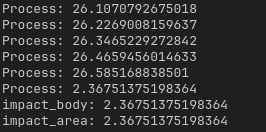
So now I tested it and here are the results.
the “impact_body” and “impact_area” are returned upon collision and the “Process” runs in the _integrate_forces function