hi,
I’ve run into some problems modifying character animations because I need to rebuild the player object (a characterbody3d) each time I change the animations in the source file (usually a .glb file).
So my process is to change the animated model in blender, then export as a .glb into the project directory. I then rename the old player mesh in the CharacterBody3d object and load the new .glb into the scene. I then have to make it ‘local’ and copy the old AnimationTree into the new animated mesh hierarchy. Then of course I need to set the correct animation player in the animation tree.
I’ve had multiple problems with bad root motions and animations exporting with weird orientations so making the process faster would be greatly beneficial.
How can I take advantage of the fact that the new animation is essentially (was actually) the same file?
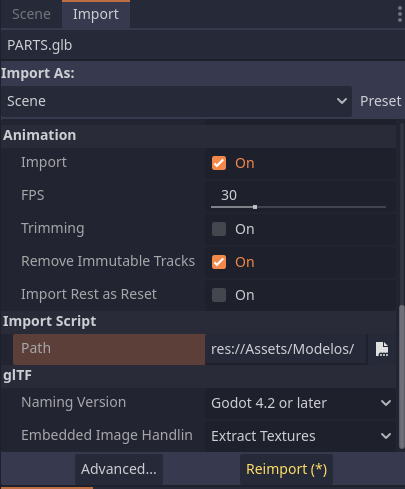
You could try using an Import Script to automate some of the process you do.
Basically, you make a script that automatically runs each time the GLB file is changed. You have to make it a tool script and extend EditorScenePostImport. This type of script gives you access to the model scene that is generated by Godot once it’s imported.
I have one that automatically changes a JSON file with part_data for my customization system.
@tool
extends EditorScenePostImport

var clothePartsFolder: String = 'res://Assets/Models/Fighter/ClotheParts/'
var dataOutputPath: String = "res://Assets/Data/Clothes/clothes.json"

func _post_import(scene: Node) -> Object:
	print("Importing clothing")
	if not DirAccess.dir_exists_absolute(clothePartsFolder):
		DirAccess.make_dir_absolute(clothePartsFolder)

	var clothes := find_clothes_recursive(scene)

	var clothe_data := create_dictionary(clothes)

	if not clothe_data.is_empty():
		generate_data(clothe_data)

	return scene
Another recommendation is to use blender scripting to export your GLB file faster. It uses python, which is what GDScript is based on.
I haven’t seen an imported model come with an AnimationTree, the step of making the AnimationTree local and copying it doesn’t sound right. You could also set the old one inactive if it is playing. Are you overwritting the last glb file? I have great success overwritting the last file and have to replace nothing in the scene tree.
Hi,
sorry for the late reply - I meant the animation tree from the previous character.
Now when I import the file first I add a bonemap, then I can export and save animations. After doing this I can easily import animations from other characters, so the model can be decoupled from the animation. So now I intend to try to import the model into the character scene with ‘editable children’, then hopefully I can update the GLB and the model will automatically change too, after I reimport with the standard skeleton bonemap - all without making the model ‘local’.
If I import the GLB as a scene but without exposing the internals (i.e. not ‘local’ or with ‘editable children’ ) then I can’t easily access the skeleton or the animation player - these are essential to the game character because I need to create bone attachments and load in animations.
Not 100% sure whether making the node with ‘editable children’ would work - whether changing the GLB will synch to the game character in this case.
Perhaps a post import script could get access to the animation player and the skeleton.
Editable children is the way to go, another very similar options is to create a “new inherited scene” from the glb.
If you are separating animation glb and a model/skeleton glb then you can change the import settings of the animation to an Animation Library, allowing you to combine animations libraries together in your own AnimationPlayer node and then an AnimationTree.
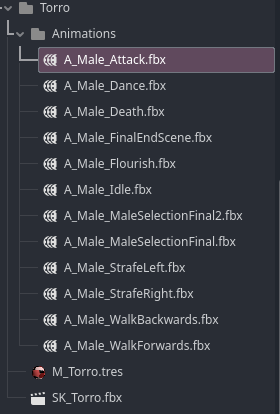
Here’s an example of fbx files containing only the armature/animation, imported as an Animation Library
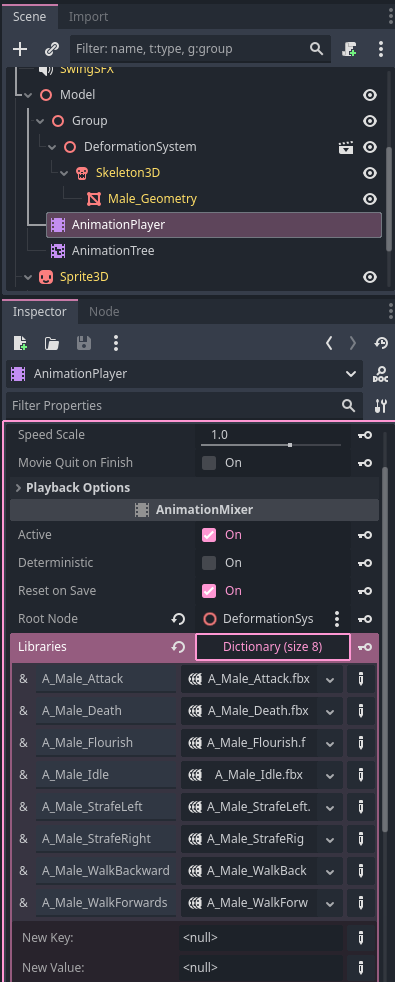
Then using these in the scene tree, where DeformationSystem is our “SK_Torro.fbx” file with editable children enabled. The AnimationPlayer is created locally and given all of the imported animation libraries