What would I need to do to make a press and hold function? For example the player presses and holds the [E] key to complete interacting with something like “kneading bread“ or “replacing batteries” and then the task is completed when the progress bar is filled.
How does this ensures that player should hold the interact key for specific time in order for progress bar to fill? Let’s say the player should hold the interact key for 1.5 seconds to actually pickup an item or do smth with specific thing. How to ensure that?
How many times the _process function is even updated that adding 1 to the progressbar.value is a good idea? Shouldn’t we use 1 * delta then?
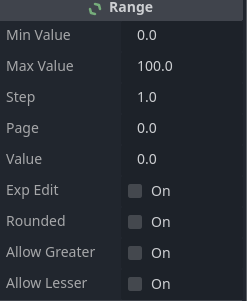
The code I gave was based on Range which is the base for all ProgressBar objects. You could update the code in this way to change the amount of time it takes.
var interact_progress_bar = $UI/Interact/InteractProgressBar

func _process(_delta):
	if Input.is_action_just_pressed("interact"):
		interact_progress_bar.value = 0.0
	elif Input.is_action_pressed("interact"):
		interact_progress_bar.value += 1.0
	elif Input.is_action_just_released("interact"):
		interact_progress_bar.value = 0.0

	if interact_progress_bar.value >= interact_progress_bar.max_value:
		print("Completed interacting!")
Just change max_value to an amount equal to the number of seconds you want for it to take to fill times 60.
You could use delta, but then you’d have to change max_value, and step. It’s 6 of one, half dozen of another. Pick your poison.
Well, actually no. Why then he would include in his script this particular part of code? await get_tree().create_timer(5).timeout. This would clearly indicate that he wanted player to hold the interact button for 5 seconds. It’s basically a delay timer as according to the Official Godot Engine documentation:
This method is commonly used to create a one-shot delay timer, as in the following example:
Quite bad and unpredictive implementation isn’t it? This kind of depends on the player’s FPS. (In crude terms). This would mean that on device A it would take 1.667 seconds but on device B it would take 0.555559 seconds. Funny isn’t it?
It’s better to use delta to ensure the time limit.
Example of that would be to do smth like this:
var variable = 0
func _process(delta):
	variable = 1 * delta
	if variable >= 5:
		variable = 0
# this script ensures that if 5 seconds passed then reset variable to 0.
Well actually I wanted the time to be any time depending on the task like how I said:
“kneading bread“ or “replacing batteries”
Not great examples but I don’t want the time to be exactly 5 seconds, but instead the time it takes to fill the progress bar which of course would change depending on the task.
@elias_lucky I should have learned my lesson the last time I gave you a thoughtful answer and you hid the whole thread. If you had another solution, give it. Don’t be disingenuous and get me to take time answering a question you aren’t really asking. Hopefully I’ve learned my lesson answering your questions.
He said the solution solved his problem. I’ve been taking a page out of @normalized book lately and not trying to overcomplicate my answers.
No, it doesn’t.
No, because process() is not framerate dependent.
No, it would not. Where did you pull those numbers from?
I am really not amused.
If you have a solution, then just give it next time and don’t waste other people’s time.
Also, since we are passing judgement on code, that code hardcodes the value to 5 seconds. It also doesn’t include the print statement. Also every frame it’s going to reset variable to 0.0166.
The ternary operator is a bit dense IMO since it increases cognitive complexity. Creative solution. However you’ve hardcoded 5.0.
I don’t think the power magnitude of my solution is fully appreciated here. Let me list the features: you already noticed the magic number and the mighty ternary. But that’s only the tip of its unstoppable iceberg. It uses whopping 3 awaits in only 12 lines of code, one of which is in _process(), and another one is recursive. But really potent magic happens after 17 seconds at 60 fps, when it conjures a stack overflow. It’s perfectly safe to use though if bread kneading time is kept under 15 seconds, which I guess is sufficient for most breads.
That’s wildly more complicated, the control flow is much harder to follow with ternary async paths. You’re spawning coroutines at least twice per frame and still the entire action is always processing per frame.
This example is much easier to follow and improve, without reset on release it’s only 7 lines of a function declaration and if/then pairs. Still processing every frame, but I’m sure it’s not slowing anything down even with several hold buttons.
If you split the _process and _input you can prevent it from running every frame while only making control flow slightly more complicated
It was a joke aimed at @dragonforge-dev who earlier complained that I don’t like awaits because I always tell inexperienced people to stay away from them, especially within _process()
It’s obviously (or not so ) a super-horrible “solution”. It’s almost impossible to mentally follow and it throws a stack overflow exception if recursive coroutine calls are kept running long enough.
Accepted solution has two problems. Its logic is almost correct but it will print the “completed” message over and over as long as the action is held after the progress reaches 100%. Since printing the “completed” message is a placeholder for code that is supposed to run upon completion, it typically should run only once. Also it is framerate dependent (@elias_lucky was right here)
@gertkeno’s solution is good but it disables the _process() callback so you can’t run any other per frame code when bar is not progressing, and wanted duration of progress (or rate of change) is not customizable. The latter is trivial to add though.
Here’s a proper textbook example:
We utilize a state flag variable in_progress that determines if we’re progressing or not.
The input is handled in an event handler so we don’t need to poll the events every frame
When action is pressed we switch into in_progress state. When it’s released we exit that state and reset the progress.
On every frame, if we’re in in_progress state, we advance the bar with a rate proportional to time slice and inversely proportional to duration
When progress is completed we exit in_progress state and run the “completed” code
We use progress bar’s ratio instead of value as this is value normalized to 0-1 range. That way the rate of change boils to simply 1 / duration, so the value we integrate to progress each frame is delta / duration
var duration := 5.0
var in_progress := false

func _input(event):
	if event.is_action_pressed("interact"):
		in_progress = true
	if event.is_action_released("interact"):
		in_progress = false
		progress_bar.ratio = 0.0

func _process(delta):
	if not in_progress:
		return
	progress_bar.ratio += delta / duration
	if progress_bar.ratio >= 1.0:
		in_progress = false
		print("COMPLETED")
Here’s also a more compacted version that doesn’t use the event handler or a dedicated state flag. I’m leaving the analysis of its logic to the OP as homework:
var duration := 5.0

func _process(delta):
	if Input.is_action_just_released("interact"):
		progress_bar.ratio = 0.0
	if progress_bar.ratio < 1.0:
		if Input.is_action_pressed("interact"):
			progress_bar.ratio += delta / duration
		if progress_bar.ratio >= 1.0:
			print("COMPLETED")