How to optimize adding a collision mesh dynamically

Godot Version

4.7

Question

I have been experimenting with terrain displacement mapping, basically taking a rock texture and using the bump channel to displace the terrain. I had problems recreating the vertex shader in gdscript so I made a compute shader over the last 2 weeks (slow progress since I have been busy with Real Life issues).

So basically I am at the stage where I am mostly satisfied with the result, the collision mesh is lining up with the visual terrain … mostly … there may still be floating point precision issues but its lining up mostly … and generating in chunks surrounding the player. I am just having trouble using the Physics Server and am not sure how to use threads with the compute shader. I would ideally like to do all the triangle processing in a thread with the compute shader in the main thread, or, I could do all the processing in a thread.

The full source is here DarkGrey456/SLICED-BREAD-DACLOD-

and it hopefully isn’t completely unreadable … the essence of the project is that grid meshes of the same scale and different LOD are instanced in a grid. The visibility ranges were set manually and can easily be tweaked.

The meshes all share the same material - its just a shader that displaces the vertices to match a heightmap texture. I then do the displacement mapping trick with the bump textures of the rocks and grass.

Because your terrain is generated from a heightmap, I would avoid creating a full triangle collision mesh.

Use a lower-resolution HeightMapShape3D for each nearby chunk instead. Generate only the height values, then assign them to map_data. It is faster than a ConcavePolygonShape3D and should match this type of terrain well.

Generate the height data with WorkerThreadPool, but apply the finished shape to the CollisionShape3D on the main thread using call_deferred(), since the active scene tree is not thread-safe.

If you keep the compute shader, use buffer_get_data_async() rather than sync() or buffer_get_data(), then create the collision when the callback returns.

I would also keep collision LOD separate from visual LOD, reuse existing chunks, and only update them when the player enters a new chunk rather than every frame.

Glad that help you!

Hi, yeah I agree the Heightmap shape works better than a triangle mesh but the displacement mapping is moving the vertices off the grid so they can even overhang - they are no longer a heightmap shape.

I can always regress the project to use heightmap shapes in chunks yes … and that does work well.

You are right: once the vertices can fold over the XZ grid and create overhangs, a HeightMapShape3D can no longer represent the terrain correctly.

In that case, I would use a lower-resolution ConcavePolygonShape3D for each nearby chunk. Generate the PackedVector3Array of triangles in a background thread, then create and assign the collision shape on the main thread.

Only rebuild collision when the player enters a new chunk or when the terrain changes, and reuse the existing chunk nodes instead of recreating everything.

If you keep the compute shader, avoid reading its result back immediately, since GPU synchronization may cause a larger stall than generating the collision on the CPU. Another option is a hybrid setup: heightmap collision for normal ground and simpler convex colliders for overhangs.

I was aware of this, however the problem is architectural, its a complicated system however not difficult to understand on the function level …

The _process(delta) function checks the player/camera position every frame and if the grid cell has changed (they are 128 x 128) then the collision generator is called.

The function loops over the 9 nearby grid cells and checks whether they already have collision models, if they do not then it calls a function that generates the mesh. This function either uses threads (CPU) or compute (GPU). That is all fine and working properly.

The compute function looks like

compute.execute(...)
compute.sync()
var collision_verts = compute.read_buffer(...)

## then form the triangle list from the vertices and indices

so the return value is from compute.read_buffer(…) but that must happen after sync() so how do I call sync() and retrieve the returned values from a thread ?
I couldn’t use

compute.sync.call_deferred()

or

compute.call_deferred(“sync”)

for example, because I still need to get the return value …

then perhaps I could attach a signal similar to this pattern:

node.connect("compute_complete", 
			 Callable(self, "_on_compute_complete").bind( node, ... ))
										

with the tree entered function triggered when the call_deferred completes …

func compute_complete():
    ### finish adding the collision model

but I have not seen a way of doing this

call_deferred() cannot return a value. The simplest approach is to run the whole compute job on a worker thread, then send the result back to the main thread.

func generate_collision() -> void:
    # Record and dispatch the compute shader here.

    rd.submit()
    rd.sync()

    var data: PackedByteArray = rd.buffer_get_data(output_buffer)
    call_deferred("_finish_collision", data)


func _finish_collision(data: PackedByteArray) -> void:
    # Convert the data and create/apply the collision shape here.

This requires a local RenderingDevice created with:

var rd := RenderingServer.create_local_rendering_device()

Keep all access to that device on the same worker thread. sync() will block that worker while the GPU finishes, but it will not directly block the main thread. Creating or adding the final collision node should still be done on the main thread.

This avoids needing a custom signal just to retrieve the return value, although the GPU workload itself can still affect frame time.

I will definitely try this method (at least to establish the technique), there is also one drawback to the local rendering device and thats the texture memory that can be shared with the material shaders using Texture2DRD in the main thread ( I just have not implemented it yet ).

I can also try these options:

  1. launching another thread to complete the collision model after the compute shader has called sync(). This would just finish with parent_node.add_child.call_deferred( static_body )and then I could connect the _on_tree_entered()signal and set the global_position when the static body enters the scene.
  2. Passing the index buffer to the compute shader to complete the physics model in the shader, then using a thread to create the static body, the collision shape, and add child with call_deferred as above.

Does Godot automatically sync() every frame? How can I access the data in this case?

No. Godot processes the global RenderingDevice as part of its render loop, but it does not perform a full sync() every frame.

With the global RenderingDevice, use buffer_get_data_async() to retrieve the result without manually blocking the main thread:

func start_compute() -> void:
    RenderingServer.call_on_render_thread(_dispatch_compute)


func _dispatch_compute() -> void:
    var rd := RenderingServer.get_rendering_device()

    # Dispatch the compute shader here.

    rd.buffer_get_data_async(result_buffer, _on_data_ready)


func _on_data_ready(data: PackedByteArray) -> void:
    call_deferred("_create_collision", data)


func _create_collision(data: PackedByteArray) -> void:
    # Decode the data and create the collision nodes here.
    parent_node.add_child(static_body)
    static_body.global_transform = target_transform

The callback is executed once the GPU data is available, so you do not need to call sync() yourself.

Only a local RenderingDevice uses the manual approach:

rd.submit()
rd.sync()

var data := rd.buffer_get_data(buffer)

Using another thread can prevent the main thread from freezing, but that worker thread will still wait for the GPU.

Also, the collision data must eventually return to the CPU because Godot’s physics system cannot directly use a GPU buffer.

This is not a use case for a compute shader, or at least there are no benefits in using it. The collider data is needed on the cpu side anyway and there is no pressure to generate it quickly on per-frame basis as the terrain streams “slowly”. Simply generate it in regular cpu thread(s).

The compute shader is used only to unify the displacement function - see the first post for information. Most of the junk (ok its WIP code that is to be refactored later ) is in hmaploader.gd.

i was experimenting with displacement mapping for the bump/heightmaps of the terrain textures - making rocky areas look more realistic. Basically the displacement map uses the mesh normal after heightfield displacement ( i have to use different terminology here because heightfield displacement uses the global terrain texture but its essentially the same with different normals ) so there can be overhangs.

When I tried to compute the collision model in gdscript the results were not accurate - I could not replicate the sampler2D from the glsl shader in gdscript.

The version in the compute shader can be unified with the version in the vertex shader using a glsl include file. The limitations are that I will probably have to copy the values from VERTEX and NORMAL because they are globals defined in the large global glsl script, as you know. Also I cant use any in-built definitions that are exclusive to Vertex or Fragment shaders.

I do have a theory that perhaps the sampler2D in the vertex shader is sampling 9 pixels, or that perhaps i need to offset by a value like 0.5, but so far I have not had any luck recreating it in gdscript.

Thanks yeah I will try the async() function and check performance and FPS.

Then there’s even less of a reason to go through all the trouble of setting it up and transferring data. A regular threaded script should be perfectly capable of doing it, and far easier to debug.

Its complicated … heres what ive got …

func sample_image_bilnear_bump(image:Image,x:float, y:float, scale:float, divisor:float, size:float)->float:
	
	var u_1 = scale * x / divisor  
	var v_1 = scale * y / divisor 
		
	var u__1 =  (u_1 - int(u_1))
	var v__1 =    (v_1 - int(v_1))
	
	var u1 = size * u__1
	var v1 = size * v__1
		
	var u12 = u1 + 1 
	if u12 > size-1: u12 = 0
	var v12 = v1 + 1
	if v12 > size-1: v12 = 0

	# bilinear filter attempt 
	var m_uv1 := Vector2i( u1,v1)
	var m_uv12 := Vector2i( u12,v1)
	var m_uv13 := Vector2i( u1,v12)
	var m_uv14 := Vector2i( u12,v12)
	var disp11 = image.get_pixelv( m_uv1 ).a	
	var disp12 = image.get_pixelv( m_uv12 ).a
	var disp13 = image.get_pixelv( m_uv13 ).a
	var disp14 = image.get_pixelv( m_uv14 ).a
	var disp1 = lerp ( lerp(disp11,disp12,u__1), lerp(disp13,disp14,u__1), v__1)	

	return disp1

@export var channel_for_splat:int

func get_map_values( x:float, z:float, X:int, Z:int):
	var normal_pix:Color = nmap.get_pixel(X+int(x), Z+int(z))
	
	var H1 = HEIGHT_SCALE*hmap.get_pixel(X + int(x-1), Z + int(z)).r
	var H2 = HEIGHT_SCALE*hmap.get_pixel(X + int(x+1), Z + int(z)).r
	var H3 = HEIGHT_SCALE*hmap.get_pixel(X + int(x), Z + int(z-1)).r
	var H4 = HEIGHT_SCALE*hmap.get_pixel(X + int(x), Z + int(z+1)).r
	
	var normal = -Vector3(2.0*(H2 - H1), -4.0, 2.0*(H4-H3) ).normalized();
	
	var splat:Color = splat_map.get_pixel( X+int(x), Z+int(z) )
	#x += X
	#z += Z
	 
	# TEXTURE_DIVISOR is 127 here, 128-1, because x never reaches 128 for each tile, it goes 0-127
	# BUT ... viewing with the collision mesh showed the results were bettwe when the shader
	# had 128 as the divisor ... why ? I don't know, its still broken.
	
	var disp1 =sample_image_bilnear_bump(alb1,x,z,UV_SCALE.x,128.0,512)

	var u2 = 	int(512.0*(x * UV_SCALE.x/ TEXTURE_DIVISOR  - floor(x * UV_SCALE.x/ TEXTURE_DIVISOR  ) ))
	var v2 = 	int(512.0*(z * UV_SCALE.x/ TEXTURE_DIVISOR  - floor(z * UV_SCALE.x/ TEXTURE_DIVISOR  ) ))
	var m_uv2:= Vector2i( u2,v2 )
	var disp2 = alb2.get_pixelv( m_uv2 ).a	
	
	var disp3 =sample_image_bilnear_bump(alb3,x,z,UV_SCALE.z,128.0,512)


	var u4 = 	int( 512.0 * fposmod( (x * UV_SCALE.w)/ TEXTURE_DIVISOR, 1.0  )) 
	var v4 = 	int( 512.0 * fposmod( (z * UV_SCALE.w)/ TEXTURE_DIVISOR, 1.0  )) 
	var m_uv4:= Vector2i( u4,v4 )
	var disp4 = alb4.get_pixelv( m_uv4 ).a	
	
	var splat_pixel = get_splat_color(splat)	
		
	var hval:float = (splat_pixel* disp1 +(1.0 -splat_pixel) * disp3)			
	
	return {
		"normal":normal,
		"height":hval
	}

It is only using Textures 1 and 3, rock and grass in this case.

Then the displacement is calculated this way and also in the mesh instance shader (ordinary MeshInstance3D)

func generate_mesh_data(rect: Rect2) -> Array:

	var mesh_faces_local :PackedVector3Array=  PackedVector3Array()
	
	for v in mesh_faces:
		v.y = get_altitude(Vector3(rect.position.x+v.x, 0, rect.position.y+v.z))
		var disp_dict = get_map_values(v.x, v.z, rect.position.x, rect.position.y)#x/2.0,z/2.0
		var v1 =Vector3(v.x, v.y, v.z)
		v1 += 5.0 * disp_dict["normal"] * disp_dict["height"]# - 2.5 * disp_dict["normal"]
		mesh_faces_local.append(v1)
		
	return mesh_faces_local	

I just found out that the code was using a local rendering device - I was using the EasyCompute addon to manage all the rendering device setup logic etc.

EasyCompute.gd

I will probably rewrite all the initialization code anyway.

Also on the bright side, I made progress on the collision model, the mesh is now actually about 99.99 % correct, the issue with floating point problems was because the splat map was sampled with the source_color modifier in the vertex shader, when that was switched off the mesh is basically done.

There is just one vertex that makes a spike instead of laying flat. I even changed the compute to run on

num_verts / group_size + 1 invocations

it is probably either the first or the last vertex in the mesh.

edit: I have fixed the spike - I had only updated the number of invocations in the first initialization of the compute process - there is another function that runs the same shader dynamically during the running of the program.

func generate_physics_shape_per_frame(height_map:Image, 
							splat_map:Image, 
							tex1:Image, 
							tex2:Image, 
							grid_coord:Vector2,
							uv_scale:Vector4,
							splat_col:float,
							HEIGHT_SCALE:float,
							mesh_verts:PackedVector4Array)->PackedVector4Array:
	
	var my_data :PackedFloat32Array = [grid_coord.x, 
										grid_coord.y, 
										HEIGHT_SCALE,
										splat_col,
										uv_scale.x,
										uv_scale.y,
										uv_scale.z,
										uv_scale.w]
	var my_data_bytes = my_data.to_byte_array()
	compute.update_buffer("my_data", my_data_bytes )	
		
	compute.execute("compute_height", ceil(float(mesh_verts.size())/128.0), 1, 1 )
	compute.sync()
	
	var final_mesh_data = compute.fetch_buffer("dest_verts")
	var float_data = final_mesh_data.to_vector4_array()
	return float_data

so there are now

ceil(float(mesh_verts.size())/128.0)

invocations. The process just needed one more group to get the last vertex. So there is some degenerate un-used threads (maybe 127) but they might fit in with the other groups

.

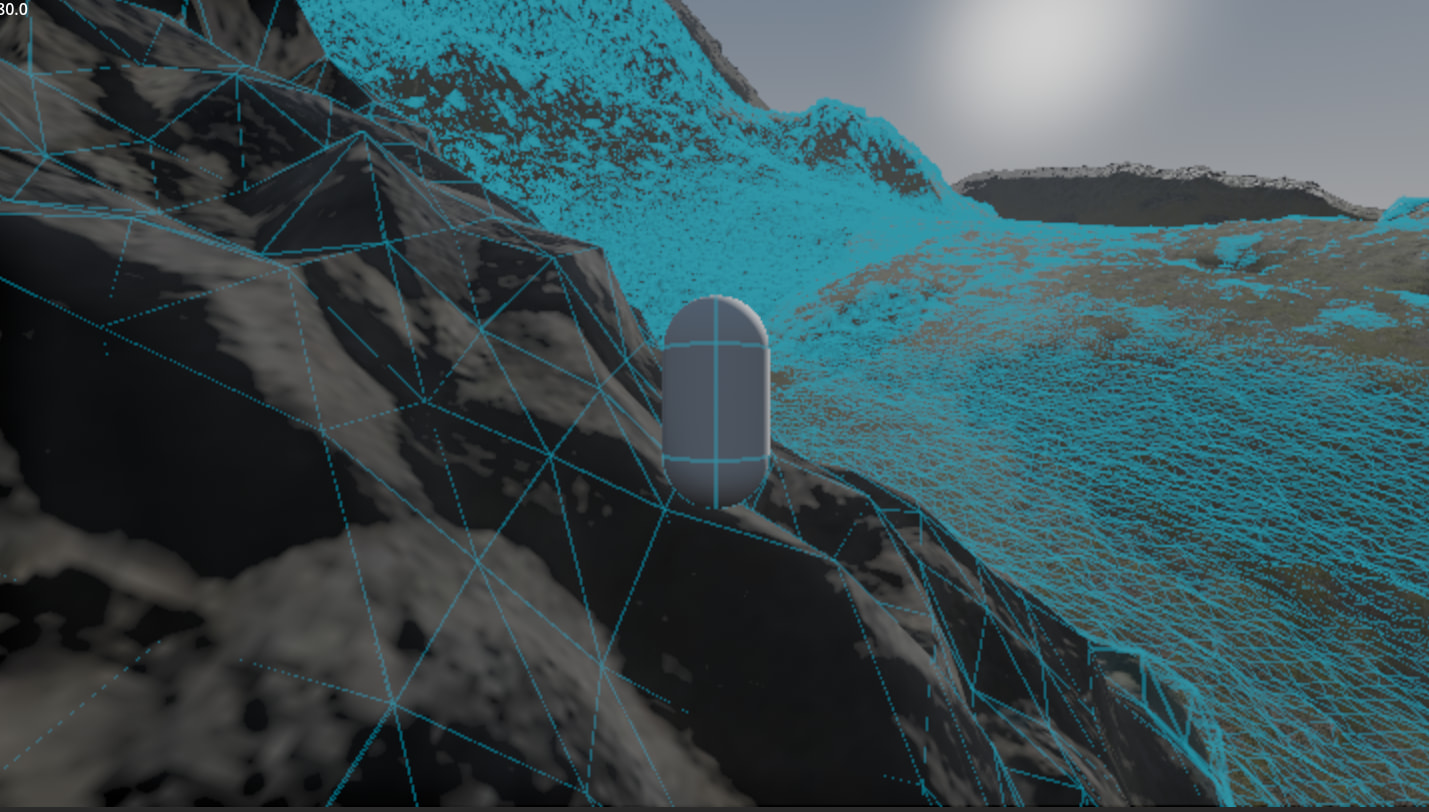
updated image showing where the spike was:-