How to set up collision in a top-down 2D game without tilemaps

Godot 4.5

Hello, extreme Godot beginner here. I apologise if my understanding is rough.

I’m working on a 2D game that is top-down programmatically, but doesn’t use tilemaps. I am failing to get the player character (Area2D, parenting Area2D, parenting Collisionshape2D; marked in yellow at the bottom of the character) to interact with the world collision (Area2D, parenting CollisionShape2D). Both are depicted below.
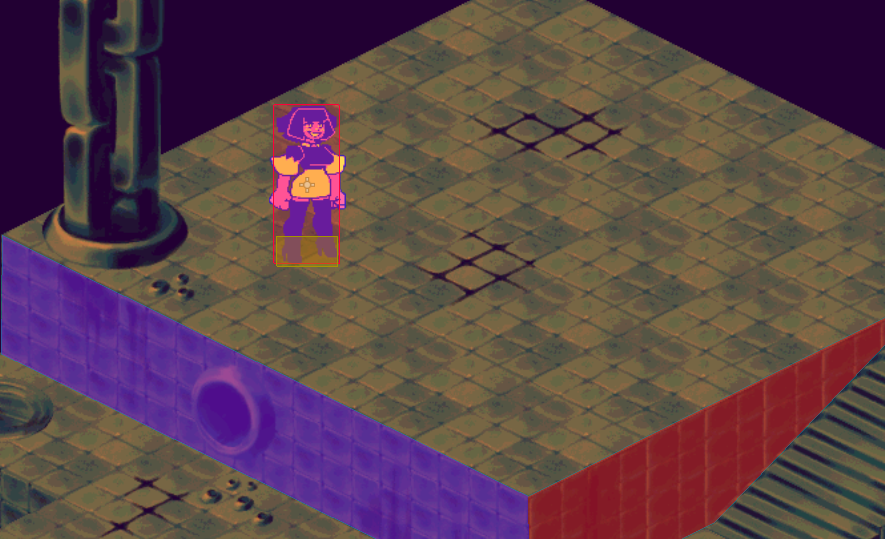
Answers to similar questions either involve tilemaps, which I am not using, or physics bodies, which I don’t have any major interest in using, and attempts at using them (like, changing the player to a CharacterBody2D) result in my character behaving strangely, like flying at the edge of the screen at the press of a button, or dropping to the bottom of the screen like a rock.

The code for my player is essentially as follows, largely copied from the 2D game tutorial:

extends Node2D

var speed = 250 # Movement speed in (pixels/sec).

func _ready() -> void:
	screen_size = get_viewport_rect().size

func _process(delta: float) -> void:

	## This controls movement.
	var velocity = Vector2.ZERO # The player's movement vector.
	if Input.is_action_pressed("move_right"):
		velocity.x += 1
	if Input.is_action_pressed("move_left"):
		velocity.x -= 1
	if Input.is_action_pressed("move_down"):
		velocity.y += 1
	if Input.is_action_pressed("move_up"):
		velocity.y -= 1
		
	position += velocity * delta
	position = position.clamp(Vector2.ZERO, screen_size)

The Area2D that actually contains the player CollisionShape2D has no code, as does the Area2D containing the world collision.

I recognise that the Area2D that actually contains the CollisionShape2D within the player scene should contain code that detects the collision with the world CollisionShape2D, and communicates the details to the player Area2D, though I have absolutely no clue how to make this work, nor what exactly the parent should do with this information programmatically.

If anyone could help, I would appreciate being walked through this like I’m five. I’ve been able to do pretty well with systems in Godot that don’t seem to have any sort of confusing built-in functionality, but where collision is concerned I may as well BE five.

Thank you!

I think you should definitely branch out and attempt to learn CharacterBody2D in this case, I think you will have an easier time later on.

Otherwise, you can have areas interact by connecting their area entered signal to each other, or just have it be one way.

For example, in the scene tree, select your world area, and in the inspector window there is a ribbon on the top that says node. Left click node, and you will see all the built in signals that Area2D classes have. Find “area entered”, and right click it and select connect from the drop down menu that appears. Select the player area and connect the signal.

Now, in the player script there will be a new function generated called on_world_area_entered(area: Area2D) and there you can do whatever you want the player to do once it collides with the world area.

Just note that area entered is one shot.

1 Like

For what you want to accomplish you should definitely use physics bodies. It could be done with areas, but that will be way more complicated.

CharacterBody2D doesn’t do anything on it’s own, though the default script example is for side scrolling games and applies gravity, which could explain the issue you had. In fact, if you wanted to use your script for a CharacterBody2D it doesn’t need many changes:

# For using a CharacterBody2D, the script needs to inherit from it:
extends CharacterBody2D

var speed = 250

func _ready() -> void:
	screen_size = get_viewport_rect().size

# unlike _process(), _physics_process() is frame rate independent
func _physics_process(delta: float) -> void:

	# CharacterBody2D already has the velocity property, so you
	# don't need to define the variable, but only need to change its value:
	velocity = Vector2.ZERO
	if Input.is_action_pressed("move_right"):
		velocity.x += 1
	if Input.is_action_pressed("move_left"):
		velocity.x -= 1
	if Input.is_action_pressed("move_down"):
		velocity.y += 1
	if Input.is_action_pressed("move_up"):
		velocity.y -= 1
		
	# Instead of directly changing the position, for a CharacterBody2D
	# you call move_and_slide(). This function automatically moves
	# the body depending on 'velocity' and the _phsyics_process() 'delta'.
	move_and_slide()

	position = position.clamp(Vector2.ZERO, screen_size)

Other objects you want to collide with should be mostly StaticBody2D then.

1 Like

I really appreciate the alternative given to CharacterBody2D, but I definitely agree that I should learn Godot’s physics engine in better detail so I’m not making the rest of the project in half-measures. Thank you!

1 Like

Thank you for the corrections to the player code; after changing it to a CharacterBody2D and the world collision to a StaticBody2D, it did genuinely work. I’m definitely going to try and study what went right here so I can get a foothold on making the physics system work for me.

1 Like