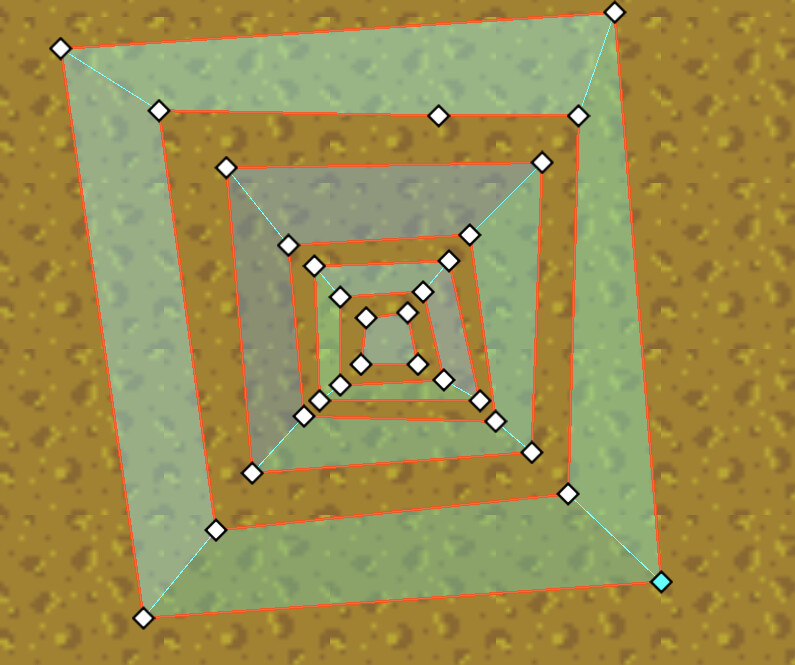
When working with NavigationRegion2D node with an attached NavigationPolygon in Godot editor, you can easily create nested traversable areas, that is, a traversable area with holes, inside the hole, you can create another traversable area with holes, just by drawing all traversable outlines counter-clockwise, and obstacle clockwise. like this:
I didn’t try this with code, but i assume using code from doc could achieve similar result, by just adding boundingOutline for traversable and obstacle areas in their corresponding direction.
var newNavigationMesh = new NavigationPolygon();
Vector2[] boundingOutline = [new Vector2(0, 0), new Vector2(0, 50), new Vector2(50, 50), new Vector2(50, 0)];
newNavigationMesh.AddOutline(boundingOutline);
NavigationServer2D.BakeFromSourceGeometryData(newNavigationMesh, new NavigationMeshSourceGeometryData2D());
GetNode<NavigationRegion2D>("NavigationRegion2D").NavigationPolygon = newNavigationMesh;
However, when it comes to NavigationMeshSourceGeometryData2D, things won’t work. Once you add_obstruction_outline, then add_traversable_outline to add another outline inside it, the inner outline is ignored after bake.
Code looks like this:
          // .....
          var sourceGeometry = new NavigationMeshSourceGeometryData2D();
          foreach (var outline in outlines)
          {
              if (Geometry2D.IsPolygonClockwise(outline)) // CCW in screen coord => traversable
              {
                  // Array.Reverse(outline);
                  sourceGeometry.AddTraversableOutline(outline);
              }
              else // outline => obstacle/hole
              {
                  // Array.Reverse(outline);
                  sourceGeometry.AddObstructionOutline(outline);
                  // sourceGeometry.AddProjectedObstruction(outline, carve: true);
              }
          }
          // ...bake sourceGeometry to a NaviPolygon and set polygon to a NaviRegion...
I’ve tried reverse each outlines but makes no difference.
Can we use NavigationMeshSourceGeometryData2D to create nested areas? Or we have to use NavigationPolygon?
You do not use nested outlines at all anymore. That is a broken legacy feature from pre Godot 4.2.
Ever since Godot 4.2 added actual 2d navmesh baking you use traversable outlines and obstruction outlines.
Each outline type gets merged on its own and then intersected afterwards.
The legacy outlines are treated as traversable outlines on the internal for partial compatibility.
Nested outlines make no sense at all for this, it is just useless geometry that is broken from begin to end and not supported. The only reason you are even allowed to still create such outlines in the editor is because the editorplugin for 2d polygon drawing is shared and half broken which is outside what the navigation system can fix.
Thanks for your reply
I’m working with procedural generated map. The map is composed of areas with different surface type, like dirt, mud, sand, etc. with each surface type has its unique travel_cost.
Since each NavigationRegion2D node has only one travel_cost, I choose to create one NavigationRegion2D per surface type, so that each naviRegion holds all scattered regions of a certain surface type in arbitary shapes and layout. All naviRegions fits together without overlap to form a navigation mesh for the whole map.
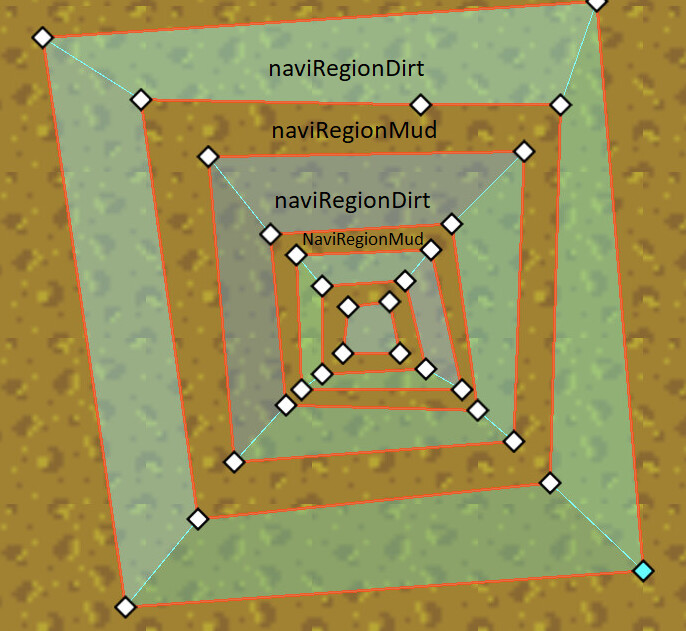
Sometimes one of naviRegions contains nested shape layout, like the image posted above,
The nested polygons are of the same surface type, say dirt, held by a node: naviRegionDirt.
The gaps between them are of other surface type, say mud, and are held by another node naviRegionMud.
Both Dirt and Mud are walkable, but with different travel_cost
The agent should be able to navigate from the out most Dirt polygon to an inner one, through a Mud gap, with a path with lowest cost.
BTW, nested outlines seems not a good idea.
Should I create naviRegion for each scattered region, instead of combining all regions of same cost into one single naviRegion?
Instead of thinking “odd-even outlines with holes” that are brittle and break easily due to nesting errors and other issues … just think polygons and empty.
Outlines are only for the 2d editor because 2d people are used to them. The actual navmesh is always converted to convex polygons in the end, there are no outlines anymore.
The majority of all the errors happen with 2d navmesh are due to the brittle conversion of complex outlines to actual convex polygons. So avoiding more complex outline stacking is a sane thing to do in general.
It is easier to do by using multiple regions for each connected polygon surface. It also makes it easier to query polygon owners when each connected polygon surface is its own region should you need that for gameplay later.