Godot Version
4.5 (I think)
Question
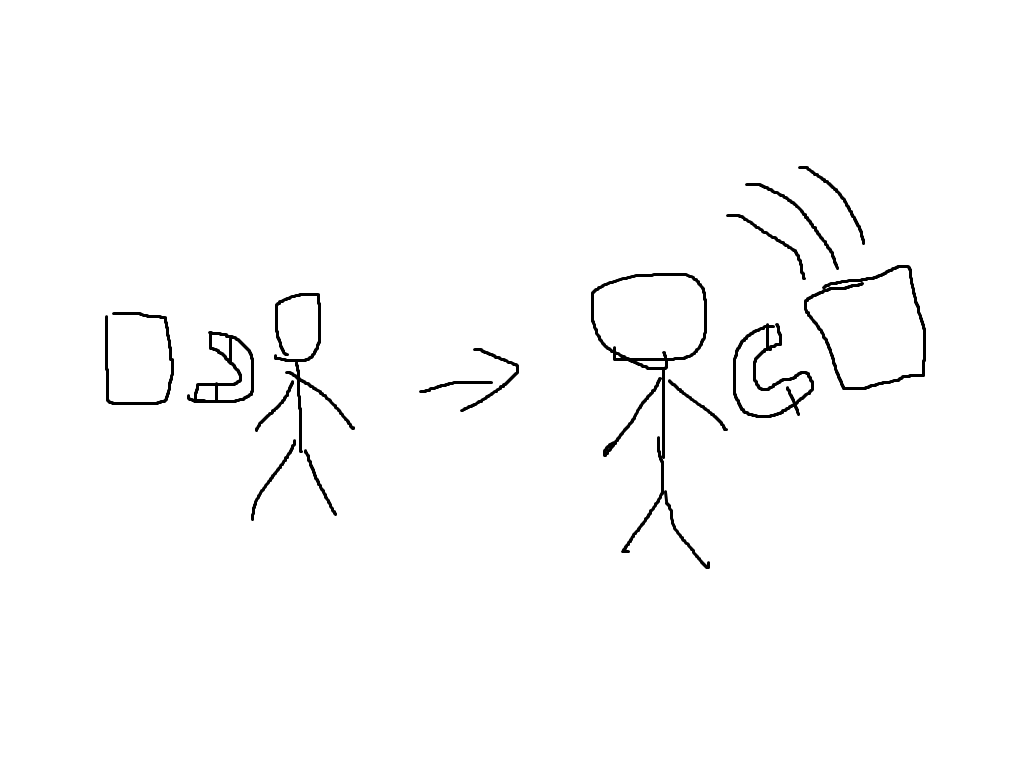
I am making a game about magnets. And i want to add a single item pick up feature like shown in the image, using Area2d. If you need any more information, I will be glad to give you. This is my first time using the godot forum, so if I did anything wrong please tell me. (Yes I know, my art is amazing)
2 Likes
What have you tried so far? What roadblocks have you hit?
1 Like
You want an Item Magnet! I used this video to make one. It’s a really great tutorial.
I am very new to godot so I haven’t tried anything yet and I can’t find any tutorials for this. I tried some to do some coding for the feature but it didin’t work out (can’t show the script (I deleted it))
25 minutes video for this relatively simple things is a bit of an overkill. Plus, the implementation is a bit pedestrian using multiple custom arrays to maintain attracted objects state. The “Godotic” way would be to stick each object that entered the magnet area into a dedicated group, and put all temporary animation data into object’s metadata. Let the engine do the unglamorous cleanup work for you.
1 Like
I went and pulled up the code I wrote like a year and a half ago when I first saw this. It was for a game jam game, Barbarian Rage.
extends Area3D

@export var strength: float = 0.05

var pickups: Array[Pickup]
var speeds: Array[float]

@onready var range: CollisionShape3D = $Range


func _ready() -> void:
	area_entered.connect(_on_area_enter)


func _process(delta: float) -> void:
	var current_position = global_position
	for i in range(pickups.size() -1, -1, -1):
		var pickup = pickups[i]
		if pickup == null:
			pickups.remove_at(i)
			speeds.remove_at(i)
		elif pickup.global_position.distance_to(current_position) > speeds[i]:
			speeds[i] += strength * delta
			pickup.position += pickup.global_position.direction_to(current_position) * speeds[i]
		else:
			pickup.global_position = current_position


func set_range(black_hole_range: float) -> void:
	range.shape.radius = black_hole_range


func get_range() -> float:
	return range.shape.radius


func _on_area_enter(area : Area3D) -> void:
	var pickup = area.get_parent() as Pickup
	pickups.append(pickup)
	speeds.append(strength)
	pickup.set_physics_process(false)
I agree I would handle it differently now. I don’t know that I would have come up with the groups and metadata solution though. It’s an interesting idea.
In the good spirit of one-upmanship here’s my ad hoc implementation:
class_name ItemMagnet extends Area2D

signal item_arrived(item: Node2D)

@export var strength := 1000.0
@export var arrived_distance := 10.0

func _process(dt: float) -> void:
	for item: Node2D in get_tree().get_nodes_in_group("_attracted"):
		var speed: float = item.get_meta("speed")
		item.global_position = item.global_position.move_toward(global_position, speed * dt)
		item.set_meta("speed", speed + strength * dt)
		if item.global_position.distance_to(global_position) <= arrived_distance:
			item_arrived.emit(item)

func _on_area_entered(item: Area2D) -> void:
	if item.is_in_group("magnetable"):
		item.add_to_group("_attracted")
		item.set_meta("speed", 0.0)
4 Likes
I like it. I will probably use this in the game jam game I’m working on now.
One question: How come you chose to prefix the group name with an underscore as if it’s a private variable?
I just put some prefix to signify that the group is indeed meant to be used privately for ItemMagnet. Group names are global across the scene tree. To prevent name clashes with some other system’s groups, best to pick a complicated, specific name like “ItemMagnet:attracted” that’s unlikely to be used by someone else. The underscore kinda hints on that. The actual name would depend on project’s naming conventions.
What jam is it? If you don’t mind sharing.
1 Like
Not at all!
Godot Wild Jam #89
I’m doing this one differently. Taking some advice from my brother and blogging every day on it. I’m also making the project public from the beginning. The project is up here: Katamari Mech Spacey. There’s not much to it yet, but I’ve got a nice new splash screen for the game. And yesterday’s devlog is here: Day One DevLog.
1 Like