So I’ve finally decided to detach the camera node from the player so that it can stop in place when they’re using the glitch ability. And I’ve realized that my camera offset func is quite entangled. Back when the camera was a child of the player node, I never really considered writing the code for offset alignment anywhere other than in the player’s script. So here’s what we have now:
func _align_camera_offsets() -> void:
	var camera: ShakingCamera = GameWindow.camera_node
	if !camera.follow_player:
		return

	if abs(velocity.x) >= max_speed and !is_on_wall():
		camera.position.x = move_toward(camera.position.x,
				cam_origin.x + MAX_CAM_OFFSET_H * sign(velocity.x), 4)
	else:
		camera.position.x = move_toward(camera.position.x, cam_origin.x, 8)

	if abs(velocity.y) > GRAVITY:
		camera.position.y = move_toward(camera.position.y,
				cam_origin.y + MAX_CAM_OFFSET_V * sign(velocity.y), 16)
	else:
		camera.position.y = move_toward(camera.position.y, cam_origin.y, 8)

	# keeping the camera steady when jumping
	if Input.is_action_just_pressed("jump") and velocity.y <= 0:
		camera.drag_top_margin = 0.28
	else:
		camera.drag_top_margin = 0
Logically, all this offset thing should probably be in the camera’s script, but it’s very dependent on the player’s actions so it should probably be in the player’s script? I’m kinda confused at this point. Can this be kept as-is or should it be rewritten somehow? (it probably should given that the camera’s position isn’t static anymore, I feel like my brain is gonna hurt so badly, is there a better solution? Am I doing the completely wrong thing?)
also I can’t get it to follow the player properly but that feels like a separate problem
This is an example of the X-Y Problem. You’re asking how to fix your solution to the previous problem. I’m going to answer that question, but first I’m going to answer the previous question, which is “How to I deal with the camera when it glitches and shouldn’t move?”
I suggest that you just attach the camera to the player. If you want it to move slightly behind the player, playing with the smoothing options.
When the camera glitches, reparent it to the level. When it un-glitches, re-parent it to the character, and if necessary, make a tween to make the transition smooth.
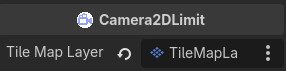
You can also do some of what I think you’re doing by setting camera limits. So it will move when there’s room in the level to move, but otherwise stay still. If you want a really easy way to do that, grab my Camera2D Plugin. Then add a CameraLimit2D node on it.
Then you can assign your TileMapLayer to it through the Inspector or code, and your camera will be limted to your level map.
Where to Put Your Code
If you don’t want to do that, you should make your Camera2D manage itself. The Player should either send signals to say what it’s doing when they Camera2D cares, or the Camera2D should have methods that the Player calls to pass information.
The typical rule of thumb in Godot is: Signal up, call down. In other words if you’re trying to pass information from a child node to a parent, use a signal. If you’re trying to pass information from a parent to a child node, call a function on the child node. If they are siblings, use signals to communicate up - either to a Node that parents them both or to an Autoload they can both see.
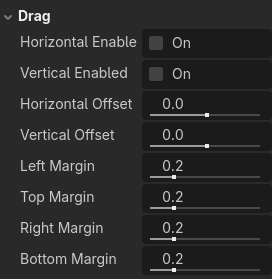
About smoothing options. Right now, my player node isn’t part of the stage (exactly because of the glitch shenanigans), it’s loaded a bit later. And the camera node, even in it’s original version, has a bit of smoothing before it moves to what’s supposed to be its initial position. Right now, it’s very hackily worked around by disabling smoothing and drag when it first spawns, then awaiting the timeout of a less-than-a-second-long timer, then enabling it back. What is a better way to actually properly fix this? And why doesn’t the camera spawn in the same place where the player does if it’s the player’s child?
That’s actually not what I’m doing here, here I’m making the camera move in front of the character when they’re running/falling at max speed so the player can see more of what’s ahead. It also doesn’t quite work for falling, maybe because the smoothing is slowing the camera down, I’m not exactly sure why.
maintain the position_wanted property and constantly interpolate camera position in _process() towards it. For interpolation, use move_toward() if you want linear feel or lerp() if you want eased feel.
maintain the interpolation_strength property that determines how fast the camera interpolates towards the wanted position. Use this property for scaling the interpolation parameter in your interpolation function call.
provide a small api consisting of functions set_position_wanted() and set_interpolation_strength() to set those properties “from outside”, in your specific case it will be form the player script.
Player script:
maintain a reference to the camera node so you can call those two api functions you just implemented
call camera’s set_position_wanted() each frame. but pass it the position depending on what the player is doing. If the player is standing, pass the exact player position, if it’s moving, set it in front of the player etc.
call camera’s set_interpolation_strength() whenever you want to change how fast the camera converges to its wanted position. On startup, set it to a very large number so the camera immediately snaps where it needs to be. On the next frame set it to the value that causes your regular smoothing.
If the camera already exists, then its position doesn’t change when it is reparented. When you change it, change its position to match the player’s position. You can either jump to it, or tween it to make it smooth.
Why tho??? I don’t understand why it’s so different when the camera is a child of the stage and spawns together with it from when it’s somewhere separate? Why doesn’t smoothing/drag affect it when it’s first positioned in the stage as one of the children?
Here’s the stage loading code:
var player_scene := preload("res://scenes/entity/hero.tscn")
@onready var player_node: PlayerController = player_scene.instantiate()
@onready var player_cam := player_node.get_node("PlayerCam") as Camera2D


func _ready() -> void:
	GameWindow.player_canvas.add_child(player_node)

	player_cam.drag_horizontal_enabled = false # oh gods here starts the horror
	player_cam.drag_vertical_enabled = false
	player_cam.position_smoothing_enabled = false

	player_node.global_position = $PlayerSpawnMarker.position
	player_cam.global_position = player_node.global_position # THIS JUST DOESN'T WORK, it might as well not be there
	set_camera_limits(GameWindow.PlayerCameraModes.FREE_CAMERA)
	GameWindow.player_canvas.layer = 0
	PlayerStats.get_node_or_null("EnergyRegenTimer").start()
	$HudCanvas.show()

	GameWindow.player_node = player_node

	if get_node_or_null("HudCanvas/TitleCard"):
		$HudCanvas/TitleCard.finished.connect(_on_title_card_finished)
	else:
		player_node.allow_input = true

	await get_tree().create_timer(0.1).timeout
	player_cam.drag_horizontal_enabled = true
	player_cam.drag_vertical_enabled = true
	player_cam.position_smoothing_enabled = true
I don’t wanna tween the camera to my desired position, I want it to just heccin be in its place already when the stage starts (unless I’m misunderstanding something and tweening can somehow make it start out where I want it to?)
You’re overcomplicating. Above, I wrote you an exact synopsis for a very simple and very versatile system that can be implemented in less than 20 lines of code. You just need to type them.
Maybe, but I’m just trying to solve the problem from the source (at least I hope that’s what I’m doing) and understand why my camera isn’t loaded where it should be instead of using hacks to shove it into the place I want it to be
Well, y’know, instead of coming up with some hack to fix a bug, find the root cause and fix that. Maybe I will consider your solution but clearly not today, it’s nighttime where I am and my brain is totally melted, I should probably go to sleep
Here are the questions you asked in your initial post. I answered them all by posting that solution. If you didn’t understand what I wrote, you should have asked follow up questions.
so it should probably be in the player’s script?
I broke down exactly how responsibilities should be divided between the player and the camera scripts.
Can this be kept as-is or should it be rewritten somehow?
Rewrite as I suggested.
is there a better solution?
Yes, look at my post.
Am I doing the completely wrong thing?
Not completely, but you’re overcomplicating a rather simple thing.
So I slept off my melted brain, realized your idea wasn’t so bad, started implementing it, realized I could try disabling processing for the camera instead, and it almost worked, except for the dramatic shake, which it obviously can’t do if it’s not processing. Guess I have to implement it anyway.
Oh well, at least your suggestion indirectly gave me the idea that I could code custom smoothing for the X and Y axes separately. Kinda never occurred to me this was a possibility.
You have lots of additional possibilities if you implement it like this. For example, instead of scripting the camera directly in that way, you can script a plain 2d node and parent the actual camera node to it. Now you created a simple camera rig. The rig node is tracking/smoothing the overall camera position while you can do additional camera movements (like shaking, rotating etc..) on top of that, by animating the camera node.
I’m thinking about having a common parent node control all the player-camera interactions since right now my brain is melting again from having to wire them up to each other. Is this a good or a bad idea?
Oh btw I fixed the “not initializing in the right spot” bug and now I know that if you set the position before spawning the camera node, it won’t use smoothing to snap there
They shouldn’t be “wired up”. The camera needn’t know anything about the player. It just needs to get the wanted position and that’s the call that player makes towards the camera every frame. So the communication is basically one way, from player towards the camera. Camera just does its thing depending on parameters it gets from the player. The only connection between them should be a reference to the camera (or the camera rig) held by the player.