Godot Version
4.5
Question
I have the same issue as this post but the solution did not help.
here are my code
extends Area2D

@export var seleted = false
# Called when the node enters the scene tree for the first time.
func _process(delta: float) -> void:
	if seleted:
		self.global_position = get_global_mouse_position()

func _input(event: InputEvent) -> void:
	if event is InputEventMouseButton and event.button_index == MOUSE_BUTTON_LEFT:
		print("input works")

func _on_input_event(viewport: Node, event: InputEvent, shape_idx: int) -> void:
	print("input_event works")
	if event is InputEventMouseButton and event.button_index == MOUSE_BUTTON_LEFT:
		if event.pressed:
			seleted = !seleted
I have:
- enabled piackable for my area2d
- checked that physics Object Picking is set to on
- show collision layer when I debug the game and confirms I’m clicking on collison layer
- have one collison layer + mask enabled
- didn’t use any control node + run the node locally so it shouldn’t intercept anything
yet when I click on the object, input_event works does not get printed.
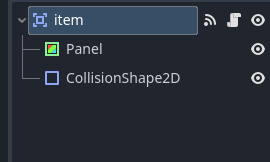
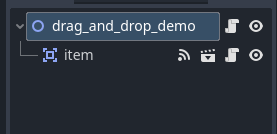
here is how my scene looks, please let me know how to fix this
Add this to your script:
func _ready() -> void:
	input_event.connect(_on_input_event)
also I think you have a typo in your variable name seleted . I think you meant selected.
Panel might be consuming the event.
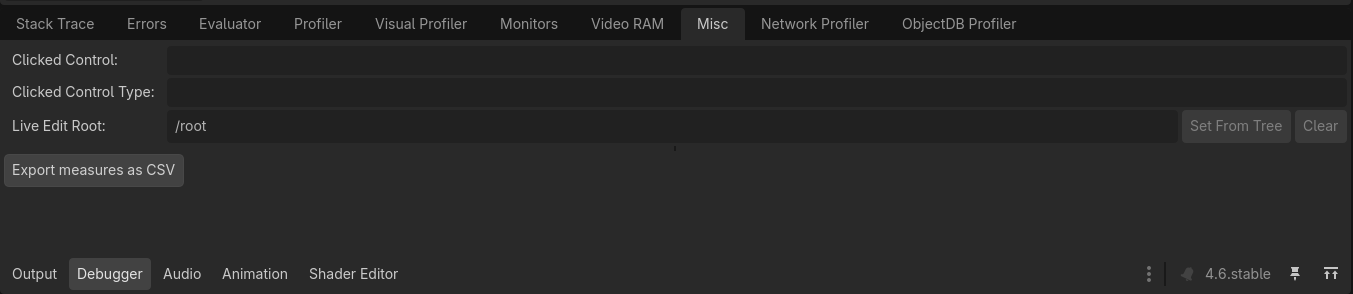
You can check what @normalized said in the Debug → Misc panel.
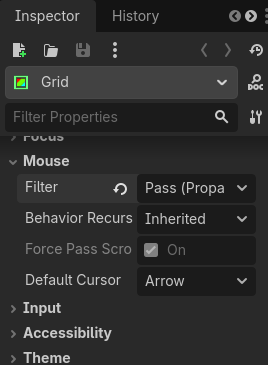
Click on the item (when the game is running in the editor) and see what it says you clicked on. If it’s Panel change the Mouse Filter to Pass.
interesting, I did try to swap their orders in scene tree before coming here. but after setting mouse filter to pass it does work. ty!
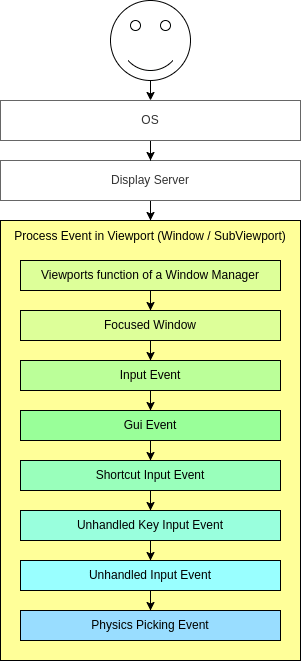
The order in the scene tree doesn’t matter in this case. GUI inputs are always processed before physics input. This diagram from the docs shows the exact order.
@normalized This is the other reason I’m working on putting less effort into my answers. I do too much that people don’t ask for. I’m trying to change from “teach them to fish” to “give them a hint and they’ll fish sooner or later”.
I think it’s totally ok to give a more elaborate answer, just not right away… especially if the question boils down to basically remote debugging with a lot of missing information.
Fair enough. I’ll keep that in mind.
never know there is an option to debug like this, ty!