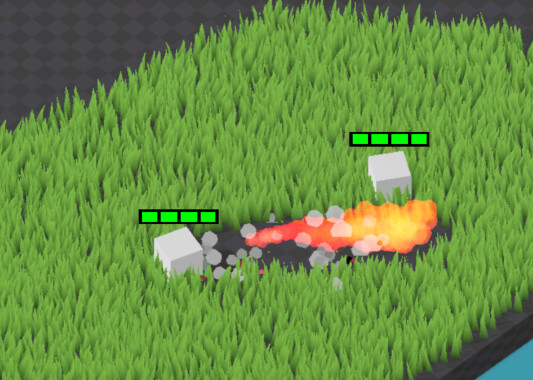
I’m using viewports and ImageTextures acting as masks in shaders to achieve certain effects, for instance the disabling of grass in the screenshot below. The top right corner displays the mask used by the grass shader.
I would love to use this mask to now instantiate particles where the grass has disappeared.
The crude way of doing this is is by reading the ImageTexture from GPU to CPU and iterate over the pixels, like so:
    var img := viewport_texture.get_image()
	while i < remaining_pixels.size():
		var pos: Vector2i = remaining_pixels[i]
		var v := img.get_pixel(pos.x, pos.y).r
		if v > 0.0:
			# spawn smoke
			var world_x = rect_pos.x + rect_size.x * float(pos.x) / w
			var world_z = rect_pos.y + rect_size.y * float(pos.y) / h
			var vfx = smoke_pool.get_item(true)
			vfx.global_position = Vector3(world_x, 0.0, world_z)
However I’ve noticed large and inconsistent spikes in the cpu profiler, even when not getting into the v >0.0 condition, I’m assuming due to the image being passed from GPU to CPU.
Id love to avoid the CPU all together and just instantiate GPUParticles3D directly from the texture, like using emission masks in GPUParticles2D. I understand that an image has no concept of worldspace but perhaps it would be possible to supply one by using a Sprit3D or otherwise specifying it.
I was wondering if this indeed would make sense and is possible to achieve using GPUParticles3D’s ParticelProcessMaterial, or if anyone can think of another way of spawning particles using the mask I have without relying much on the CPU ?
I have to confess I have yet to look into writing a particle shader for this problem, but perhaps that is the only way. However if this feature is not too niche, perhaps ParticleProcessMaterial should support it ?
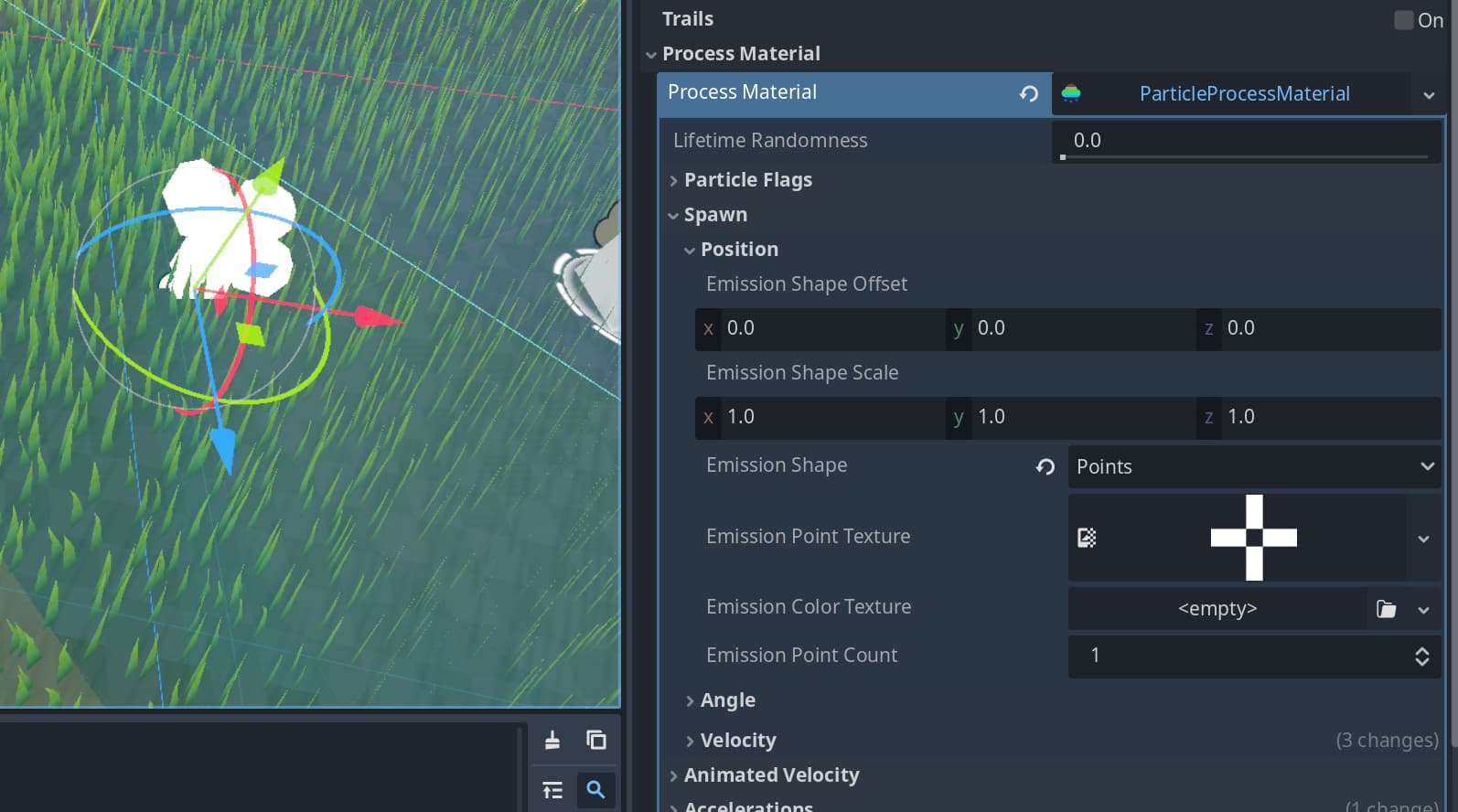
If you emit from a plane then this is already built into particle process material. Set the emission shape to points, adjust area size and offset, and assign the texture.
I tried this before, but can’t get it to work. It works when using the “Create Emission Points from Node” built in button, which creates the texture from a mesh, but supplying a custom texture won’t work for me.
I tried scaling the shape and increasing emission point count to no avail.
Most likely the texture needs to be of a specific format? If so do you know what is has to be? Transparent + White doesnt seem to cut it.
I can’t post a second picture because of a new user restriction, but when creating the texture from a mesh by using godots built in button, I’m not sure how to interpret the texture.
Probably not convenient for your use case but you might be able to generate such texture in addition to the mask.
If not, you can convert the process material to a shader, plug the mask texture into the shader, sample it on particle creation and kill the particle immediately if it’s not within the mask.
For now I’ll try to generate this texture using a compute shader, converting the black and white texture into a RGB texture with the coordinates. Important to note that this texture comes from a viewport, so it’ll change every frame, but I’m hoping this won’t be an issue for the GPUParticles3D.
The particles will be smoke particles, when the grass is burned, so just some upwards drifting particles with a few tweaks.
If not, you can convert the process material to a shader, plug the mask texture into the shader, sample it on particle creation and kill the particle immediately if it’s not within the mask.
This is what chatGPT (I know..) suggested as well! Great to hear that its a valid approach. The reason why I was hesitant doing this is because tweaking the values in the inspector of the standard ParticlesProcessMaterial is such a nice feature to have and if possible I’d like to keep it.
A shader converted from the material will retain tweakable uniforms for everything you enable in the material. But you can go the compute shader route as well although doing it with process shader is probably far less work, both for you and for the gpu
I can’t believe I didn’t know I can convert to a shader material
You learn something every day!
Thank you, that is very likely the best approach and I wouldn’t have noticed without you.
Will post results if everything goes well, hopefully.
All running on the GPU now, using a custom shader material for the gray smoke particles that get spawned by converting the world coordinate of the particle to uv coordinate and sampling from the emission texture.
Couple thoughts,
if the grass area is quite large, I need a box emission that covers all of the grass, which requires me to increase the particle amount. currently I have a “density” of around 16 amount per unit^2, so in a 10 by 10 square that amounts to 1600 particles, that still have to be initalialized before 99% are being discarded. Not horrible on modern GPUs and definitely faster than looping over the texture in the CPU each frame, but something too keep an eye on.
ParticleProcessMaterial convertion to ShaderMaterial is great (although not all parameters get exposed, i.e. box spawn shape etc), but slightly annoying that the inverse is ofcourse not possible, so making small adjustments often means to create a new particleProcessmaterial, tweak it, convert it and update the code with your custom code.
somewhat irrelevant, but I ran into a nasty little bug where my framerate above 1000 caused my delta_time to be so small that it let to floating point precision errors on the GPU. not fun to debug but lesson learned. what a first world problem…
Edit: Perhaps this is useful for someone in the future, so I’m posting the most relevant code snippet here which does the particle masking:
The smoke particles only spawn when grass is first burned away, not always (i..e when there is no grass). This information only lives inside textures, i.e. the GPU.
An orthographic top down camera which only sees a certain (invisible to the main camera) particle layer. I emit these particles alongside the “flamethrowing” particle emittance.
Edit: That might not have been enough info. In addition to this orthographic camera, there are actually multiple viewports each with their own sprite2d, which have their own little shader which accumulates or calculates the delta in accumulation change of the particles captured by the orthographic camera. Meaning I have multiple texture, one for the current particles emitted, one for the accumulated (persistent) particles emitted and one for the delta of this accumulation. The smoke particles use this delta texure to spawn smoke only where grass has been burned. The grass shader uses the accumulated texture to disable the rendering where particles have been emitted before.
I’d do an approximation of the flame “beam” on the cpu side and spawn particles there. You’ll probably need something like that anyway if that flame is supposed to damage enemies.
You can approximate with some sort of simple geometric shapes (e.g. circles or triangles), pass the list of those shapes to the shader and spawn inside one of those shapes.
Yeah, I’m totally in the midst of trying out different damage solutions and by now means have found a perfect solution yet
For damage I actually don’t mind the collision checks to be more crude and less realistic (This will be an RTS or RTT game, but only with tens of, not hundreds of units) . For starters I was just doing a custom spatial hash fetch of nearby units + distance check to a cylinder in front of the unit for damage, 3 times during the flames animation. Works okay, but right now I’m actually considering using “real” outwards flying Area3D with SphereShapes and applying damage on enter. I figure I only need about 3 per flame throwing attack (only lasts less than a second).
Another solution is to simulate a cone and just do custom distance checks again. I’ve often found gdscript to be somewhat slow hence my thought of trying out actuall collision objects, just to see perfomance.
For the visual side of things though, I was aiming for something much more accurate and pretty. Hence the orthographic camera and viewports. For simple shapes like a quick explosion it is easy to do some of the maths on the CPU side, but for particles such as the flames, which can have some turbulance and what not I thought the current solution looked really pretty as the grass disappearing + smoke is super accurate and satisfying to watch thanks to the textures used. I wish I could post a gif/video, but it looks like I’m not allowed yet as a new user. I’m not trying to defend this as THE solution however, I totally get concerns over performance and I’m just trying to figure things out and learn on the way