Instantiating objects that are created during run time

Godot Version

v4.5.stable.official

Question

I don’t know if this is possible but I’d like to create this grid of objects with this code below but I want to create it only once and than instantiate already created grid as a object.

func spawn_grid(array:Array,chunk_id:int):
	var default_pos = entity_spawner.position
	for i in height:
		if i != 0:
			entity_spawner.position.y+=1
		entity_spawner.position.x = 0
		for j in width:
			if j != 0:
				entity_spawner.position.x += 1  
			entity_spawner.spawn_entity(array[i][j],str(i)+"_"+str(j),chunk_id)
	entity_spawner.position = default_pos

Does anyone know how to go about this?

When you say:

It is confusing. What exactly is this grid object you want to create? Are you talking about a grid map, or a grid container, or just placing the objects in a grid like position? If the object is already created, why are you instantiating it?

If you explain this a bit more, perhaps we can help a bit more. We can certainly clean up your code quite a bit too. For instance, if you don’t already have a container grid instantiated, and are just adding elements, then you should instantiate the grid first (perhaps with visible = false) and then add the elements.

Also your spawn_entity function seems a bit weird too. Just send it the i and the j and let it make its own string. Also, why are you loading i and j into an array, only to then send the values of i and j, why not just send the values?

Show us that spawn_entity function (at least what it is expecting) and explain a bit more about what you are trying to do please. Keen to help, just need more info I think.

PS Naming an array “array” is not very helpful.

1 Like

I see. I will provide more detail.

I am trying as you said place the objects in a grid like position.
Grid it self is dependent on a 2d int array that is generated by this code.

func create_int_grid():
	var int_array = []
	for i in height:
		int_array.append([])
		for j in width:
			int_array[i].append(randi_range(0,3))
	return int_array

This 2d array is then passed to the code I posted previously.

func spawn_grid(int_array:Array):
	var default_pos = entity_spawner.position
	for i in height:
		if i != 0:
			entity_spawner.position.y+=1
		entity_spawner.position.x = 0
		for j in width:
			if j != 0:
				entity_spawner.position.x += 1  
			entity_spawner.spawn_entity(int_array[i][j])
	entity_spawner.position = default_pos

(I removed the i,j string and chunk_id from spawn_entity function since that concerns a feature I didn’t manage to implement anyway)

spawn_entity function than places individual pixels

func spawn_entity(entity_id: int):
	var entity = general_entity_instancer.return_entity(entity_id).instantiate()
	chunk_holder.add_child(entity) #spawn do objektu
	entity.set_global_position(self.get_global_position()) #globalni pozice

also here is the general_entity_instancer if that helps

extends Node
class_name EntityInstancer
@export var dirt_1: PackedScene
@export var dirt_2: PackedScene
@export var dirt_3: PackedScene
@export var dirt_4: PackedScene
@onready var dirt_array = [dirt_1,dirt_2,dirt_3,dirt_4]

func _ready() -> void:
	pass

func return_entity(entity_id: int):
	return dirt_array[entity_id]

Then I run this code in top parent node

func _ready() -> void:
	array_functions.spawn_grid(array_functions.create_int_grid())

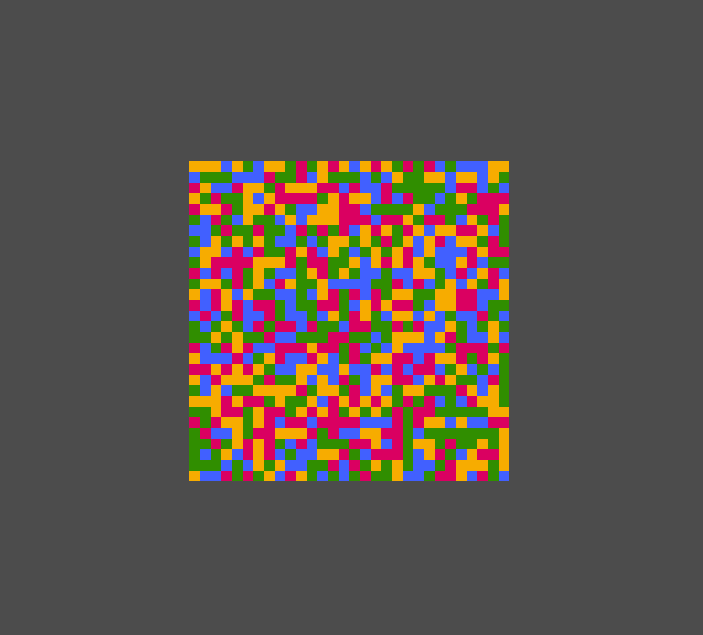
and that creates this grid of pixels


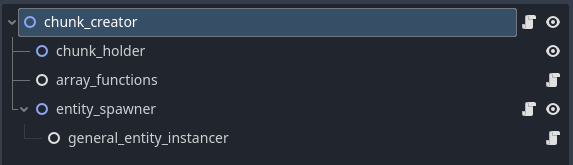
also here is the structure of this chunk spawner scene

I tried to make chunk based system that would load these tiles (grids) as the player would move. But the performance was horrible since the two loops of 2d arrays were running with each spawned grid.

It is true that saving grid int array and just reusing it didn’t cross my mind, that would definitely boost the performance so thank you for that advice :D.

But I was wondering if I could do the same think with the grid of already placed pixels. Somehow preload it and then instantiate it so the loop for placing pixels wouldn’t have to run over and over again.
Ok, so that seems incredibly complicated for what you are doing, but perhaps your actual situation is more complex/flexible for your entities and so on.

You would be setting these up from your required chunk position:

func _ready() -> void:
	# Create a 20 by 20 grid
	var height: int = 20
	var width: int = 20	
	var grid_position: Vector2 = Vector2(200, 200)
	
	# You may want this function in a separate spawner node
	spawn_grid(grid_position, width, height)

Then wherever your grid spawner is with this info:

@export var dirt_1: PackedScene
@export var dirt_2: PackedScene
@export var dirt_3: PackedScene
@export var dirt_4: PackedScene
@onready var dirt_array: Array = [dirt_1, dirt_2, dirt_3, dirt_4]

Add the function here:

func spawn_grid(grid_origin: Vector2, grid_width: int, grid_height: int) -> void:
	for grid_y_pos: int in range(0, grid_height):
		for grid_x_pos: int in range(0, grid_width):
			var entity_position: Vector2 = grid_origin + Vector2(grid_x_pos, grid_y_pos)  
			var spawned_entity: Node = dirt_array.pick_random().instantiate
			spawned_entity.position = entity_position
			add_child(spawned_entity)

I hope something in there helps.

Of course you can add the child to a separate container if you want to, something like:

@onready var grid_container: Node2D = $grid_container

grid_container.add_child(spawned_entity)

And you may want to be setting the grid origin with a global position too of course.
Also I didn’t know what your packed scenes were, but if they are Node2D you might want to be more specific here too:

var spawned_entity: Node2D

Anyway, I hope it helped somehow.

PS I don’t know why the code formatter has gone a bit haywire - sorry about that.

1 Like

This doesn’t really answers my original question however as I was thinking about it I realized more and more issues with what I was asking for.

And your answers gave me useful advices and some new ideas on how I could tackle this.
So still, thank you for answering.

1 Like

Make a tool script that does it in the editor and then save the scene.