Godot Version
4.7.1
Question
hi, i’m currently following the Zenva Learn to Make a Farming Game in Godot ebook after going through several of the beginner ones. it’s good! but i’m struggling to fix an issue and even looking at the given finished project and final code in the book itself isn’t helping.
what i’m trying to do: reference the tile_info and map tile under the player to change it to a tilled state.
full error:
FarmManager.try_till_tile: Invalid access to property or key '(0, 0)' on a base object of type 'Dictionary[Vector2i, TileInfo]'.

  <GDScript Source>farm_manager.gd:41 @ FarmManager.try_till_tile()
  <Stack Trace> farm_manager.gd:41 @ try_till_tile()
                player_tools.gd:32 @ _process()
the problem code:
func try_till_tile(player_pos: Vector2): #try to till tile under player
	var coords: Vector2i = tile_map.local_to_map(player_pos)

	if tile_info[coords].crop:
		return
	if tile_info[coords].tilled:
		return

	_set_tile_state(coords, TileType.TILLED)
the info it’s trying to reference, found in the same node:
class TileInfo:
	var tilled: bool
	var watered: bool
	var crop: Crop

@onready var tile_map: TileMapLayer = $FarmTileMap
var tile_info: Dictionary[Vector2i, TileInfo]
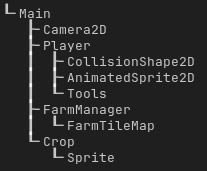
the relevant tree, just in case:
i saw that other issues like this are caused by typos and the like, but i’ve looked over what i can think of to try and fix things and referenced the course (which again, works fine on its own project fsr). please let me know if any more information’s needed!
edit: tbh at this point i will probably go to a different zenva lesson and try to learn from there and see if anything can be applied to fixing this one (though i’m still upset that even comparing it to the given finished project nothing seems different?)
Hey bradimey, the error is highlighting that the key being passed in is (0,0), which either means your character was either trying to till the grid position (0,0), or there is an issue here with the inputted data, either from tile_map.local_to_map() incorrectly converting to coords, or the player_pos being incorrect. Is this happening everytime you try to till?
What does your dictionary look like when it is populated at runtime? Should it have an entry for (0,0)?
Also, when you are accessing a dictionary it is usually best to confirm that it has an entry for your key, so that instead of getting this error you can decide how to handle the bad data.
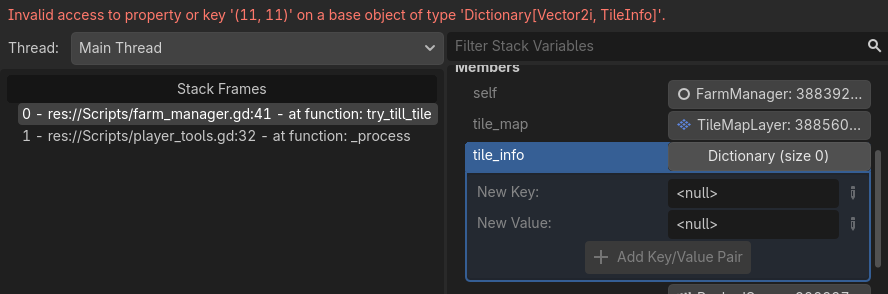
this is happening every time i try to till, with the same error occuring with different coords ( (12, 13) or (20, -10) etc ). looking at it during the runtime, the dictionary says it’s empty when it Should be populated:
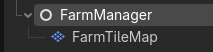
so i have to assume the issue is not receiving anything from tile_map.local_to_map()? hovering over tile_map itself, i’m not sure if this is normal or if it should be acknowledging that $farmtilemap is there

this is the first book project i’ve followed that’s involved a dictionary, so for right now they’re still a new concept to me (though i’ll be looking up the actual godotengine docs about them after this)
What’s the code that’s supposed to populate the tile_info dictionary? Looks like it’s not doing its job as you expect it to.
To see what exactly is happening with the dictionary, print it right before the error line.
besides the vector2i, the class TileInfo is supposed to be in it, shown here:
class TileInfo:
	var tilled: bool
	var watered: bool
	var crop: Crop
as for the dictionary, nothing is showing up when printed besides the brackets (only able to do print(tile_info) in _ready, as trying to do it when i till only brings up the error and no text/print).

This means that the dictionary contains no data.
As I said, check the code that’s supposed to populate that dictionary.
Could you try await get_tree().process_frame before printing the dictionary?
still nothing when putting it in the same function, only the error <
Can you tell us about the structure of the game? Do you have one scene for the main menu, another for the game? If so, can I see any code you have attached to the game scene’s root node?
following the instructions so far, there’s one scene for the primary game, one for the player, and one for different crops. as of right now there’s nothing connected to the main/root node, and the code i’ve posted so far is attached to a regular Node that’s a child of the main Node2D and also a parent of a TileMapLayer (with no script attached to it). i know there’s going to be a script on the Main node eventually, but this is still supposed to work even with how little there is
jic, here’s all the code before getting to the primary functions and all just in case there’s something i’ve missed:
class_name FarmManager
extends Node

enum TileType
{
	GRASS,
	TILLED,
	TILLED_WATER
}

class TileInfo:
	var tilled : bool
	var watered : bool
	var crop : Crop

@onready var tile_map: TileMapLayer = $FarmTileMap
var tile_info : Dictionary[Vector2i, TileInfo]
var crop_scene: PackedScene = preload("res://Scenes/crop.tscn") #template to spawn crops, instantiate when planting

#maps logical tile types to atlas position in the tileset. aka 00 for grass, 1 0 for right of grass, etc
var tile_atlas_coords : Dictionary[TileType, Vector2i] = {
	TileType.GRASS: Vector2i(0, 0),
	TileType.TILLED: Vector2i(1, 0),
	TileType.TILLED_WATER: Vector2i(0, 1)
}
Actually, could you put print_tree_pretty() into the ready function of your FarmManager and show us the result? That just shows what the exact structure of the game is.
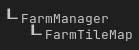
only it and the FarmTileMap (TileMapLayer). i also put it on a quick script on the main node just in case:
Can you tell me which ones have scripts attached?
the Player has a script, Tools has a script, and FarmManager and Crop have scripts. there’s also an unattached script for crop data with a class (CropData) that Crop calls back to
Sorry for the delay! Do you have a GitHub account? If so, could you set up a repository there?
Otherwise, could you paste your Tools script?
unfortunately no, or at least not yet but here’s the full tools script:
class_name PlayerTools
extends Node2D

enum Tool
{
	HOE,
	WATER_BUCKET,
	SCYTHE,
	SEED
}

var current_tool: Tool
var current_seed: CropData

@onready var farm_manager: FarmManager = $"../../FarmManager"

# Called when the node enters the scene tree for the first time.
func _ready() -> void:
	#this is just a placeholder. connect gamemanager.setplayertool when the ui's set up
	current_tool = Tool.HOE

func set_tool(tool: Tool, seed: CropData):
	current_tool = tool
	current_seed = seed


# Called every frame. 'delta' is the elapsed time since the previous frame.
func _process(delta: float) -> void:
	if Input.is_action_just_pressed("interact"):
		match current_tool:
			Tool.HOE:
				farm_manager.try_till_tile(global_position)
			Tool.WATER_BUCKET:
				farm_manager.try_water_tile(global_position)
			Tool.SCYTHE:
				farm_manager.try_harvest_tile(global_position)
			Tool.SEED:
				farm_manager.try_seed_tile(global_position, current_seed)
Oh, it’s literally tools. For the player. Hm.
Do you ever modify/access the tile_info variable outside of FarmManager.gd?
not yet, it’s only accessed or modified/attempted to be modified inside FarmManager.gd so far. it’s the same with TileInfo. the player tools script does call back to FarmManager.gd to attempt to till(/etc) a tile, though?
if Input.is_action_just_pressed("interact"):
		match current_tool:
			Tool.HOE:
				farm_manager.try_till_tile(global_position)
			Tool.WATER_BUCKET:
				farm_manager.try_water_tile(global_position)
			Tool.SCYTHE:
				farm_manager.try_harvest_tile(global_position)
			Tool.SEED:
				farm_manager.try_seed_tile(global_position, current_seed)
Could you post the code snippet(s) where tile_info is populated/modified? LIke @normalized was saying we still haven’t confirmed whether its ever gets populated with good data
tile_info is supposed to be populated by a Vector2i set of coordinates (not set anywhere but supposed to be the map? idk. i follow the instructions in the book) and the TileInfo given above it here:
class TileInfo:
	var tilled: bool
	var watered: bool
	var crop: Crop
and then called for tilling and watering:
func try_till_tile(player_pos: Vector2): #try to till tile under player
	var coords: Vector2i = tile_map.local_to_map(player_pos)

	if tile_info[coords].crop:
		return
	if tile_info[coords].tilled:
		return

	_set_tile_state(coords, TileType.TILLED)


func try_water_tile(player_pos: Vector2): #try to water tile under player
	var coords: Vector2i = tile_map.local_to_map(player_pos)

	if not tile_info[coords].tilled:
		return

	_set_tile_state(coords, TileType.TILLED_WATER)

	if tile_info[coords].crop: #mark planted crops watered 4 growth
		tile_info[coords].crop.watered = true
and then also used to try and get info on painted tiles in the map (as of rn all tiles are painted the same)
	#get tile info for every painted tile on the map
	for cell in tile_map.get_used_cells():
		tile_info[cell] = TileInfo.new()