Godot Version
4.6.2
Question
I’ve never seen this error before, but this is my first time working with signals. It’s pretty simple - one emits as signal when the area is entered, and the other is supposed to receive that signal to update the progress bar. I’ll share both scripts and a screenshot of the error message
I’ve gone through multiple times and it doesn’t seem to be a spelling or capitalization error, but I totally could’ve missed something.

The progress bar that should receive the signal:
@onready var rescueable = Rescueable

func _ready():
	rescueable.Collectedgodplease.connect(update)
	update()

func update():
	value = GameManager.score * 100 / GameManager.maxscore
The node emitting the signal:
class_name Rescueable
signal Collectedgodplease

@onready var anim = $AnimatedSprite2D
var collected : bool = false


func _on_body_entered(body: Node2D) -> void:
	if body.name == "Player":
		anim.play("saved")
		await get_tree().create_timer(1.0).timeout
		handle_release()
		GameManager.score += 1
		Collectedgodplease.emit()

func handle_release():
	self.queue_free()
@onready var rescueable = Rescueable
This should be a reference to an instance of Rescuable… possibly $Rescuable if it’s in the same scene…
This is making a variable and assigning it a value that is the type Rescueable, which is not what you want, you want it to be of that type.
var rescueable: Rescueable
No need for the onready.
NB: In hindsight, being your first time using signals, you are probably not hooking this up dynamically; and you should ignore me and listen to @MrWetsnow, who has likely identified the correct problem.
They’re two different scenes, so i’m not sure what to do
- Your signal name looks like a class name. I recommend renaming it in
snake_case.
- Your Rescuable class does not extend anything, which means it is extending RefCounted, and you are trying to treat it as a Node of some kind, likely a Node2D.
- What @MrWetsnow said: You’re assigning a Type to a variable of type Variant.
- I made comments and simplified your code.
class_name Rescueable extends Node2D #Or whatever the type is of this node emitting the signal, because you didn't say - and that's important.

signal collected

var collected : bool = false

@onready var anim: AnimatedSprite2D = $AnimatedSprite2D


func _on_body_entered(body: Node2D) -> void:
	if body.name == "Player": #If you put the player on its own layer, you don't need this check.
		anim.play("saved")
		await anim.finished
		queue_free()
		GameManager.score += 1
		collected.emit()
@onready var rescueable: Rescueable = $Rescueable

func _ready():
	rescueable.collected.connect(_on_collected)
	_on_collected()

func _on_collected():
	value = GameManager.score * 100 / GameManager.maxscore
now it is saying invalid access to property or key ‘collected’ on a base object of nill. I also cannot do the Rescuable = $Rescuable. There seems to be no problems with the name, but the signal isn’t working.
Time to back up.
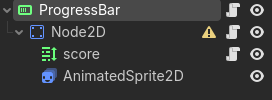
Can you post a screenie the scene tree for the progress bar?
Also (maybe redundant based on scene tree), can you explain what the intention of the line
@onready var rescueable = Rescueable
is/was? Where is this Rescueable? In the progress bar scene tree? Somewhere else?
(back to assuing things): It is possible you intended to create a Rescueable with the line above? In that case it will need to be Rescueable.new()
But we are assuming too much and not getting anywhere, so post up the scene tree and where this Rescueable instance actually lives (if anywhere), and we should be able to get to the bottom of things.
1 Like
Ok here is the picture:
The rescuable is a different scene, just an npc that should emit that signal when you enter their body. The progress bar is technically for 2 things, (one being health, which is already figured out and done in a separate way, and the progress for collecting these rescuable, which is what I’m struggling with)
The only two scripts I am working with for this is the npc (rescuable) and the progress bar itself. Everything else is coded for the purpose of keeping track of health. Sorry if this is jumbled I’m not quite sure how to explain

Ok, the collected signals (sort out your naming ;P) on the NPCs need to be actually hooked up to your handler update (BAD name for what it is). Depending on your setup, it is possible you did this in the editor, but results suggest otherwise, so:
@onready var rescueable = Rescueable does what I originally said, not what you want.
@onready var rescueable = $Rescueable will not do anything because it is not a child of this scene.
Delete that line, whatever it looks like now, you can’t hook this/these signal(s) up in this scene.
What you need to do is find a ‘common ancestor’ of the NPC’s and the progress-bar, possibly the top level ‘root’ node (the ‘level’ so to speak), and connect them there.
Something like:
func _ready() -> void:
    for npc in rescueables:
        npc.collected.connect(prog_bar.update)
Assuming your NPCs are accessible there in an array, which you may want to do if you aren’t already, else if they are direct children you can iterate all children and test if they are Rescueable, and connect them up if so.
Also assumes you have cached the progress bar scene in prog_bar.
Adjust accordingly if these things are not true, or make them true.
1 Like
I think i’ve mostly done what you said, but now there is an error calling “iter_next” for the scene. Technically in the levels they do not directly reference the characters in the script so there isn’t really a common thread there, but they do ultimately connect to that scene through it being their parent. They both also have something to do with the player so maybe I could reference that instead? Sorry I’m having some trouble understanding everything
Post actual code and exact error message.
Strange sounding error in any case, suggesting something is still fundamentally wrong.
Are you trying to say the character’s are created dynamically (generated at runtime, and not placed in the editor)? Maybe post the scene tree of the ‘level’ as well.
When I said you can’t connect them in this script, that was kind of a lie (but a very well intentioned one), if you know the relative path you can do it, but that is dodgy and will lead to problems. Any code you have which makes assumptions about its parent node or sibling nodes is flakey and should be decoupled (with signals).
This is why the common ancestor node is the place to do it, it only needs to reference child nodes (which is fine). It knows about both, while neither know about each other.
There was an error calling “_iter_next” on iterator object of type (res://world.gd):<GDScript#-9223371998770493967>.
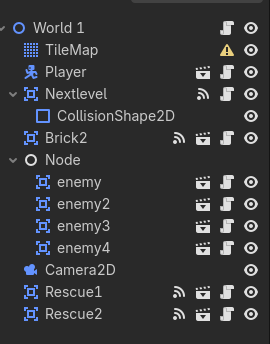
I beleive the error is from me misinterpretting what you said but here is the scene tree. Thank you for helping me so much
Alright, I see two rescueable’s there, where is the progress bar? Child node of player?
In the World1 script’s _ready() you can connect the signals like so:
func _ready() -> void:
    $Rescue1.collected.connect($Player.progress_bar.update)
    $Rescue2.collected.connect($Player.progress_bar.update)
But adjustment may still be needed depending on where the progress bar lives and how it is named.
If you have @onreadys in the World1 script to reference the rescueables you can use them instead of the paths ($Rescue1, $rescue2), likewise with player.
ah yes the progress bar is a child node of the player. I think that should fix it but, now it’s having trouble accessing the ProgressBar on the character. Maybe I used the wrong name?
That looks like a path name, so it would then be $Player/ProgressBar
So make it:
$Rescue1.collected.connect($Player/ProgressBar.update)
The snippet I provided before was assuming you were caching it in a @onready in the player script with @onready var progress_bar = $ProgressBar
ok I think that mostly fixed it, but now it is saying that it can’t update on a null instance. I’m confused because I have the update function in the progress bar, so I don’t understand why its not working.
lol, that suggest’s the path $Player/ProgressBar is in fact not correct. Which may make sense because it is probably in a container on a cavas layer (?).
So the correct path probably looks more like $Player/CanvasLayer/PanelContainer/HBox/ProgressBar, but will depend on your actual scene…
If that makes sense, you’re good to go (just fix the path), else one more scene tree please, for the player this time 
it worked thank you so much I think I understand the pathways a lot more now
1 Like
Awesome.
A couple of additional notes then:
Node paths are kind of fragile, especially GUI nodes, you may change the containers at some point to change the look/layout somehow, at which point all those paths in your code are now wrong.
If you right click the ProgressBar node (with the Player scene open) there will be an option to access it using a unique name, do so and you can then reference it (in the Player script) as %ProgressBar and it will remain valid even if you mess with the containers it is in.
Expose it with a @onready in the player script, for other scripts to reference if needed.
# player.gd
#...
@onready progress_bar: ProgressBar = %ProgressBar
#...


# world1.gd
#...
    $Rescue1.collected.connect($Player.progress_bar)
#...