Now, ive got an inventory (code at the bottom), but i have three quiestions.
How would i make it so that my interactable objects, with this script:
extends Node3D
#interactable instance, make child of interactable object

var current_interactions := []
var can_interact := true


func _input(event: InputEvent) -> void:
		if event.is_action_pressed("interact") and can_interact:
			if current_interactions:
				can_interact = false

				await current_interactions[0].interact.call()

				can_interact = true
extends StaticBody3D
#script on interactable objects

func interact():
	print("interacted")
	queue_free()
would go into my inventory on interaction?
I want to be able to drag objects from my 2d inventory into my 3d world and check if the objects can combine. If they can, I want something to happen, How would one do something like that?
My inventory spawns in visible, how would I be able to stop that?
Inventory Scripts:
extends Control
@onready var isopen: bool = false

#inventory script, the script that loads the items in and deals with holding items.

var items_to_load := [
	"res://InventoryItems/MINILSTICKER2D.tres",
	"res://InventoryItems/VhsTapeInv.tres"
]

func _ready():
	for i in 24:
		var slot := InventorySlot.new()
		slot.init(item_data.Type.MAIN, Vector2 (32, 32))
		%Grid.add_child(slot)
	for i in items_to_load.size():
		var item = InventoryItem.new()
		item.init(load(items_to_load[i]))
		%Grid.get_child(i).add_child(item)
class_name InventoryItem
extends TextureRect
#inventory items code, used as a resource to place within items

@export var data: item_data

func _ready() -> void:
	if data:
		expand_mode = TextureRect.EXPAND_IGNORE_SIZE
		stretch_mode = TextureRect.STRETCH_KEEP_ASPECT_CENTERED
		texture = data.item_texture


func init(d: item_data) -> void:
	data = d

func _get_drag_data(at_position: Vector2) -> Variant:
	set_drag_preview(make_drag_preview(at_position))
	return self_modulate


func make_drag_preview(at_position: Vector2) -> Control:
	var t := TextureRect.new()
	t.texture = texture
	t.expand_mode = TextureRect.EXPAND_IGNORE_SIZE
	t.stretch_mode = TextureRect.STRETCH_KEEP_ASPECT_CENTERED
	t.custom_minimum_size = size
	t.modulate.a = 0.5
	t.position = Vector2(-at_position)

	var c := Control.new()
	c.add_child(t)

	return c
class_name InventorySlot
extends PanelContainer
#inventory slots


@export var type: item_data.Type
@onready var player = $"."

func init(t: item_data.Type, cms: Vector2) -> void:
	type = t
	custom_minimum_size = cms

func can_drop_data(_at_position: Vector2, data: Variant) -> bool:
	if data is InventoryItem:
		if type == item_data.Type.MAIN:
			if get_child_count() == 0:
				return true
			else:
				if type == data.get_parent().type:
					return true
				return get_child(0).data.type == data.data.type
		else:
			return data.data.type == type
	return false
extends CanvasLayer
#the way to make it open and close


func _process(_delta):
	if Input.is_action_just_pressed("Inventory"):
		visible = !visible
		if visible:
			Input.mouse_mode = Input.MOUSE_MODE_VISIBLE
		else:
			Input.mouse_mode = Input.MOUSE_MODE_CAPTURED
I would try toying with signals to achieve this effect, the way I do my interaction is a class structure that emits an interacted signal. You could make a script that reacts to the signal, queues the object for deletion, then adds it to its memory. It seems like you’re already doing something similar if i read your code right so keep toying with that
For objects combining, it would depend on how you want them to combine. If you want them to combine automatically on the ground, what I’d do is whenever an object is dropped, do a spatial query with a sphere for other objects and use that to determine combinations
I don’t think I can help you there I’m not the best at UI </3
the _ready function runs at the start of the game only once, this is a great place to put visible = false or hide() to hide the inventory at the start of the game, you can show it again with visible = true or show()
Your inventory may be better off containing this code too, so the showing/hiding is all in one place.
This is a pretty big question, combining items is hard enough as it but you’re adding a cross between 2d and 3d. Overrides like _get_drag_data will not work on it’s own for 3d objects, you will have to write your own 2d dragging system that mixes into the 3d, probably via Raycasts.
I’ve tried to help you with this a few times now, I’d highly recommend replying to the last post you made instead of making new threads for the same subject.
I see that you have a item_data type as used in the inventory items code. You would use that type in this snipped I provided before
You did not answer my previous questions about how your interaction system works to find the player
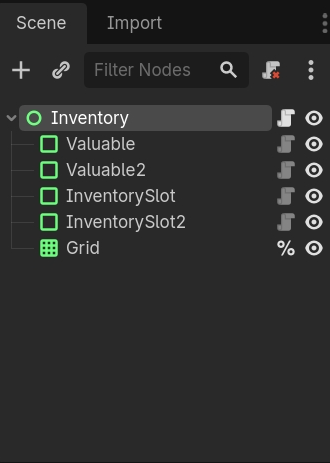
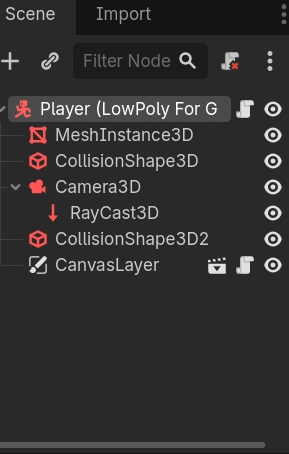
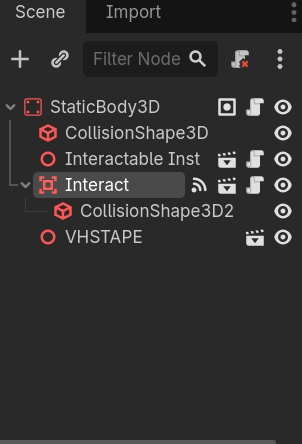
So it’s hard to recommend how you’d patch this, it would help if you shared your scene tree as a screenshot or through print_tree_pretty()
Put this inventory conundrum aside for a while and make several tiny projects where you explore and hopefully solve various basic sub-problems that are required for making an inventory system.
I’d suggest starting with the following:
Project 1: Clickable Godot icons.
A bunch of Godot logo icons are scattered on the screen. Each changes color when the mouse is hovering over it. When an icon is clicked it disappears.
Project 2: Arrangeable Godot icons
Same bunch of icons from Project 1, but now you can press the mouse on an icon and start dragging it. When the mouse is released, the icon stays at dragged position. So you can arrange the icons on the screen anyway you like.
If you implement those two simple projects, you’ll learn a lot about how to implement inventories. A lot.
And im actually not sure about the interactable objects, i was working for how to do it for a week and then just blindly followed a tutorial. I can try to find said tutorial but, i think the push_back function was for the objects? Its an area3d that detects the player if thats what your asking?
Thanks this information helps a lot. Your current interactable code will never detect the player because you are connecting the Interact (Area3D)'s area_entered code, this only detects other Area3Ds, but your player is a body so you would have to connect to body_entered. If it did detect the player it would try to call .interact() on the player, which wouldn’t be very helpful since you are trying to interact with the VHSTAPE scene i presume.
I believe the tutorial you followed was intended to place the Interact (Area3D) as a child of the player, likely in front of their view, then it would scan around for other Area3Ds that could interact. If you want this you should move Interact on the player, possibly as a child of it’s Camera3D.
After moving the interactable I think you would benefit from changing the connected functions. Currently _on_area_3d_area_entered tells me that your Interact area is only looking for other areas, which would never find the extends StaticBody script that holds the target interact function, changing Interact to use the body_entered signal would detect that script, but it would also detect a lot more, so you must do some filtering
extends Area3D
# interact zone, make child of player/camera3d

# Now that it's a child of the player, the @export can assign to the player (root node)
@export var player: Player

var current_interactions := []
var can_interact := true

func _input(event: InputEvent) -> void:
		if event.is_action_pressed("interact") and can_interact:
			if current_interactions:
				can_interact = false
				await current_interactions[0].interact.call(player)
				can_interact = true


# connect body_entered signals, Godot may make different function names
func _on_body_entered(body: Node3D) -> void:
	# filtering: only push objects with 'interact'
	if body.has_method("interact"):
		current_interactions.push_back(body)


func _on_body_exited(body: Node3D) -> void:
	if body in current_interactions:
		current_interactions.erase(body)
For this, do you think I could use the raycast parented with my player? If its that hard, I could make it so its something like (and please forgive me this is a draft and doesnt have syntax)
func on_body_entered (if i have an area 3d parented to the object i want to be able to interact with with, lets say, a key, then it could detect the player on entry? or the raycast?)
If I understand your draft, maybe you could use the same interactable system as before to check if the player has certain items in their inventory
func interact(player: Player) -> void:
    if player.has_item("Key"):
        unlock()
I don’t know what the raycast parented to your player is currently for, I’d imagine for click-and-drag you’d want to rotate the raycast to match where the mouse is pointing, which may interfere with any of your other raycast related code.
Wait, and i think i probably just missed something (four hours of sleep haha), but what about the interactable data going into the inventory? Will this help?
You would have to define your own player.has_item, Godot does not know anything about items unless you tell it. This was only an example of how you could re-use the interact function, I do not know how your player links to the inventory; again if it’s a child of the player that may be easier to access, or a Global/Autoload would be easy too.
You’ve got some complicated systems here, it’s hard to follow because you must understand that we know nothing of your systems, only Godot’s core. If you are having trouble getting or adding items to the inventory you must explain the path your code walks, from this problem function interact to the target inventory, how would one travel that path? For example the first step here is that interact has the argument player, we can move from interact into any of the players functions, from the player how can we reach the inventory?
Awesome yeah that’s vital information, getting the player means we can have direct access to the inventory. With that you can define your inventory-helper functions such as has_item and add_item.
Seems like your inventory is mostly based on InventorySlots as children of %Grid and further their children of type InventoryItem.
Something like player.inventory.has_item("Key") may look something like this
func has_item(item_name: String) -> bool:
	for slot in %Grid.get_children():
		# has an InventoryItem?
		if slot.get_child_count() > 0:
			var inventory_item := slot.get_child(0) as InventoryItem
			# is this item named `item_name`?
			if inventory_item.data.item_name == item_name:
				return true

	# Did not find any `item_name`s
	return false
While add_item may have to look for an empty slot, one without any children.
Feel free to use code blocks for examples/pseudo-code. The things I’m posting are not tested, only an idea of a program.
Your interact definition could look like my previous sample, with the new information I’d recommend player.inventory.add_item
@export var held_item: item_data # exported data can be assigned in-editor

func interact(player: Player) -> void:
    player.inventory.add_item(held_item): # *calls* add_item here
    queue_free()
The definition of add_item should be on your inventory, so it can be accessed from inventory.add_item. If this function takes an item_data then you do not have to load it, assume it has already been loaded, such as by an @export.
func add_item(new_item: item_data) -> bool:
	for slot in %Grid.get_children():
		# has an InventoryItem?
		if slot.get_child_count() > 0:
			pass # it's full, can't add item here
		else:
			# The same code you used in _ready() to init an item
			var item := InventoryItem.new()
			item.init(new_item)
			slot.add_child(item)
			return true # we found and filled a slot!

	# Did not find any empty slots
	return false

 just a button press instead, i dont feel like dealing with the collision