Like the title says - is there any way to see a selected cell’s local map coordinates in the inspector or GridMap editor? I can manipulate things with map_to_local() and the inverse all day long programmatically, but actually finding the coordinates I’m trying to move things to is a huge pain (currently I just have my player character report their position every turn during debugging and working from there). I feel like I’m missing something, but I’ve been all over the editor UI and come up completely dry. It seems like there should be some toggleable view gizmo that reports the current selected cell’s coordinates at the y-layer selected in the Gridmap editor that I’m missing tucked away somewhere.
But I also see that there is a GridMapEditorPlugin node and it has a method of get_selected_cells(). So tecnically, it may be possible to write a simple editor running script or a plugin. But I don’t know how to do that. Maybe someone else can help with it.
Oh, thank you!!! That looks like exactly what I needed - I was up until 3AM or so trying to make a plugin work with a raycast in the Spatial editor window but it was really finicky and felt like I was still a ways off. I’ve only had a couple minutes to poke at this between day job meetings, and it seems like it’s harder than you’d intuitively think to get access to the current active GridMapEditorPlugin, but once I get that sorted out I can absolutely use its methods to report what I’m looking for.
Yeesh, okay - I finally got access to the GridMapEditorPlugin with this:
	var root = get_editor_interface().get_resource_filesystem().get_node("/root")
	var grid_map_editor = root.find_children("", "GridMapEditorPlugin", true, false)[0]
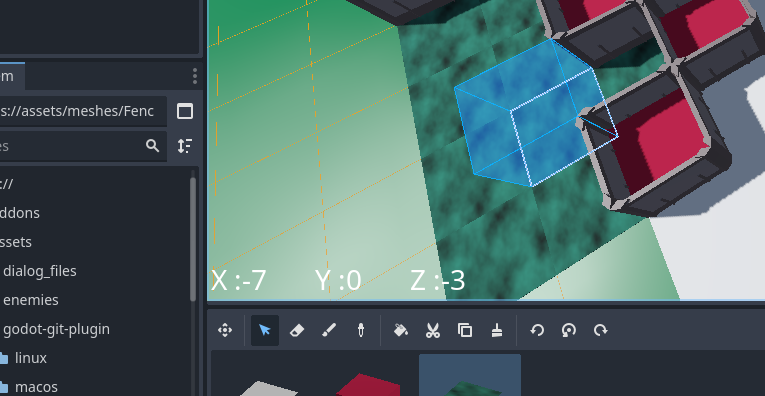
From there it was simple enough to just use get_selected_cells() and pop the first result into a few labels (I’ll add some handling for multiple selections later):
Anyway, thanks a ton for your help!!! I might clean this up and toss the plugin on the AssetLib later, it’s weird but extremely useful for some methods of manipulating GridMaps.
Sorry, I ended up getting a bit sidetracked doing a bunch of Blender tutorial courses. I’ll try to get it on the AssetLib this week and reply again here when I do!

 I’ll try to get it on the AssetLib this week and reply again here when I do!