Godot Version
4.6
Question
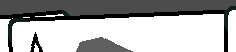
I have a set of cards moving up and down slowly over time, each being rotated more as it reaches the edge of the hand. The problem is the rotated cards have a distorted pixel edge as they move up and down.
Below is a video demonstrating the problem. The distortion is most visible at the top of the card.
I have searched other forum posts and tried setting Stretch Mode to canvas_items and Scale Mode to integer. These are the only possible solutions I have found.
The card items have a size of 280x400 and have a scale of 1.0 (i.e. not scaled up at all).
Additional screenshot for clarity:
How can I make it so that the edges are smooth?
You can change the rendering/anti_aliasing/quality/msaa_2d project setting to enable 2D antialiasing.
See also: 2D antialiasing — Godot Engine (stable) documentation in English
I just enabled Anti Aliasing MSAA 2D on 8x and there seems to be no change. I even restarted the editor but it stays the same.
It is not supported in compatibility mode and web.
Could it be you’re using that?
I keep sharing my videos, sorry about that, but I always look at this forum on my phone and cannot gather links to docs easily that way:
I am on forward+.
No problem at all.
I am not making a web game so this video doesn’t apply.
I’ve recently tried changing my art to have a one-pixel invisible border around each card but this doesn’t change anything. I can’t seem to find a fix anywhere online.
What are those cards made of?
The card scenes are a Node2D with a sprite 2d as a child.
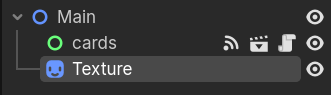
The control node is for the card functionality and should be irrelevant to my problem.
The texture has a shader applied onto it.
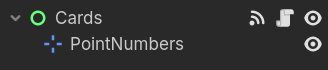
The control node and a marker to spawn numbers to display points.
The shader is set in code to activate its effect whenever I call a specific function.
# Card Component script
func flash():
	self.texture_holder.material = SHAKE_MAT
	await get_tree().create_timer(0.7).timeout
	var tween = get_tree().create_tween()
	tween.tween_property(self.texture_holder.material, "shader_parameter/hit_effect", 0, 0.2)
	await tween.finished
	SHAKE_MAT.set_shader_parameter("hit_effect", 1.0)
	self.texture_holder.material = null
'''
The effect is for the card to shake and pulse.
There is no shader by default.
shader_type canvas_item;

// Variable for hit effect
uniform bool get_hit = false;
uniform float hit_effect : hint_range(0,1) = 0.0;
uniform float shake_intensity = 10.0;
uniform float flash_speed = 30.0;
uniform vec4 flash_color : source_color = vec4(1.0, 0.0, 0.0, 1.0);

// Variable for wind effect
uniform bool render_noise = false;
uniform sampler2D noise_texture : repeat_enable; // set in inspector
uniform float amplitude : hint_range(0.0, 0.5, 0.01) = 0.05;
uniform float time_scale : hint_range(0.0, 5.0, 0.01) = 0.04;
uniform float noise_scale : hint_range(0.0, 2.0, 0.0001) = 0.001;
uniform float rotation_strength : hint_range(0.0, 5.0, 0.1) = 1;
uniform vec2 rotation_pivot = vec2(0.5, 1);
varying vec2 world_position;

float rand(vec2 co) {
    return fract(sin(dot(co, vec2(12.9898,78.233))) * 43758.5453);
}

void vertex(){
	if(get_hit){
		float time = TIME * 30.0;
        vec2 random_offset = vec2(
            rand(vec2(time, 0.0)) * 2.0 - 1.0,
            rand(vec2(time, 10.0)) * 2.0 - 1.0
        );
        VERTEX += random_offset * shake_intensity * hit_effect;
	}
    else{world_position = (MODEL_MATRIX * vec4(VERTEX, 0.0, 1.0)).xy;}
}

vec2 get_sample_pos(vec2 pos, float scale, float offset) {
	pos *= scale;
	pos += offset;
	return pos;
}

vec2 rotate_vec(vec2 vec, vec2 pivot, float rotation) {
	float cosa = cos(rotation);
	float sina = sin(rotation);
	vec -= pivot;
	return vec2(
		cosa * vec.x - sina * vec.y,
		cosa * vec.y + sina * vec.x
	) + pivot;
}

void fragment() {
	vec4 original_color = texture(TEXTURE, UV);
	// get noise from texture
	vec2 noise_sample_pos = get_sample_pos(world_position, noise_scale, TIME * time_scale);
	float noise_amount = texture(noise_texture, noise_sample_pos).r - 0.5f;

	// get rotation position around a pivot
	float rotation = amplitude * noise_amount;
	vec2 rotated_uvs = rotate_vec(UV, rotation_pivot, rotation);

	// blend original uvs and rotated uvs based on distance to pivot
	float dist = distance(UV, rotation_pivot) * rotation_strength;
	vec2 result_uvs = mix(UV, rotated_uvs, dist);

	// output color
	if (get_hit) {
        float flash = sin(TIME * flash_speed) * 0.5 + 0.5;
        flash *= original_color.a;

        vec4 final_color = mix(original_color, flash_color, flash);
        final_color = mix(original_color, final_color, hit_effect);
        final_color.a = original_color.a;

        COLOR = final_color;
    } else {
       COLOR = texture(TEXTURE, result_uvs);
    }
	// optional, preview noise texture for debugging
	if (render_noise) {
		vec4 noise_color = texture(noise_texture, noise_sample_pos);
		COLOR = noise_color;
	}
}
```
Make sure that sprite’s texture filtering is set to “Linear”.
Setting the texture filtering to “Linear” definitely helped! The jagged edges are now much less visible and no longer move much.

However, there is still a bit of the staircase effect left. Is there any final way to get rid of the remaining bit of jaggedness?
Try increasing the pixel size of card textures.
Do you mean to use higher resolution textures?
I used a texture that has 4x the resolution and still there is a bit of jaggedness.

Game cards are pretty simple shapes. You can draw them als native Polygon2D and Line2D.
If you then turn on msaa anti-aliasing the edges are smooth.
The video shows the plugin I built to make this easier to do in engine…
sorry again for the shameless self promotion. I cannot help myself.