Keeping Resources separate in the same scene?

Godot Version

4.6

Question

Note that I am currently using the Inspector, not code, to work with these objects/scenes.

Bear with me - this is a bit long…

I’ve made several resources (.tres), and each of them have the “Local to Scene” option checked.

I made a “pickup object” scene, and include one of these resources and then instantiate it in another scene, it behaves as expected. That is, I can change the quantity of the resource after instantiating, and it remains separate from all other instances within the same scene - so, behaves as intended.

This is fine when I use a “pickup object” scene that is intended to be a single item - like a power-up, or a weapon, or health potion. I can have multiples, and when I change a value for one of them, the others are unaffected.

However, I made a pickup that contains an array for holding multiple resources (a chest). When I instantiate the chest, I can add any number of resources and change their values.
Of course, when I instantiate another chest and add the same resources, they are still linked - changing the quantity of one resource in a chest changes the quantity of that same resource in a different chest.

I know this is normal behavior - to make them separate, the resource must be included in the ‘pickup’ scene with ‘Local to Scene’ checked prior to instancing in another scene.

My question is: Is there any way to add multiple resources to my ‘pickup’ object at design time and keep the resources ‘unlinked’?

The first thought I had was to add the possible resources to the chest scene array, all with values of ‘0’, then change the values after instantiating them into another scene.
However, this is cumbersome as I might have a dozen resources, and it may change later.
Save them all to disk. As soon as you save a resource, it will stay unlinked.

My resources are all saved to disk with ‘Local to Scene’ checked.

After instantiating a chest.tscn and then adding the resource to it in the Inspector, it remains linked to all other chests if I add the same resource.

I’m not certain when you are suggesting I save, as everything is already saved to disk:
money.tres, pickup.tscn, pickup.gd

Hmmm, then perhaps I’m just not understanding the problem you’re running into.

If you only use a script to define a resource, then there is no linkage between the various resource objects.

You might be able to do the same thing with the resources you have defined if you create them with new() instead of instantiate(). I haven’t actually tried this, so I do not know if that will work.

Currently I’m only testing concept/structure so I’m not using code to instantiate - I’m using the inspector and there’s no option for new() (that I’m aware of)

This is why I’m confused. The word instantiate means something specific. BTW, technically you are using new() as that’s the only option in the editor.

I think your chests are sharing the pickup array as a whole.
Try creating a dedicated resource type for that array and making it unique per-chest.

If you are using the inspector for all of your values, then all of those values will be linked to the underlying object.

If you want unlinked resources you need to write code.

I’m using “Instantiate Child Scene” from the Inspector to add my pickup object into the existing scene - call it “PickUp”

Then, I add one or more .tres resources to “PickUp” which contains an Array to hold the resources.

Within the resource, there’s a var for ‘quantity’ (among other things like ‘description’, ‘id’, etc.)

The pickup scene used to be for single resources only - a potion, money, etc. along with a var for ‘quantity’. Health_Pickup.tscn had a heath.tres, and the quantity in separate vars., plus the mesh, collision shape, etc.
Money_Pickup.tscn has a money.tres, and and a var for quantity, and so on.

I needed to handle multiple items, like within a chest, so I added the Array to hold the resources/tres and moved the var for ‘amount’ into the resource itself.
So, the array has multiple resources, and each resource is self-contained - description, id, amount, etc.
It works well, until this issue…

There it is, the .tres files. If you use the same tres on two different scenes, they will share the same instance. make a different tres for each item type going on each chest. I suggest putting it all into a single per-chest tres or making a folder for each chest, cause there’s probably gonna be a LOT of these around.

.tres files are not required for resources. The vast majority of resources I use are defined only in script files.

class_name InventoryItem
extends Resource

var id
var description

And will that solve my issue - using scripts instead of .tres files?

I guarantee a 100% refund of my consulting fee if it doesn’t.

Try this on the editor.
On each chest, there’s its array of pickup resources. For every item on that array, check resource → local to scene to “On”. Then for the array itself, check local to scene to “On” as well.
The array has to be unique so that each chest has its own pickup list.
Every pickup on that array has to be unique so that for each chest, each pickup is a different bundle of some item.

Local to Scene exists on each resource (.tres), but it does not exist on the pickup scene, or its array, or the individual resources once they are added to the array.

OK, I’ll try it - but if it doesn’t work, I’m coming after you for my $0

OK - I found a solution that I can use in the Inspector.

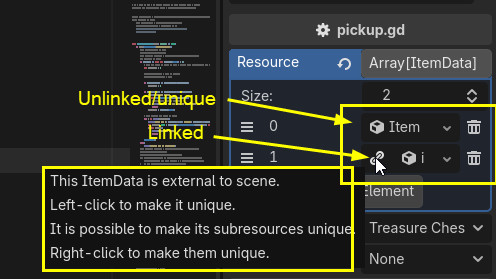
After adding a resource to a chest array, I can click the ‘link’ icon which makes it unique and breaks the dependency on the .tres file. DUH!

@that_duck : Once I get further into working with Godot, I’ll probably switch to using code instead. Right now, I’m only a couple weeks into learning it so the editor is easier - thanks.

@Guarapicci : perhaps this is what you were referring to in your post?

More or less. Item 1 is external, which means it’s probably on a .tres file. If you had a bunch of chests with “external” ItemData entries, they were probably reusing the same .tres files for them, thus sharing the same quantity of each.

Yes - that is exactly the situation I described.