Godot Version
4.1.1.stable.mono
Runtime Version: .NET 9.0.6
Runtime Identifier: osx-arm64
Process Architecture: Arm64
Question
Hi there. Apologies if this is a commonly asked question. I’ve tried following solutions which i’ve found online but thus far haven’t been able to rectify the issue.
I’m trying to load json file configuration data in. It works fine in debug, but the check for the path fails when i export.
This is where the exception is blowing when i try to load a language file.
        string path = $"res://assets/translations/{languageCode}/game.json";

        if (!FileAccess.FileExists(path))
            throw new Exception($"Language file not found: {path}");```
        using var file = FileAccess.Open(path, FileAccess.ModeFlags.Read);
        string json = file.GetAsText();
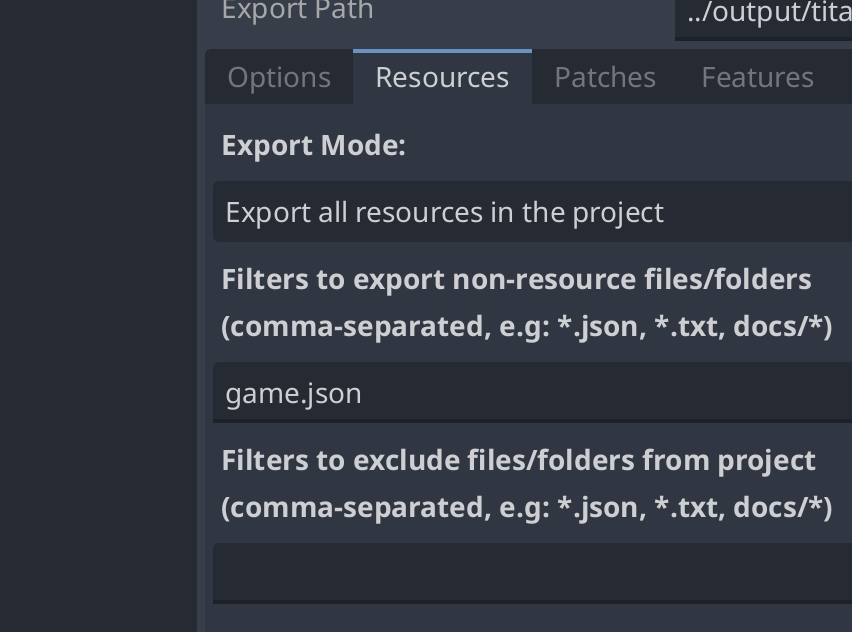
I’ve got the export set to the json files:
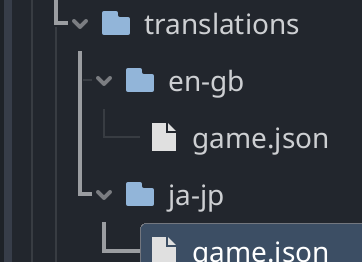
And we have the files here:
I know i’m doing something fundamentally incorrect here, but i just can’t fathom it. Again, works fine running from the editor or a vscode debug build. The exported build was also fine before I added this in. There must be something odd with importing json files as the Exception is always being thrown when the file check occurs for the file.
Many thanks in advance!