Because then each level needs to have more info in it than it needs to. It either needs the Main/Pause menu as part of it, or it needs to know how to switch to that scene. Either way, a level doesn’t need to know about the rest of the game, menus, etc. So it’s poor encapsulation.
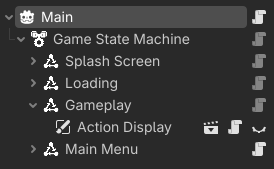
I prefer a main scene that handles everything with a state machine.
I have a Game autoload that has a signal. It takes a level name which can actually be a name to search for, a path, or UID. Then a player which can be any type of Node (typically a CharacterBody2D/3D). And finally the name of a transition area which is typically the name of a Marker2D/3D node where the player spawns.
signal load_level(level_name: String, player: Node, target_transition_area: String)
The Loading and Gameplay states listen for that signal. When it goes off, the Loading state kicks off and uses the ResourceLoader to load a threaded request. It puts up a customizable progress bar.
Loading State
class_name GameStateLoading extends State

var progress_amount := 0.0
var level_path: String

@onready var loading_screen: CanvasLayer = $"Loading Screen"
@onready var progress_bar: ProgressBar = %ProgressBar
@onready var precentage_label: Label = %PrecentageLabel


func _activate_state() -> void:
	super()
	Game.load_level.connect(_on_load_level)
	precentage_label.text = "0 %"
	loading_screen.hide()


func _enter_state() -> void:
	super()
	Game.pause()
	loading_screen.show()
	print_rich("[color=purple][b]Level Loading[/b][/color]: %s" % [level_path])
	progress_bar.value = 0.0
	set_process(true)
	ResourceLoader.load_threaded_request(level_path)


func _exit_state() -> void:
	super()
	Game.unpause()
	loading_screen.hide()


func _process(delta: float) -> void:
	var progress: Array = []
	var status = ResourceLoader.load_threaded_get_status(level_path, progress)

	if progress[0] > progress_amount:
		progress_amount = progress[0]

	if progress_bar.value < progress_amount:
		progress_bar.value = lerp(progress_bar.value, progress_amount, delta * 60)
	progress_bar.value += delta * 0.2 * (3.0 if progress_amount >= 1.0 else clamp(0.95 - progress_bar.value, 0.0, 1.0))

	precentage_label.text = str(int(progress_bar.value * 100.0)) + " %"

	if status == ResourceLoader.THREAD_LOAD_LOADED:
		set_process(false)
		progress_bar.value = 1.0
		precentage_label.text = "100 %"


func _on_load_level(level_name: String, _player: Node, _target: String) -> void:
	if level_name.contains("uid://"):
		level_path = level_name
	else:
		level_path = "res://levels/" + level_name + ".tscn"
	switch_state()
At the same time, when that signal kicks off, the Gameplay state starts monitoring the progress of the ResourceLoader’s threaded loading. When it is complete, it takes over and loads the level, making it a child of itself. If there’s an old level, it then deletes that level once the player has been moved over.
Gameplay State
class_name GameStateGameplay extends State

var level_path: String
var player: Node
var current_level: Node
var target_transition_area
var level_loading = false


func _activate_state() -> void:
	super()
	Game.load_level.connect(_on_load_level)
	set_process_input(true)


func _process(delta: float) -> void:
	var status = ResourceLoader.load_threaded_get_status(level_path)
	if status == ResourceLoader.THREAD_LOAD_LOADED:
		set_process(false)
		await get_tree().create_timer(0.5).timeout
		switch_state()


func _input(event: InputEvent) -> void:
	if not Game.is_paused():
		return
	if event.is_action_pressed("pause"):
		switch_state()
		get_viewport().set_input_as_handled()


func _enter_state() -> void:
	super()
	if Game.is_paused():
		Game.unpause()
	if level_loading:
		_start_level()


func _on_load_level(level_name: String, player: Node, transition_area: String) -> void:
	set_process(true)
	if level_name.contains("uid://"):
		level_path = level_name
	else:
		level_path = "res://levels/" + level_name + ".tscn"
	self.player = player
	target_transition_area = transition_area
	level_loading = true


func _start_level() -> void:
	var scene = ResourceLoader.load_threaded_get(level_path)
	var new_level = scene.instantiate()
	add_child(new_level)
	if player != null:
		player.reparent(self)
	if new_level != current_level and current_level != null:
		current_level.queue_free()
	current_level = new_level
	current_level.start(player, target_transition_area)
	level_loading = false
You can see working examples for 2D and 3D in my Game Template Plugin.