I’m trying to make menus for my game and have these menus be navigated purely via button presses and not the mouse. I’ve set the button mouse filters to ignore, but there’s one thing I can’t seem to get rid of. Whenever I left click on the screen the button that was once focused loses focus. I would like to make it so that when clicking on the screen the button does not lose focus.
EDIT: So apparently the buttons are not actually losing focus they just lose the ring around them that visually shows that they are in focus. Weird. Trying to figure out how to make the ring not go away now.
i’m not trying to grab the focus, i’m trying to keep the focus from getting released. I think i may have phrased this post badly.
All of the buttons have mouse filter set to ignore, yet when i click on the screen the focus disappears. when i hit a ui input the focus reappears, but i want it so that the focus never disappears. I feel like there has to be a setting somewhere that i’m missing.
You could try the “poor man’s debugger” just add a script on each of your controls in the entire scene tree that handles the focus_entered signal and prints its name.
If you need more info you could also print a stack trace:
static func print_trace() -> void:
	var st := get_stack()
	print("Stacktrace requested:")
	for l in st:
		print("   at ", l["function"], " (", l["source"].replace("res://addons/curved_lines_2d/", ""), ":", l["line"], ")")
	print("--")
PS
That’s the sort of thing the vibers delegate to Claude without realising it. When asked to explain the thing generates a sentence that sounds like “I bisected your code for you”, but in fact it will have brute forced many many failure routes until finally resulting - hopefully - in a good answer… That’s why our planet is cooked. (Just wanted to put that out there).. so all that long winded extra text just to say: I love that you just came to the place with the humans for help.
ok so i’m looking at it more. I poked around some more and it turns out that the buttons actually never lose their focus, just the highlight around the button goes away for some reason. Anyone know why this happens?
To be totally honest, I’m not sure, but I do remember this happening. Have you tried to also set the mouse filter to ignore for your VBoxContainer as well? You don’t want mouse interaction there anyway, right?
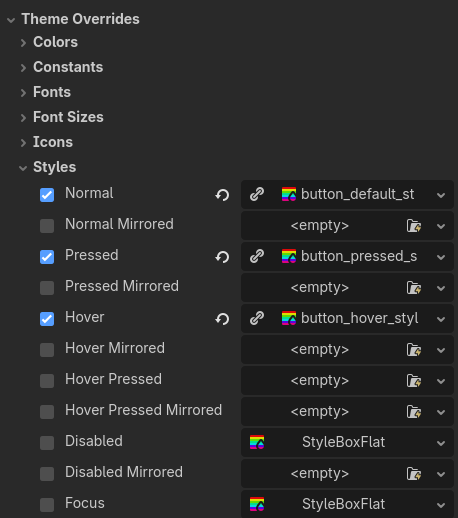
Alternatively, you could see if you can work around it by overriding the themes for all the button states:
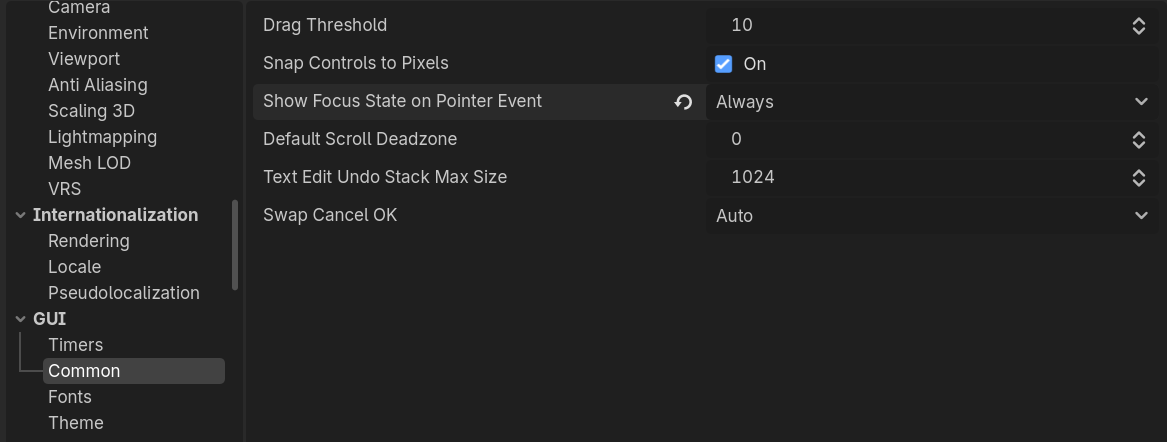
it turns out there’s a project setting gui/common/show_focus_state_on_pointer_event that makes it so that focus is hidden when pointer events happen. setting this to “always” ended up fixing my issue. thanks anyways gang!