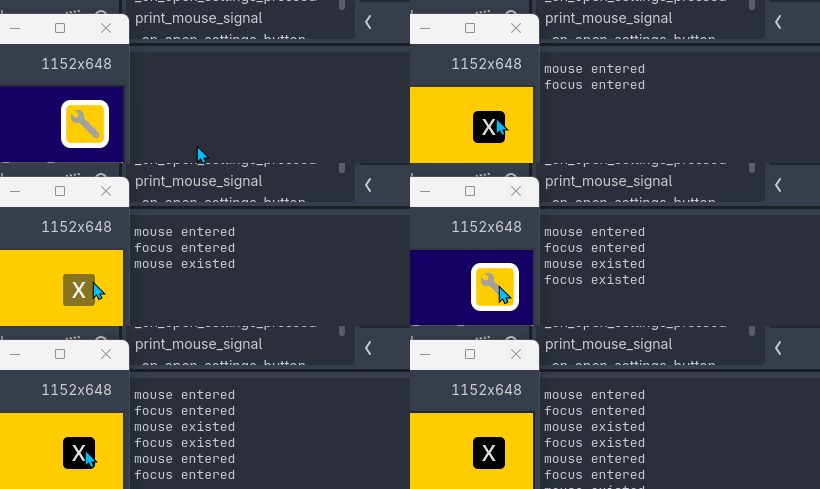
I have an UI element with a button that when pressed it will move its content to a side of the screen. I noticed that when the button leaves its position, it still maintains the “over” style instead the normal or another one. Also, just by chance, behind it there is another button and this one does not notice the mouse is over it and it does not change the style either. This happens until I move the cursor.
I’m not sure if this is the expected behavior, or is a limitation of how things works, but… Is there a way to refresh or make Godot check if the cursor is still on a button or not without moving the mouse?
I will attach an animation that I hope can make things easier to understand. The state printed is the wrench button, the “x” button does not print its state.
If you are using a tween to move the controls, you could use a workaround found from that issue: call get_viewport().update_mouse_cursor_state(). For example this tween spends 3 seconds to move a button and constantly calls the get_viewport().update_mouse_cursor_state() function. Mouse exit signal is emitted even if the mouse is not moved (tested with 4.7 beta 4).
Thank you very much for the quick response"! By calling the proposed method after the tween animation ends is good enough for me at the moment. Let’s hope they can fix the issue in future versions.