Godot Version
4.6
Question
After upgrading to godot 4.6 from 4.5.1 the inputs of my ui “windows” have stopped working. The windows emulate the windows of a desktop enviroment. For example below is the code for making them “draggable”. This no longer works as the _on_drag_area_input function is no longer called.
Some windows have buttons in them, and these buttons now also no longer receive mouse inputs. I have some simpler ui with an item list with selection that still works.
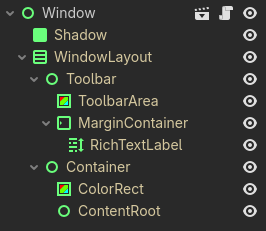
Here is the window structure:
Window has the script from below attached to it.
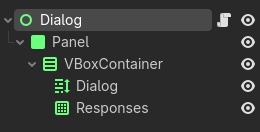
For reference, here is the scene structure of the other ui that still functions:
To reiterate: everything worked in godot 4.5.1 and only broke once opened in godot 4.6
extends Control
class_name WindowControl

@onready var drag_area: ColorRect = $WindowLayout/Toolbar/ToolbarArea

var dragging := false
var drag_offset := Vector2.ZERO

func _ready():
	drag_area.mouse_filter = Control.MOUSE_FILTER_STOP
	drag_area.gui_input.connect(_on_drag_area_input)

func _on_drag_area_input(event: InputEvent) -> void:
	print("event") # <--- this never fires
	if event is InputEventMouseButton:
		if event.button_index == MOUSE_BUTTON_LEFT:
			if event.pressed:
				dragging = true
				# calculate offset in parent-local coordinates
				drag_offset = drag_area.get_local_mouse_position()
				_bring_to_front()
			else:
				dragging = false
	elif event is InputEventMouseMotion and dragging:
		var new_pos = get_parent().get_local_mouse_position() - drag_offset

		var parent_size = get_parent().get_size()
		var window_size = get_size()
		new_pos.x = clamp(new_pos.x, 0, parent_size.x - window_size.x)
		new_pos.y = clamp(new_pos.y, 0, parent_size.y - window_size.y)

		position = new_pos

func _bring_to_front():
	var p := get_parent()
	p.move_child(self, p.get_child_count() - 1)