Godot Version
v4.7.dev2.official [778cf54da]
Question (1st time)
How would one pass procedurally-generated, instance-specific parameters to any one shader of the node’s Sprite2D layers?
In other words,
How do I make procedurally-defined shaders?
Context
Suppose one had a scene for a planet that is procedurally generated at runtime or during play, that may or may not have user-inputs taken into account.
The scene then makes use of separate Sprite2D nodes, that when layered, give the impression that the planet is composed of many distinct and separate systems (oceans, land, vegetation, city-lights, atmosphere, etc.).
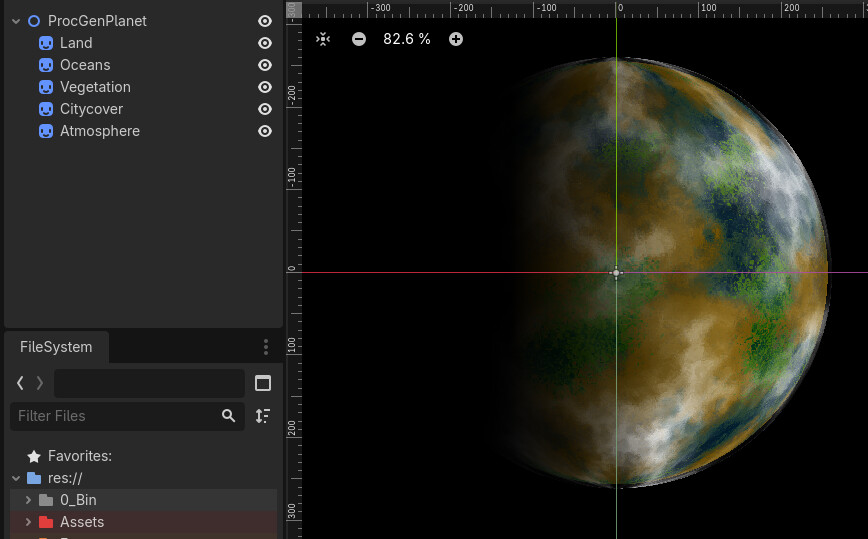
The base textures for each layer are generated using various noisemaps that are made at or during runtime. This is fine, as it is NOT shader-based.
The textures are all 2:1 flat maps, that are then projected onto gently spinning spheres using various shaders that are all fundamentally congruent, but tuned differently (e.g. atmosphere spins slightly slower or faster than the land one; citycover fades out at the terminator rather than fading in).
Here is one of these shaders, as an example:
shader_type canvas_item;

varying bool is_paused;

instance uniform float rotation_speed = 0.3;
instance uniform float tilt;
instance uniform float light_multiplier = 2.0;
instance uniform bool surface_glow = true;
instance uniform vec3 glow_colour : source_color; //= vec3(0.2, 0.4, 1.0);

instance uniform vec3 liquid_mask_colour : source_color; //= vec3(0.2, 0.4, 1.0);
instance uniform float liquid_albedo;

instance uniform vec2 lightspot_pos;
instance uniform float lightspot_strength;
instance uniform float lightspot_colour;
instance uniform float lightspot_scale;

instance uniform vec3 light_dir = vec3(1.0, 0.0, 0.0);
instance uniform float offset;

varying float stored_time;

void fragment() {

	is_paused = false;

	if ( !is_paused ) {
			stored_time = TIME;
		}

	vec2 p = UV * 2.0 - 1.0;

	// aspect correction
	p.x *= TEXTURE_PIXEL_SIZE.y / TEXTURE_PIXEL_SIZE.x;

	float r2 = dot(p, p);

	if (r2 > 1.0) {
		COLOR = vec4(0.0);
	} else {
		float z = sqrt(1.0 - r2);

		vec3 n = vec3(p.x, p.y, z);

		// axial tilt
		float ct = cos(tilt);
		float st = sin(tilt);

		n = vec3(
			n.x,
			n.y * ct - n.z * st,
			n.y * st + n.z * ct
		);

		float longitude = atan(n.x, n.z);
		float latitude  = asin(n.y);

		vec2 sphere_uv;
		sphere_uv.x = longitude / (2.0 * PI) + 0.5;
		sphere_uv.y = latitude  / PI + 0.5;

		// base rotation
		sphere_uv.x = fract(sphere_uv.x - TIME * 0.1 * rotation_speed);

		vec4 col = texture(TEXTURE, sphere_uv);

		// lighting + liquid albedo
		float light = dot(n, normalize(light_dir)) * light_multiplier;
		light = clamp(light * 0.5 + 0.5, 0.0, 1.0);

		float albedo_light = 0.0;

		if (distance(col.rgb, liquid_mask_colour) < 0.1) {
			albedo_light = distance(UV.x + offset, clamp(lightspot_pos.x, 0.0, 1.0)) * liquid_albedo;
		}

		col.rgb *= light + albedo_light * albedo_light;

		// surface_glow
		if ( surface_glow == true ) {
			float fresnel = pow(1.0 - dot(n, vec3(0.0, 0.0, 1.0)), 3.0);
			col.rgb += glow_colour * fresnel * 0.3;
		};

		COLOR = col;

		if (!is_paused) {
			stored_time = TIME;
		}
	}
}
The shaders aren’t fully done yet, but this is a rough idea.
As of now, I have the working shaders that I can tune, and the planets work. But they cannot be generated at runtime. So far, I can only handcraft them myself before runtime.
The reason they’d be tuned differently, is that the colour of the atmosphere or land or vegetation should be able to change, and this will have real-game impacts on what resources (or chemical compounds) are found there. The way it’s generated might mess with its axial tilt, or its atmospheric windspeeds, or if it has an atmosphere at all. Stuff like that! It’ll be important for the game’s mechanics. Ideally, players would be able to venture out and generate these themselves (with or without user input).
Question (2nd time)
How would one pass procedurally-generated, instance-specific parameters to any one shader of the node’s Sprite2D layers?
In other words,
How do I make procedurally-defined shaders?
In trying to use get_shader_uniform_list(), I noticed that the instance uniform variables don’t get listed, and when I try mutating them from an outside .gd file, or even its parent .gd file, it seems I can’t.
However, if I switched to standard uniform variables, then I’d be able to mutate them, but it would mutate the shader for all objects using it. And I wouldn’t want that either.
Am I missing something?
The docs don’t seem to help much. I’m also relatively new to shaders, so please forgive me if I missed something obvious.