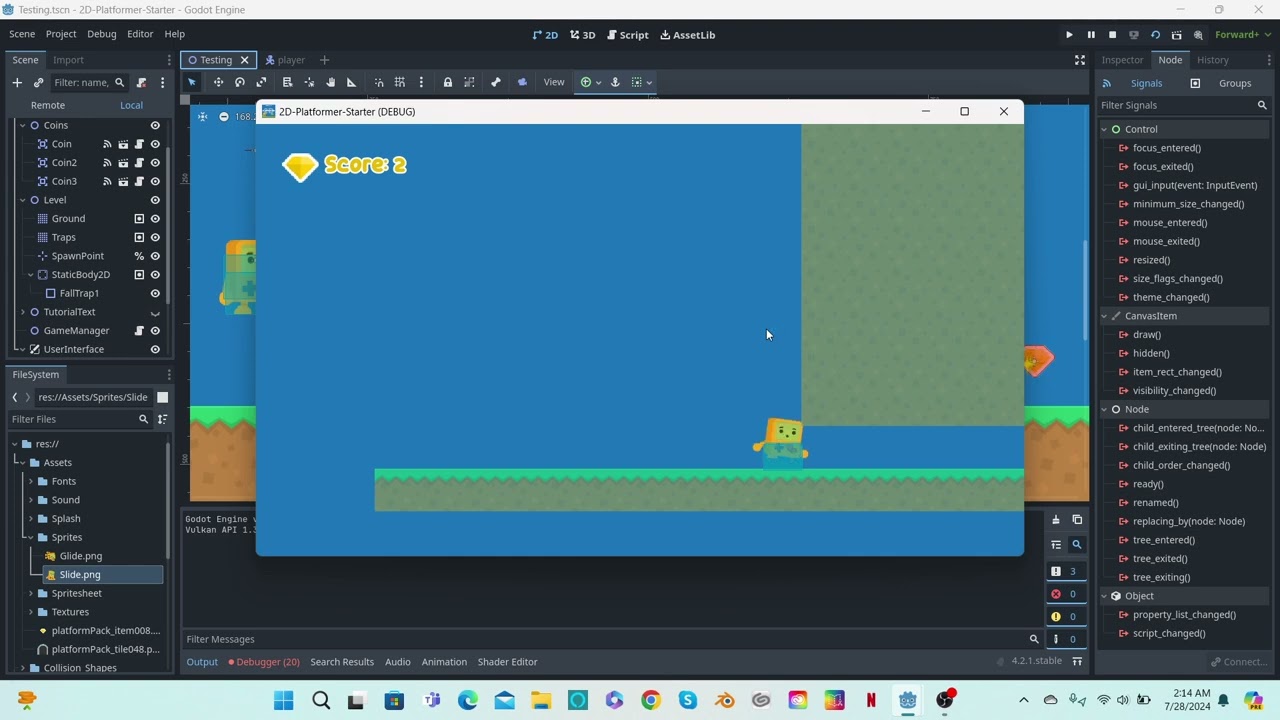
Hello. I am making a running game in Godot 4.21, with a template made by G2P Studios. I made a second collision for my player whenever he slides under a wall. However, this didn’t work when my player crashes into the wall while its collision size is small (to match with the character’s sprite). Not only that, but it somehow doesn’t interact with coins. Only the running collision can. I tried fixing it by removing the Area2D collision and switching groups to my character’s collision. Unfortunately, I couldn’t solve the problem. I need some help on fixing this collision bug and making the character slide under the walls.
Video:
Here’s the codes:
Player codes:
← Player Movement Code →
func movement():
# Gravity
if !is_on_floor():
velocity.y += gravity
elif is_on_floor():
jump_count = max_jump_count
collsion.shape = running_collsion
collsion.position.y = 15
func character_slide():
if Input.is_action_just_pressed(“ui_down”):
if is_on_floor():
slide = true
$Sliding_Timer.start()
if slide == true:
collsion.shape = sliding_collsion
collsion.position.y = 28
--------- SIGNALS ----------
Reset the player’s position to the current level spawn point if collided with any trap
func _on_collision_body_entered(_body):
if _body.is_in_group(“Traps”):
AudioManager.death_sfx.play()
death_particles.emitting = true
death_tween()
Coin code:
Coin collected
func _on_body_entered(body):
if body.is_in_group(“Player”):
AudioManager.coin_pickup_sfx.play()
GameManager.add_score()
var tween = create_tween()
tween.tween_property(self, “scale”, Vector2.ZERO, 0.1)
await tween.finished
queue_free()
I’d suggest turning on the Collision Shapes in the Debug menu. That might help with seeing what’s going on.
My guess is that your character is sliding under the coins.
How many times did you ask this? It’s just because your velocity will overlap the location of your collision layer. If you move with 16 pixel rates. And, put a collision layer somewhere in the square of multiple of 16. Like 128 for example. Your player will end up inside that collision zone. It can only detect collisions on the outside, from the outside. You can try it. Here’s 3 rigidbodies3D. All inside one another. Loading the scene will initialize the bodies as outside of each other.
2024-07-27T04:00:00Z
You can use something from here. https://docs.godotengine.org/en/stable/classes/class_concavepolygonshape3d.html#class-concavepolygonshape3d
bool backface_collision = false

void set_backface_collision_enabled ( bool value )

bool is_backface_collision_enabled ( )

If set to true, collisions occur on both sides of the concave shape faces. Otherwise they occur only along the face normals.
I’m trying to remember what that other dude was saying about shape cast.
Here it is again. But, it’s in Godot 3.6 It will basically try to fill your collision insides with a bunch of triangles or obtuse scales.
https://docs.godotengine.org/en/3.6/classes/class_shapecast.html
If you want to complain. Complain to OpenGL. Or, Vulcan foundation. I haven’t seen much chaperoning there. Or, if you want to complain. Complain to the OIC. They control how your brain processes math. Guess who’s the owner.
Nevermind, I was able to solve this problem with video tutorials of adding crouching or crawling functions and obstacle detection, so that I’m able to make my character slide through the walls. Including removing the second collision that wasn’t able to collect coins, and then edit the main collision through code.
1 Like