Create a Sprite2D with the following texture:
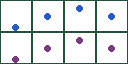
Setup the sprite region to look like this:
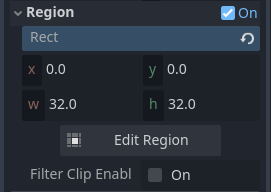
To navigate the sprite sheet columns, you adjust the region_rect.position.x. The rows are traversed with region_rect.position.y. Use multiples of the width and height when changing the position value.
# Ball
extends Sprite2D

#region docs
## Demonstrates navigating through a sprite sheet using the region functionality
#endregion docs

@onready var ball: Sprite2D = $"."


## Width of an image in the sprite sheet
var frame_x: int = 32
## Height of an image in the sprite sheet
var frame_y: int = 32
## Number of columns in the sprite sheet
var h_frames: int = 4

func _ready() -> void:
	var frame_pause = func() -> Signal:
		return get_tree().create_timer(0.25).timeout

	var not_done := true
	var counter: int = 0
	var loop_limit: int = 4

	while not_done:
		## Navigate through the columns
		for i in h_frames:
			await frame_pause.call()
			ball.region_rect.position.x = (frame_x * i)


		## Switch back to the first frame
		await frame_pause.call()
		ball.region_rect.position.x = 0

		## Flip back and forth through the rows
		if region_rect.position.y == 0.0:
			region_rect.position.y = frame_y
		else:
			region_rect.position.y = 0.0

		counter += 1
		if counter > loop_limit: not_done = false