Godot Version
4.5.1
Question
How can I get my multiple tilemaplayers to sort of “combine” so my enemy using a navigationagent2d can move properly instead of making paths that go through walls and trying to follow them
I’ve tried things like this:
extends TileMapLayer

var _obstacles: Array[TileMapLayer] = []

func _ready() -> void:
	_get_obstacle_layers()

func _get_obstacle_layers():
	# make sure the name here is the same as the group's
	var layers = get_tree().get_nodes_in_group("Obstacles")

	for layer in layers:
		if layer is not TileMapLayer: continue
		_obstacles.append(layer)

func _use_tile_data_runtime_update(coords: Vector2i) -> bool:
	return _is_used_by_obstacle(coords)

func _is_used_by_obstacle(coords: Vector2i) -> bool:
	for layer in _obstacles:
		if coords in layer.get_used_cells():
			var is_obstacle = layer.get_cell_tile_data(coords).get_collision_polygons_count(0) > 0
			if is_obstacle:
				return true
	return false

func _tile_data_runtime_update(coords: Vector2i, tile_data: TileData) -> void:
	if not _is_used_by_obstacle(coords):
		tile_data.set_navigation_polygon(0, null)
but it doesnt work I dont even get an error
i’ve tried following Pathfinding Guide for 2D Top-View Tiles in Godot 4.3 - casraf.dev but it doesnt seem to work in godot 4.5 or atleast I couldnt get it to.
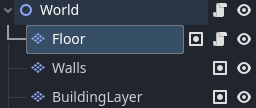
My Scene looks a little like this, this is the tilemaplayers I need to “combine” or make pathbindable
Also the player can build on a grid (so they can place tiles on the BuildingLayer tilemaplayer node, so I need the Floor layer to update and remove tiles/add tiles in realtime to respond to that
thanks in advance for the help!
1 Like
Godot Version
4.6.1
Sorry for editing so much, it’s my first time here. I don’t understand much English, I used Google Translate so there may be errors.
I managed to do it this way, using AI and some manual corrections. There might be easier ways to do it, but this one at least works.
extends CharacterBody2D
class_name PlayerWithAStarClickToMove

@export var ground_layer: TileMapLayer
@export var obstacle_layer: TileMapLayer
@export var speed: float = 130.0
@export var allow_diagonals: bool = false

@onready var path_line: Line2D = $"../PathLine"

const TILE_SIZE: int = 16
const CENTER_OFFSET: Vector2 = Vector2(8, 8)

var astar_grid: AStarGrid2D = null

var current_path: PackedVector2Array = []
var path_index: int = 0


func _ready() -> void:
	if not ground_layer or not obstacle_layer:
		push_error("Player: Defina ground_layer e obstacle_layer no Inspector!")
		return

	update_astar_grid()
	snap_to_center()


func update_astar_grid() -> void:
	if not ground_layer or not ground_layer.tile_set:
		push_error("Player: ground_layer inválido!")
		return

	astar_grid = AStarGrid2D.new()

	var map_rect: Rect2i = ground_layer.get_used_rect()
	astar_grid.region = map_rect
	astar_grid.cell_size = Vector2(TILE_SIZE, TILE_SIZE)
	astar_grid.offset = CENTER_OFFSET

	astar_grid.default_compute_heuristic = AStarGrid2D.HEURISTIC_MANHATTAN
	astar_grid.default_estimate_heuristic = AStarGrid2D.HEURISTIC_MANHATTAN

	astar_grid.diagonal_mode = (
		AStarGrid2D.DIAGONAL_MODE_ONLY_IF_NO_OBSTACLES
		if allow_diagonals
		else AStarGrid2D.DIAGONAL_MODE_NEVER
	)

	astar_grid.update()

	for x in range(map_rect.position.x, map_rect.end.x):
		for y in range(map_rect.position.y, map_rect.end.y):
			var cell := Vector2i(x, y)
			if not _is_cell_walkable(cell):
				astar_grid.set_point_solid(cell)

	print("A* Grid atualizado | Região: ", map_rect, " | Diagonais: ", allow_diagonals)


func _is_cell_walkable(cell: Vector2i) -> bool:
	var ground_data: TileData = ground_layer.get_cell_tile_data(cell)
	if ground_data == null:
		return false

	var obstacle_data: TileData = obstacle_layer.get_cell_tile_data(cell)
	if obstacle_data != null and obstacle_data.get_collision_polygons_count(0) > 0:
		return false

	return true


func _input(event: InputEvent) -> void:
	if event is InputEventMouseButton:
		if event.button_index == MOUSE_BUTTON_LEFT and event.pressed:
			var click_global = get_global_mouse_position()
			move_to_position(click_global)


func move_to_position(target_global: Vector2) -> void:
	if not astar_grid:
		return

	var start_cell := ground_layer.local_to_map(ground_layer.to_local(global_position))
	var target_cell := ground_layer.local_to_map(ground_layer.to_local(target_global))

	if not astar_grid.is_in_boundsv(start_cell) or not astar_grid.is_in_boundsv(target_cell):
		path_line.clear_points()
		return

	if astar_grid.is_point_solid(target_cell):
		path_line.clear_points()
		return

	var local_path := astar_grid.get_point_path(start_cell, target_cell)

	current_path.clear()
	for local_pos in local_path:
		var global_pos = ground_layer.to_global(local_pos)
		current_path.append(global_pos)

	path_index = 1
	update_path_visual()


func update_path_visual() -> void:
	if path_line == null:
		return

	path_line.clear_points()

	if current_path.is_empty():
		return

	for point in current_path:
		path_line.add_point(point)


func snap_to_center() -> void:
	var current_cell = ground_layer.local_to_map(ground_layer.to_local(global_position))
	var center_local = ground_layer.map_to_local(current_cell) + CENTER_OFFSET
	global_position = ground_layer.to_global(center_local)


func _physics_process(delta: float) -> void:
	if current_path.is_empty() or path_index >= current_path.size():
		velocity = Vector2.ZERO
		update_path_visual()
		return

	var target_point = current_path[path_index]
	var direction = (target_point - global_position).normalized()

	velocity = direction * speed

	move_and_slide()

	var distance_to_target = global_position.distance_to(target_point)
	if distance_to_target < 4.0:
		path_index += 1
		update_path_visual()

		if path_index >= current_path.size():
			current_path.clear()
			velocity = Vector2.ZERO
			path_line.clear_points()

	if path_index >= current_path.size():
		current_path.clear()
		velocity = Vector2.ZERO
		if not current_path.is_empty():
			global_position = current_path[-1]
		if path_line:
			path_line.clear_points()
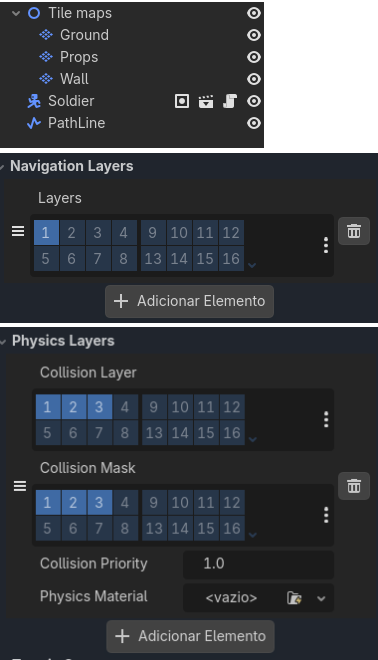
This is how my nodes are organized
Ground = Navigation layers
Wall = Physics Layers