Need a Helpful Rubber Duck and Maybe a Map

Godot Version

4.7.1, Arch Linux

Question

What the mechanic is:

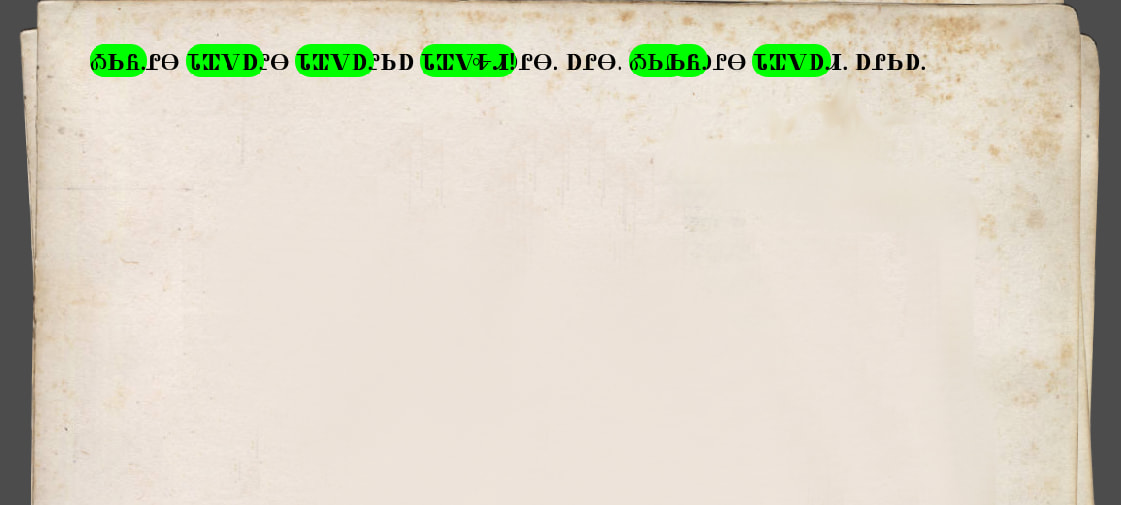
The player opens up a note of unknown origin and unknown language. The player collects clues and words. As they do so, the words on these notes “light up” and become buttons which they can click on in order to view the translation independent of any inflection or other grammatical changes.

What I have so far:

I have a dictionary of words for translating, which gives each word a unique id that can be accessed from anywhere. Each word has the base form and translation and the part of speech.

What I want it to look like:

I would like the learned words to show up as buttons (or something similar), the text being the word or phrase, background color-coded to the part of speech, and popping up with a thing that gives the base form and translation.

What I’ve tried:

RichTextLabel [url] tag. Gives me the meta options to pop a tooltip, but it doesn’t change the background of the word if the player has discovered it.

Custom RichTextEffect. Can’t figure out how to access existing RichTextEffects like [url] and [bgcolor].

Custom Button node. Looks and functions like I want it to, but can’t figure out how to assign the words of the notes to the buttons in an efficient and performance-friendly manner. There are dozens of these notes with hundreds of words.

Ideas or examples would be welcome.

Thank you :slight_smile:

You can use a TextParagraph to shape the text and use TextParagraph.add_object() to add the buttons you need in-between the text.

Example:

extends Control

var buttons: Dictionary[String, Button]
var paragraph = TextParagraph.new()


func _ready() -> void:
	var font = ThemeDB.fallback_font
	var font_size = ThemeDB.fallback_font_size

	paragraph.add_string("Hello world, if you click ", font, font_size)
	var btn1 = _create_button("this button")
	btn1.pressed.connect(func(): size.x = 1000)
	add_child(btn1)
	buttons.set("btn1", btn1)
	paragraph.add_object("btn1", btn1.size)
	paragraph.add_string(" something will happen. If you click ", font, font_size)
	var btn2 = _create_button("this other button")
	btn2.pressed.connect(func(): size.x = 500)
	add_child(btn2)
	buttons.set("btn2", btn2)
	paragraph.add_object("btn2", btn2.size)
	paragraph.add_string(" something else will happen", font, font_size)


func _draw() -> void:
	paragraph.width = size.x
	paragraph.draw(get_canvas_item(), Vector2.ZERO)

	for idx in paragraph.get_line_count():
		for obj_key in paragraph.get_line_objects(idx):
			var rect = paragraph.get_line_object_rect(idx, obj_key)
			buttons.get(obj_key).position = rect.position


func _create_button(text: String) -> Button:
	var btn = Button.new()
	btn.text = text
	return btn

Okay, I see where you’re going.

So, what I’ve done is I have an UnknownNote resource, and it is just a collection of NoteContent resources (for doing multiple paragraphs). Each NoteContent has the regular paragraph text. Then it has an array of the individual words (including punctuation) which then link to their big word dictionary IDs.

So now, I get the UnknownNote resource and iterate over the individual NoteContent resources. I create a new TextParagraph and get the individual words of the note. Then I compare them against the dictionary with the ids. If the dictionary has a word, it gets turned into a button. If not, it’s just added as regular text. Or that’s the idea.

var note: UnknownNote
var buttons: Dictionary[String, Button]
var paragraph: TextParagraph

func _ready() -> void:
	var font = ThemeDB.fallback_font
	var font_size = ThemeDB.fallback_font_size
	
	get_note()
	for content in note.content:
		paragraph = TextParagraph.new()
		var change = content.paragraph.split(" ", false)
		for c in change:
			if content.ids.has(c):
				var click = _create_button(str(c))
				add_child(click)
				buttons.set(str("click" + str(click.get_index())), click)
				paragraph.add_object("click", click.size)
			else:
				paragraph.add_string(str(c) + " ", font, font_size)
	

EDIT: I am dumb. I forgot to change

paragraph.add_object("click", click.size)

over to

paragraph.add_object(str("click" + str(click.get_index())), click.size)

Anyway, it works now.

Formatting is going to be fun, but I think that’s just going to be playing around and tweaking things.

YOU CAN IGNORE EVERYTHING BELOW, BUT LEAVING FOR POSTERITY

I am getting an error when it tries to create the buttons:

Invalid assignment of property or key 'position' with value of type 'Vector2' on a base object of type 'Nil'.

I did not change anything in the _draw function, but it is very unhappy with that last line.

func _draw() -> void:
	paragraph.width = size.x
	paragraph.draw(get_canvas_item(), Vector2.ZERO, Color.BLACK)

	for idx in paragraph.get_line_count():
		for obj_key in paragraph.get_line_objects(idx):
			var rect = paragraph.get_line_object_rect(idx, obj_key)
			buttons.get(obj_key).position = rect.position

And here is a printout of the buttons dictionary:

{ "click0": @Button@3:<Button#112810002314>, "click1": @Button@4:<Button#113044883337>, "click2": @Button@5:<Button#113128769428>, "click3": @Button@6:<Button#113212655511>, "click4": @Button@7:<Button#113296541594>, "click5": @Button@8:<Button#113380427677>, "click6": @Button@9:<Button#113464313760>, "click7": @Button@10:<Button#113548199843>, "click8": @Button@11:<Button#113632085926> }

Do you happen to have any recommendations on formatting? This is a tiny note and it’s already a bit out of control.