Need help setting up godot for c++

Godot Version

4.5.1.stable

Question

i've been trying this for hours and i can't set up godot for c++

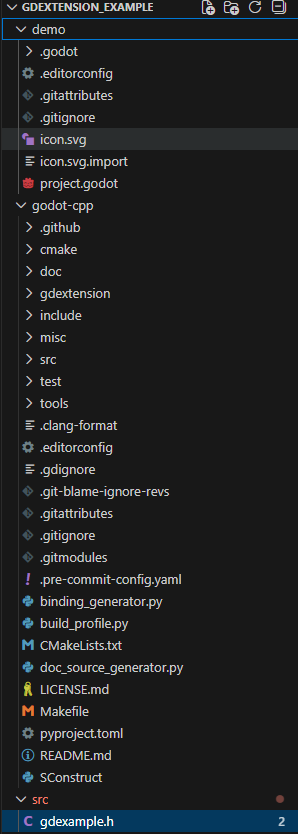
i’ve installed the godot-cpp extension and created the directory as instructed in the getting started section of the godot docs

however when i create the gdexample.h file it gives me this error
Screenshot 2025-12-11 162036

this is the folder


where am i supposed to find this class?

You need to build the bindings as described in this section:

3 Likes

it gives me this error

gdextension_example\godot-cpp>godot --dump-extension-api
‘godot’ is not recognized as an internal or external command,
operable program or batch file.

You need to use the exact path to godot executable or add that path to your system path evironment variable.

1 Like

does it have to be the full engine code or is the one you get from the website enough?
because i copied the path to the one i got from the website and it still gives me the same error

It’s a standard command line program execution. You need to specify the complete absolute or relative path to the executable, including the filename of the executable. The executable is the file you double-click on when you start the engine, e.g:

C:\godot\Godot_v4.5-stable_win64.exe

ok, it worked but now when i bulild the scons it fails, i specified the path to the new extension_api but when i start the program it gives this error


:sob:

Take care to do every step exactly as described in the tutorial. Use the same folder structure and names as described there. Watch out not to miss any steps.

Make sure you understand the basics of command line interface; specifically the concept of working directory, how absolute/relative paths works, how to navigate the directory tree and invoke programs. Otherwise using command line tools like scons will be very hard and frustrating.

i redid the whole thing from scratch, i used the exact same folders files and structures.
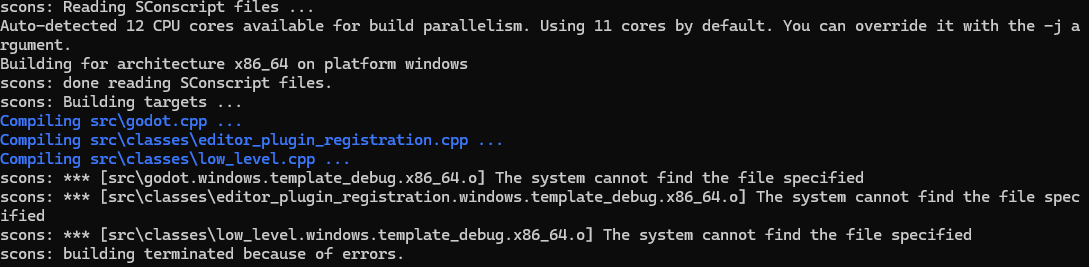
i haven’t even added the other folders to avoid breaking stuff, specified the platform type i was using and yet the scons build still breaks


it seams like now it is having trouble finding the windows related stuff

are you running the scons command from cmd.exe or from vscode?

It seems that you need to run it through vscode to get windows microsoft c++ to compile unless you are using a c++ compiler outside of vscode?

still gives the same problem

in what file path are you running the scons command

godot-cpp

Needs to be the top directory for your extension. If you followed the tutorial that’s gdextension_cpp_example.

is the command you are running

scons platform=windows generate_binding=yes target=template_debug

no it’s
scons platform=windows custom_api_file=C\filepath\gdextension_cpp_example\extension_api.json

should i just replace the extension_api.json there with the one generated by godot?

you have mscv installed in vscode?

no, i don’t

so how do you normally compile c++ code?