Newbies trying to make Buttons work for level scene

Godot Version

4.6.1

Question

Hello everyone! I am new to Godot and Programming and after failing and realizing I can’t make the game I wanted and looked online advice and stuff, I started by doing small game project and so on.

right now I am on my first game, a 2d platformer, it been around a week and it been pretty much a learning experience, but since a few a days ago I have been stuck on a problem I can’t seem to find a solution after tackling it down and failing a couple of time,

my problem is that right now I am trying to make a 2nd level, which made me realize that I need to make my TileMapLayers into scene and add them when needed which wasn’t the hard part I even added a new game menu that launch the first level just fine, and I did for the 2nd do(doesn’t work any longer). but it wasn’t meant to be, because my try again button that I am using to restart the game, literally restart the game but it need to restart the “level”, one of my attempt was to level_1.queue_free() ← direct path to my level 1 scene and re-add it again as a child node to my Main/Game node but it doesn’t work, I tried added arguments to my button function since my Main Script is Autoload so that I could use them later on, on my level_1 script to make my main script lighter and easier to read, I was able to make the next level button work… except it started my game on level 2 despite never pressing it.

for now I am giving up trying to use a global script for other level script to make it work I am just trying to make it work basic, so I tried:
get_node(“/root/Game/Level1”).queue_free()
get_tree().paused = false
await get_tree().create_timer(0.1).timeout
get_tree().current_scene.add_child(level_1)

Edit: I only added the “await” here because it tried to add the level_1 first before freeing it, which confuse me since from my understanding GDScript read from top to bottom so it should have deleted the level node first but I keep getting error that it can’t since level_1 is already a child of Game(my main node) which force me to add this but it still doesn’t work and create a weird time lag.

it crash the game without error now, I check online and so on for day trying to find a solution on how to make it work but all the “level” method feel like won’t work on button, unless I am dumb and don’t know how to make it work for me, which I don’t doubt is kinda true.

so now I am asking for guidance, I am thinking maybe creating a new function to free the level_1 node and add it to my button when I press it and adding the level as a child again, or I am doing a wrong approach about it?
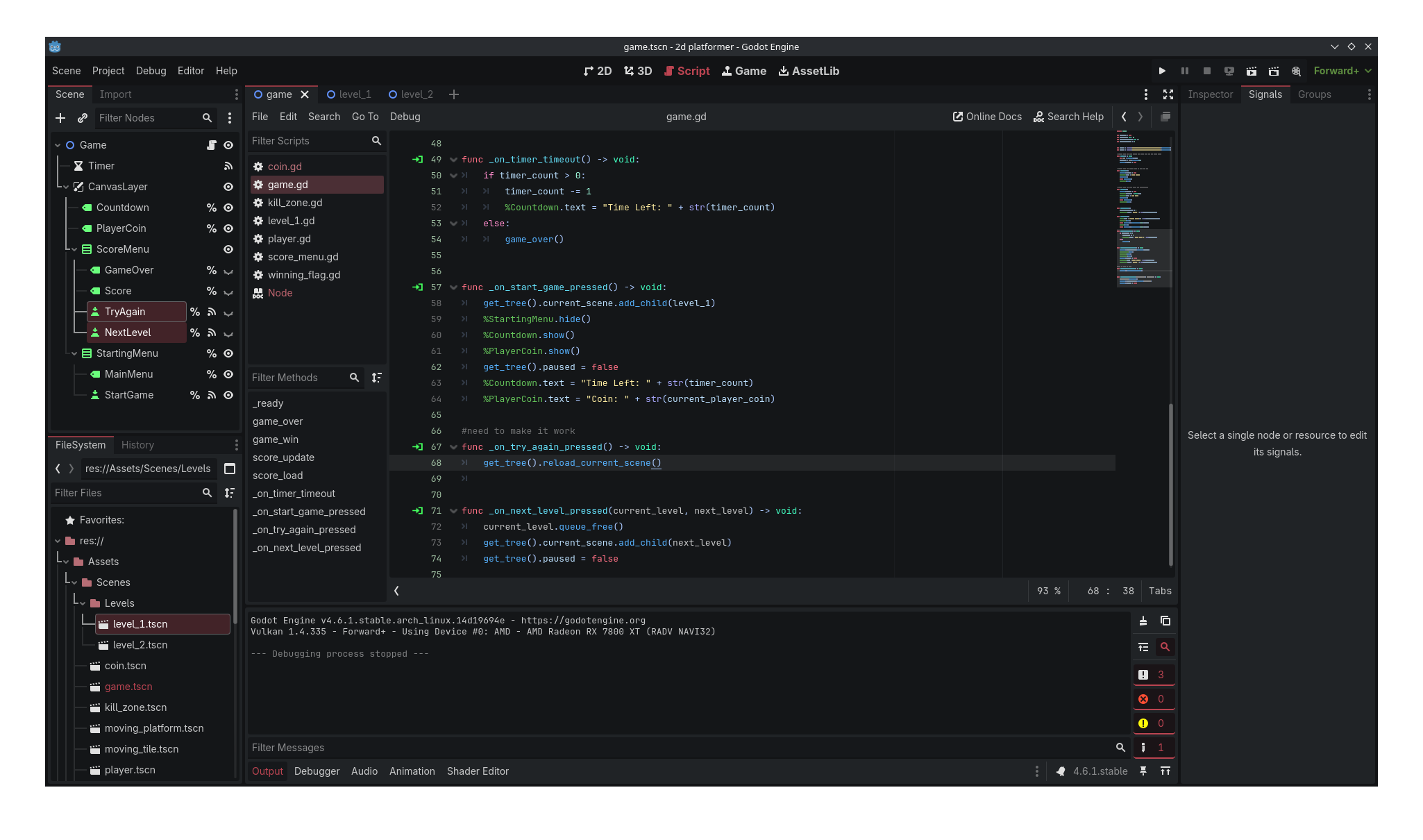
If you only want to reload your current level, use get_tree().reload_current_scene() instead of removing and re-adding the level to your scene tree.

1 Like

wait it a thing? I swear I thought of it and type reload after get_tree(). and got nothing… anyway thanks man! that big help! will remember forever and ever now!

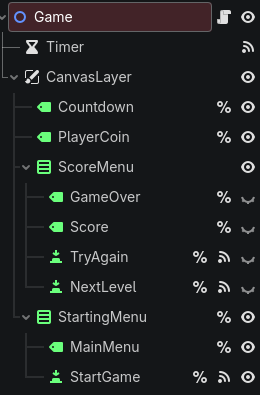
I know why I didn’t use it, my try again button is in my main tree which reload my main tree… I guess I really need to remake my whole scenes… all over again… and make the button part of my level scene…

here a screenshot of my main tree and a little bit of my script I am trying to make work, should I also sent what it look like in remote? or what it look like in the 2D section?

This should work, so why doesn’t it work? What happens? How does it fail?

Your screen shot is too small for me to read. Please format your code by doing the following:

```gd
#Code here
```

So it looks like this:

```gd
#Code here
```

func _on_try_again_pressed() → void:
level_1.queue_free()
get_tree().paused = false
await get_tree().create_timer(0.1).timeout
get_tree().current_scene.add_child(level_1)
timer_count = 99
%Score.hide()
%GameOver.hide()
%TryAgain.hide()

that my code, for why it doesn’t work I don’t know, I know it remove the level that for sure but when it try to re-add it, the game window just close without any error, like it was a function to close the game which is weird.

func _on_next_level_pressed(current_level, next_level) -> void:
	current_level.queue_free()
	get_tree().current_scene.add_child(next_level)
	get_tree().paused = false

here my next level button signal, for this one I am trying to access it on my level_x script to well change level will removing the current one, but I wasn’t able to figure out how to call it in another script and use it.

extends Node2D

var main_scene = null
var timer_count: int = 99
var current_player_coin: int = 0
var total_player_coin := 0

var level_1 = preload(“res://Assets/Scenes/Levels/level_1.tscn”).instantiate()
var level_2 = preload(“res://Assets/Scenes/Levels/level_2.tscn”).instantiate()

#Called when the node enters the scene tree for the first time.

func _ready() → void:
var root = get_tree().root
main_scene = root.get_child(-1)
get_tree().paused = true

#Called when the player fall or time run out

func game_over():
get_tree().paused = true
%GameOver.text = “GAME OVER!”
score_load()
await score_load()
%TryAgain.show()

#Called when the play reach the Winning_Flag

func game_win():
get_tree().paused = true
%GameOver.modulate = Color.BLUE
%GameOver.text = “You Win!”
score_load()
await score_load()
%NextLevel.show()

#called by other script such a level_1 script to update the coin/score label

func score_update():
current_player_coin += 1
%PlayerCoin.text = "Coin: " + str(current_player_coin)

# Used by other function to show the the end level screen for
# other function such as game_over and game_win

func score_load():
%Score.text = “You’re Score!\n” + str(current_player_coin)
%GameOver.show()
await get_tree().create_timer(0.5).timeout
%Score.show()
await get_tree().create_timer(0.5).timeout

# the timer for the player before a game_over

func _on_timer_timeout() → void:
if timer_count > 0:
timer_count -= 1
%Countdown.text = "Time Left: " + str(timer_count)
else:
game_over()

# Main menu to start the game and loading level_1

func _on_start_game_pressed() → void:
get_tree().current_scene.add_child(level_1)
%StartingMenu.hide()
%Countdown.show()
%PlayerCoin.show()
get_tree().paused = false
%Countdown.text = "Time Left: " + str(timer_count)
%PlayerCoin.text = "Coin: " + str(current_player_coin)

# need to make it work, try to reload the current level scene not main scene
# since the level is added later on. should I just remove it
# from the main tree and add it each time to each level script?
func _on_try_again_pressed() → void:
level_1.queue_free()
get_tree().paused = false
await get_tree().create_timer(0.1).timeout
get_tree().current_scene.add_child(level_1)
timer_count = 99
%Score.hide()
%GameOver.hide()
%TryAgain.hide()

#same as above but for changing level instead of reloading it
func _on_next_level_pressed(current_level, next_level) → void:
current_level.queue_free()
get_tree().current_scene.add_child(next_level)
get_tree().paused = false

I also include my Autoload/Main script fully in case it may be useful

Well that’s what I was asking. How does it fail.

So try this instead. Add the new level, then queue_free() the old one.

it my try again that cause the fail

func _on_try_again_pressed() → void:
level_1.queue_free()
get_tree().paused = false
await get_tree().create_timer(0.1).timeout
get_tree().current_scene.add_child(level_1)
timer_count = 99
%Score.hide()
%GameOver.hide()
%TryAgain.hide()

this one doing the reverse would indeed stop the game from crashing(?) but level_1 won’t be in the scene anymore.

another problem with :

func _on_next_level_pressed(current_level, next_level) → void:
current_level.queue_free()
get_tree().current_scene.add_child(next_level)
get_tree().paused = false

is that I don’t know how to use it in another script like in level_1 script which would use it to make it clear it level_1/current_level and that then next level is level_2/next_level and so on and so on.

trying to clarify my problem a little more, I am trying to make 2 buttons from my main scene act as a reload level “_on_try_again_pressed” and one for going to the next level “on_next_level_pressed” so I don’t have to re-add the buttons and reuse the code/function(since they are global) in other script.

here a picture of my Main tree.

extends Node2D

func _ready() → void:
$AnimationPlayer.play(“HMoveTile”)
Global._on_next_level_pressed(Global.main_scene.level_1, Global.main_scene.level_2)

func _on_coin_body_entered(body: Node2D) → void:
if body.name == “Player”:
Global.main_scene.score_update()

here my level_1 script for example but doing this, doesn’t work obviously since, when I press start game I will instead start in level_2 which is not what I want, I tried using if statement but that doesn’t work either or at least I fail to use them correctly.

sorry if I am not clear enough I really struggle to put my thought into words. Sorry for the trouble and I really appreciate the help!

Ok, so first of all, your code has no indentation in it. Make sure that’s getting copied over.

Second, let’s get level loading working before we try to make it global.

Now let’s talk about your code. If you’re going to preload something, make it a constant. Then instantiate it when you need it. Your main problem is that referring to level_1 always refers to the same object. Your game is crashing because you’re trying to load in a nonexistent object, because you destroyed it.

Normally, I would just rewrite your whole file, but since you didn’t include any tabs, I’m only going to do pieces so you can copy and paste them in.

const LEVEL_1 = preload(“res://Assets/Scenes/Levels/level_1.tscn”)

var level_1

@onready var starting_menu: Control = %StartingMenu


# Main menu to start the game and loading level_1
func _on_start_game_pressed() → void:
	level_1 = LEVEL_1.instantiate()
	get_tree().current_scene.add_child(level_1)
	starting_menu.hide()
	%Countdown.show()
	%PlayerCoin.show()
	get_tree().paused = false
	%Countdown.text = "Time Left: " + str(timer_count)
	%PlayerCoin.text = "Coin: " + str(current_player_coin)

# need to make it work, try to reload the current level scene not main scene
# since the level is added later on. should I just remove it
# from the main tree and add it each time to each level script?
func _on_try_again_pressed() → void:
	level_1.queue_free()
	get_tree().paused = false
	await get_tree().create_timer(0.1).timeout
	level_1 = LEVEL_1.instantiate()
	get_tree().current_scene.add_child(level_1)
	timer_count = 99
	%Score.hide()
	%GameOver.hide()
	%TryAgain.hide()

See if that solves your problem. I also showed you an example of using @onready variables to reference nodes. It’ll make your code cleaner and easier to read, and if you need to change the path or name of a Node, you only have to change the reference in one place.

As for making it work globally, I recommend you change the loading of the scenes to @export variables.

@export var current_scene: PackedScene
@export var next_scene: PackedScene

Then instantiate them before you delete the current level.

1 Like

the try again function work well and thank for the tip on the preload/const, I always have trouble understanding it I feel like every time I read about it just make me confuse more about it.

as for the next level and global using @export I am genuinely confuse how I would use that? I know that export would make it show in the inspector but how I would be able to use it that a mystery to me.

I was somehow able to make the next level work, but if I die the game crash since try again only work for level 1.

extends Node2D

var main_scene = null
var timer_count: int = 99
var current_player_coin: int = 0
var total_player_coin := 0
@export var current_scene: PackedScene
@export var next_scene: PackedScene

const LEVEL_1 = preload("res://Assets/Scenes/Levels/level_1.tscn")
const LEVEL_2 = preload("res://Assets/Scenes/Levels/level_2.tscn")
var level_1
var level_2
@onready var starting_menu: Control = %StartingMenu

# Called when the node enters the scene tree for the first time.
func _ready() -> void:
	var root = get_tree().root
	main_scene = root.get_child(-1)
	get_tree().paused = true
	

# Called when the player fall or time run out
func game_over():
	get_tree().paused = true
	%GameOver.text = "GAME OVER!"
	score_load()
	await score_load()
	%TryAgain.show()
	
	
# Called when the play reach the Winning_Flag
func game_win():
	get_tree().paused = true
	%GameOver.modulate = Color.BLUE
	%GameOver.text = "You Win!"
	score_load()
	await score_load()
	%NextLevel.show()
	
#called by other script such a level_1 script to update the coin/score label
func score_update():
	current_player_coin += 1
	%PlayerCoin.text = "Coin: " + str(current_player_coin)

# Used by other function to show the the end level screen for
# other function such as game_over and game_win
func score_load():
	%Score.text = "You're Score!\n" + str(current_player_coin)
	%GameOver.show()
	await get_tree().create_timer(0.5).timeout
	%Score.show()
	await get_tree().create_timer(0.5).timeout

# the timer for the player before a game_over
func _on_timer_timeout() -> void:
	if timer_count > 0:
		timer_count -= 1
		%Countdown.text = "Time Left: " + str(timer_count)
	else:
		game_over()

# Main menu to start the game and loading level_1
func _on_start_game_pressed() -> void:
	level_1 = LEVEL_1.instantiate()
	get_tree().current_scene.add_child(level_1)
	starting_menu.hide()
	%Countdown.show()
	%PlayerCoin.show()
	get_tree().paused = false
	%Countdown.text = "Time Left: " + str(timer_count)
	%PlayerCoin.text = "Coin: " + str(current_player_coin)

# need to make it work, try to reload the current level scene not main scene
# since the level is added later on. should I just remove it
# from the main tree and add it each time to each level script?
func _on_try_again_pressed() -> void:
	level_1.queue_free()
	get_tree().paused = false
	await get_tree().create_timer(0.1).timeout
	level_1 = LEVEL_1.instantiate()
	get_tree().current_scene.add_child(level_1)
	timer_count = 99
	%Countdown.text = "Time Left: " + str(timer_count)
	current_player_coin = 0
	%PlayerCoin.text = "Coin: " + str(current_player_coin)
	%Score.hide()
	%GameOver.hide()
	%TryAgain.hide()

#same as above but for changing level instead of reloading it
func _on_next_level_pressed() -> void:
	level_2 = LEVEL_2.instantiate()
	get_tree().current_scene.add_child(level_2)
	get_tree().current_scene.level_1.queue_free()
	get_tree().paused = false
	timer_count = 99
	%Countdown.text = "Time Left: " + str(timer_count)
	current_player_coin = 0
	%PlayerCoin.text = "Coin: " + str(current_player_coin)
	%Score.hide()
	%GameOver.hide()
	%NextLevel.hide()

here my code with the indentation didn’t notice it wasn’t there before my bad. while the @export isn’t there I tried to play with it before just settling with the current function for the next level until I understand a bit more before choosing for a direction with it and seeing if it work.

honestly right now I am trying more to understand how making level scene work in a whole game like a 2d platformer with button, I may add like 5 level total or more and test a few thing and move on to make another game, I learn quite a few thing making this game but I just can’t leave this game while being stuck on this problem because I feel like I would stumble upon it once more later on.

If you just want to learn how to load different levels, take a look at my Game Template Plugin. Specifically the example_2d folder. Take a look at how it’s constructed and let me know if you have questions.

1 Like

I look into it and all I can say is it look well structured but honestly I just don’t understand, it feel more aimed at people who have at least some experience not aimed at beginner like me, if that what it take to make my button work for loading new level and all that I may just as well give the up the idea to removing and adding the level to the tree and just have them there from the start and start from there. I do appropriate the advice to look at it, it did give me the idea to just ditch the add/remove from tree idea, though I hate that I have to settle for that.

I will try to break down possible solution into multiple steps so you can follow along.

1.Make a new scene (select base node) attach a script to it and save the scene.

2.Click project, project settings, Globals. in it you will find a folder icon click it and select the newly created scene’s tscn file.

3.Then enter “Global“ in node name option beside the folder icon, then click “+ Add“ button. Also click the enable option below it.

4.Open the new scene’s script and press ctrl then click and drag both levels tscn file to script from file system. The code should look something like this :

extends Node

const Level_1 = preload("uid://bavr11yfxpybo")
const Level_2 = preload("uid://3xn84iprc4rb")

5.Move all the canvas layer in the game scene and its children nodes to the new scene and add them as child.

6.In your game script remove extra code you made for loading level. When you want to change to certain level the code should look something like this :

func load_level_1() -> void:
	get_tree().change_scene_to_packed(Global.Level_1)
func load_level_2() -> void:
	get_tree().change_scene_to_packed(Global.Level_2)
1 Like

It wasn’t meant to dissuade you. It was meant to inspire you.

Try what @g_dot suggested. My only note is that if you follow the GDScript Style Guide (which is a good practive) const names should be in CONSTANT_CASE (aka SCREAMING_SNAKE_CASE).

1 Like

@g_dot thank for the help, I knew you could Autoload scene but didn’t know how to used them, now I learn more about it.

I mostly just added my Game Script to Global scene with a few tweak on the button now it work wonder for what I wanted, now I just need to refine them a little to accommodate more level for my next level button and refine my try again button too.

@dragonforge-dev I really appreciate trying to inspire with code honestly it look really good(not that understood much of it) and did make me wonder and hoping to one day write my game too look as good as that one day. nothing against you really , I was just really depress about coding and all since I have been stuck on it for days on it.

extends Node

const LEVEL_1 = preload("uid://bn5ygk0l8gcud")
const LEVEL_2 = preload("uid://do4sosbejamg6")

@onready var starting_menu: VBoxContainer = %StartingMenu
@onready var player_coin_label: Label = %PlayerCoin
@onready var countdown_label: Label = %Countdown
@onready var game_over_label: Label = %GameOver
@onready var score_label: Label = %Score
@onready var try_again_button: Button = %TryAgain
@onready var next_level_button: Button = %NextLevel

var timer_count: int = 99
var current_player_coin: int = 0
var total_player_coin := 0


# Called when the player fall or time run out
func game_over():
	get_tree().paused = true
	game_over_label.text = "GAME OVER!"
	score_load()
	await score_load()
	try_again_button.show()
	
	
# Called when the play reach the Winning_Flag
func game_win():
	get_tree().paused = true
	game_over_label.modulate = Color.BLUE
	game_over_label.text = "You Win!"
	score_load()
	await score_load()
	next_level_button.show()
	
#called by other script such a level_1 script to update the coin/score label
func score_update():
	current_player_coin += 1
	player_coin_label.text = "Coin: " + str(current_player_coin)

# Used by other function to show the the end level screen for
# other function such as game_over and game_win
func score_load():
	score_label.text = "You're Score!\n" + str(current_player_coin)
	game_over_label.show()
	await get_tree().create_timer(0.5).timeout
	score_label.show()
	await get_tree().create_timer(0.5).timeout

# Reset label and timer to default
func reset_label_setting():
	timer_count = 99
	countdown_label.text = "Time Left: " + str(timer_count)
	current_player_coin = 0
	player_coin_label.text = "Coin: " + str(current_player_coin)
	score_label.hide()
	game_over_label.hide()
	try_again_button.hide()
	next_level_button.hide()

# the timer for the player before a game_over
func _on_timer_timeout() -> void:
	if timer_count > 0:
		timer_count -= 1
		countdown_label.text = "Time Left: " + str(timer_count)
	else:
		game_over()

# Start the game by loading level 1 when pressing
# the StartGame button
func _on_start_game_pressed() -> void:
	Game.load_level_1()
	starting_menu.hide()
	countdown_label.show()
	player_coin_label.show()
	get_tree().paused = false
	countdown_label.text = "Time Left: " + str(timer_count)
	player_coin_label.text = "Coin: " + str(current_player_coin)

# reload current level, need to be refine
func _on_try_again_pressed() -> void:
	if get_node("/root/Level1"):
		Game.load_level_1()
		reset_label_setting()
		get_tree().paused = false
	
	if get_node("/root/Level2"):
		Game.load_level_2()
		reset_label_setting()
		get_tree().paused = false

# load next level, need to be refine
func _on_next_level_pressed() -> void:
	Game.load_level_2()
	total_player_coin += current_player_coin
	reset_label_setting()
	get_tree().paused = false

here my Global_scene script look similar to my old one on game but with a new function called reset_label_setting() since I will probably use it a lot, I am also getting an error on try again button when I use it since it can’t get either level1/2 which I will need to find a solution for it, next level button would probably follow a similar pattern when I add more than 2 level.

extends Node2D

var main_scene = null


# Called when the node enters the scene tree for the first time.
func _ready() -> void:
	var root = get_tree().root
	main_scene = root.get_child(-1)
	get_tree().paused = true

# Main menu to start the game and loading level_1
func load_level_1() -> void:
	get_tree().change_scene_to_packed(Global.LEVEL_1)
	
func load_level_2() -> void:
	get_tree().change_scene_to_packed(Global.LEVEL_2)

and here my global Game script which I will probable level_manager later on and remove the scene entirely and just keep the script global.

I share these in case someone have a similar problem to me and which to see the code I use at the end.

Finally thanks you to @dragonforge-dev @mac_deth @g_dot for the help! really, I don’t know if I sound harsh or anything but I wasn’t, I truly appreciated all your help during that drought I was going through! Thanks you again!

fast edit/update on the try again:

func _on_try_again_pressed() -> void:
		get_tree().reload_current_scene()
		reset_label_setting()
		get_tree().paused = false

just realize will scrolling the message that now I can apply @mac_deth method! clutch at the end!

1 Like

That’s a good thing. That struggle will help you learn.

1 Like