Godot Version
Godot 4.6.2 stable
Question
I’ve tested this script by adding the scene in through the editor, and it works then. Does anyone know why it might not work now? Btw, all of the variables are basically self explanitory. I didn’t include them so people wouldn’t have to look through all of that. Thanks
#in the runtime instanced scene's script
@export var fruitType : String
func _ready() -> void:
	self.owner = $".."
	add_to_group("has_harvest_signal")

	self.body_entered.connect(showPrompt)
	self.body_exited.connect(hidePrompt)

	promptButton.pressed.connect(harvest)

func harvest():
	if growthStage == "ripe":
		harvest_signal.emit(self.fruitType)

#In the thing catching the signal (usually works)
func _ready() -> void:
	InventoryButton.pressed.connect(open_close_Inventory)
	exitButton.pressed.connect(openSellUi.bind(false))
	sellButton.pressed.connect(sellItems)

	fruitTree.harvest_signal.connect(add_item)

func add_item(item: String):
	var findItem = inventoryDictionary.has(item)

	if findItem == true:
		inventoryDictionary[item] += 1
		var label = labelHolder.find_child(item)
		label.text = item + " : " + str(inventoryDictionary[item])

	elif findItem == false:
		var newLabel = BASELABEL.duplicate()
		newLabel.name = item
		labelHolder.add_child(newLabel)
		newLabel.owner = labelHolder
		inventoryDictionary.get_or_add("", item)
		inventoryDictionary[item] = 1
		newLabel.text = item + " : " + str(inventoryDictionary[item])
		newLabel.visible = true
If any code needs explaining (I forgot to add more comments, sorry) I can do that
Are you getting any errors? What are you expecting to happen and what really happens?
Yo, thanks for replying. I’m not getting any errors (I wish I was, because that would be helpful, lol). I’m expecting the signal to be fired to the second script, which is everything below the second comment. It’s apparently not catching the signal, but the script still does work up until the emitting. I’ve tested this before by printing stuff.
If you don’t get any errors then is there any chance “the thing catching the signal” is added to the scene after the harvest signal emits?
Have you confirmed how far along the code gets, using print statement or breakpoints? i.e. does harvest run? is growthStage == "ripe"?
Just tested this out quickly with this code:
func harvest():
if growthStage == “ripe”:
print(growthStage) #prints ripe
harvest_signal.emit(self.fruitType)
The print statement works. Any idea why the signal doesn’t? Thanks :()
How is your fruitTree defined? How are these objects added to the scene?
Thanks for being patient, this is probably kind of long winded
#how it’s defined
@onready var fruitTree : PackedScene = preload(“res://scenes/fruitTree.tscn”)
#how it’s added
var originalTree = fruitTree.instantiate()
var newTree = originalTree.duplicate()
parent.add_child(newTree) #parent is just the root of the scene.
The position is also set later in the script, and it shows up visually in the scene.
So a PackedScene isn’t a real tree, it’s a blueprint to create trees. When you preload such a resources the fruit tree you know doesn’t exist but using instantiate creates one. You probably do get an error, that the signal does not exist on type PackedScene. Why do you make a duplicate of originalTree if the .instantiate is already a new tree? Maybe you can share more of this script in fuller context, remember to post between three ticks for proper formatting
```gd
func _your_code_here() -> void:
   print("My code!")
```
Turns into:
func _your_code_here() -> void:
print("My code!")
2 Likes
I’m making a duplicate of originalTree because I’d like a system where I can just keep creating fruit trees (unless I’m misunderstanding the use of instantiate and it actually just creates a copy). Also thanks for formatting, I had no idea how to do that.
This is the full _ready script for the inventory that usually correctly recieves the signal. Along with references to the nodes.
@onready var InventoryButton : Button = $inventoryButton
@onready var InventoryUi : ColorRect = $inventory
@onready var labelHolder : VBoxContainer = $inventory/scroller/labelHolder
@onready var exitButton : Button = $sellbox/exitButton
@onready var sellButton : Button = $sellbox/sellButton

func _ready() -> void:
	labelHolder_children = labelHolder.get_children()
	InventoryUi.visible = false
	InventoryButton.pressed.connect(open_close_Inventory)
	exitButton.pressed.connect(openSellUi.bind(false))
	sellButton.pressed.connect(sellItems)

	parent = get_parent()
	parent.harvest_signal.connect(add_item)
	parent.openSellUi.connect(openSellUi.bind(true))
	$"../Shop".Update_money.connect(updateMoneyLabel)
I’m not sure what else would help give the full context (most of the other script stuff is purely visual and doesn’t interfere with the scripts above). Thanks
instantiate does make a copy, you do not need to duplicate the originalTree you can add it as a child and then instantiate more from fruitTree.
Your tree is a parent of the Inventory? Do you intend have this inventory script/scene for every tree?
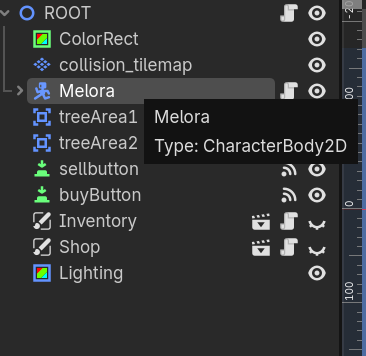
Could you share a screenshot of your scene tree?
My bad, may have explained it weirdly
The code I just posted above is inside the inventory script, so the parent is the root node. Unfortunately I’m away from my computer right now, but I’ll share my scene tree when I can. Thanks
But your root node doesn’t have a harvest_signal does it? If it does then that harvest_signal is going to be a different signal than that of your fruit trees.
Sorry for the late response. I fixed the issue you just mentioned above, and it still won’t work. Thanks though. Here’s my scene tree.
Not sure what you mean by fixed the issue, what does your code look like now? Does your script attached to ROOT have a harvet_signal?
Yep, the ROOT node has a harvest_signal now:
#in the root's script
signal harvest_signal(item : String)

func _ready() -> void:
	$Inventory.visible = true
	has_harvest_signal = get_tree().get_nodes_in_group("has_harvest_signal")
	#^ basically just a group holding all of the fruitTree scenes instanced in ROOT

	for NODE in has_harvest_signal:
		NODE.harvest_signal.connect(add_item_to_inventory) #sort of just reroutes the signals to the inventory
Tbh might be a little convoluted but I’m not great at coding lol
So that was a question because it would be an issue if your ROOT node had a harvets_signal, not that you should add one. And if you didn’t before then you certainly should have an error somewhere, can you look in your console and debugger for errors and warnings?
This code seems to explain your original issue (though not present in the original post), get_nodes_in_group is only run on _ready, so it only checks for harvestable nodes at the very start of your game, not any time after that. You may also want to check and connect when nodes are added as children of this ROOT.
# connect this singal through the editor
func _on_child_entered_tree(new_node: Node) -> void:
	if new_node.is_in_group("has_harvest_signal"):
		new_node.harvest_signal.connect(add_item_to_inventory)
Thanks for the help, this works : )
I actually didn’t get any errors, no idea why.