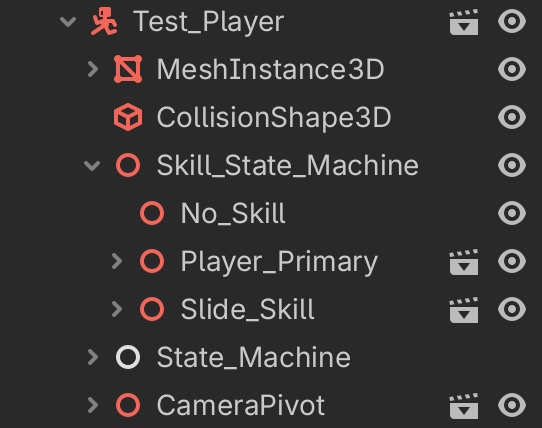
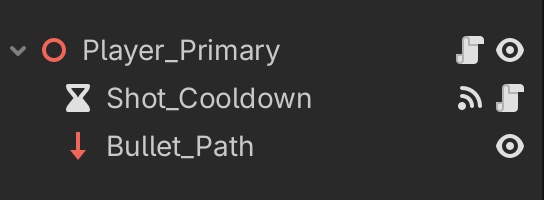
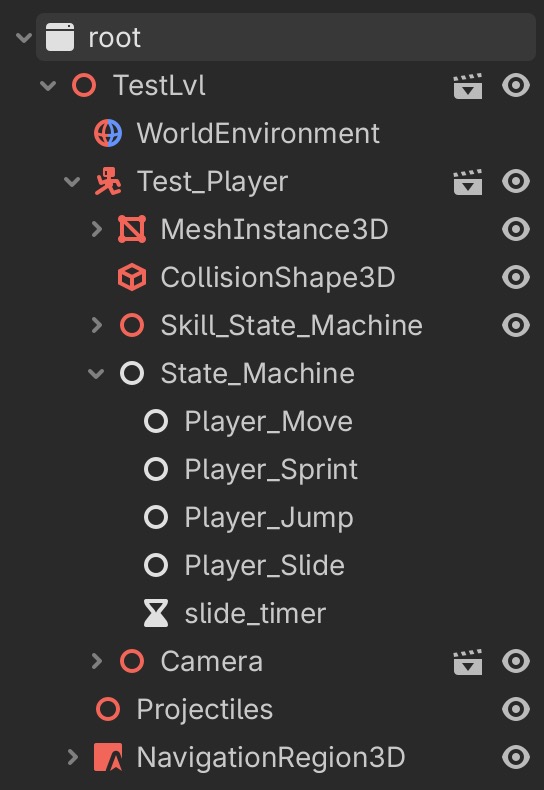
Hello, I’m having trouble with a node that controls bullet spawns moving with inputs when it shouldn’t be able to. In the video the blue path at the characters arm should be static. Video: https://imgur.com/a/JRbNTeb . All transforms are zeroed in the parent scenes. Thanks for any help let me know if any more info is needed.
Bullet Skill Code:
extends Skill_State
class_name PrimarySkill

var player:Player
var shotSpeed:float
@onready var bullet_pivot:Marker3D = $Weapon_Pivot
@export var bullet_path:RayCast3D
@onready var cooldown:Timer = $Weapon_Pivot/Shot_Cooldown
var can_shoot:bool = true
@export var sensitivity:float = 0.5
@export var bullet:PackedScene
var bullet_dir:Vector3
var bullet_object:Bullet
var camera:Camera

func _ready():
	player = get_tree().get_first_node_in_group("Player")
	camera = get_tree().get_first_node_in_group("Player_Camera")
	shotSpeed = player.stats.fireRate
	cooldown.wait_time = cooldown_times.skill1

func _input(event):
	if event is InputEventMouseMotion:
		bullet_pivot.rotation.x = -camera.camera_rotation.y

func Physics_Update(_delta:float):
	if can_shoot:
		primary_fire()
	if Input.is_action_just_released("shoot"):
		Transitioned.emit(self,"No_Skill")
	if Input.is_action_pressed("slide") and cooldown_times.skill2_usable:
		cooldown_times.skill1_usable = false
		Transitioned.emit(self,"Slide_Skill")


func primary_fire():
	create_bullet()
	begin_cooldown()

func create_bullet():
	bullet_dir = (bullet_path.to_global(bullet_path.target_position) - bullet_path.to_global(Vector3.ZERO)).normalized()
	bullet_object = bullet.instantiate().duplicate()
	get_tree().get_first_node_in_group("Projectiles").add_child(bullet_object)
	bullet_object.pass_Stats(bullet_path.global_position,bullet_dir,50,player.stats.damage)


func _on_shot_cooldown_timeout():
	can_shoot = true

func begin_cooldown():
	can_shoot = false
	cooldown.start()
Player Script:
extends Entity
class_name Player

#c@onreadymera
@onready var pivot:Node3D = $Camera@onreadyivot
@onready var model:MeshInstance3D = $MeshInsta@exportce3D
@export var Primary:Packed@exportcene
@export var Utility:Packed@onreadycene
@onready var skill_machine:Skill_State_Machine = $Skill_State_Machine

func _ready():
load_skills()

func _input(_event):
if Input.is_action_pressed(“quit”):
if Input.mouse_mode == Input.MOUSE_MODE_CAPTURED:
Input.mouse_mode = Input.MOUSE_MODE_VISIBLE
else:
Input.mouse_mode= Input.MOUSE_MODE_CAPTURED

func _physics_process(_delta):
model.rotation.x = 0

func load_skills():
var primary = Primary.instantiate()
skill_machine.add_child(primary)
var utility = Utility.instantiate()
skill_machine.add_child(utility)
That’s the thing that’s really getting me I’ll look again but unless I’m missing something i never move it. Bullet path should be static except for its rotation which is influenced by the camera. I’ll triple check my code just to be sure though.
There isn’t any movement in this script for the player or bullet I have that in a separate script for the player movement state machine and the bullet in its own script. Want me to send that over? All the script above should be doing is controlling the rotation of the bullet path and sending appropriate calls elsewhere to create the bullet.
Oh I see what you mean. So the movement for the player I have in this script here which is tied to the player move node withing the state_machine.
extends State
class_name Player_Move

func Physics_Update(delta:float):
	if(entity):
		var input_dir = Input.get_vector("move_left","move_right","move_forward","move_back")
		var direction = (entity.transform.basis * Vector3(input_dir.x, 0 ,input_dir.y)).normalized()

		entity.velocity.x = direction.x * speed * delta
		entity.velocity.z = direction.z * speed * delta

		if not entity.is_on_floor():
			entity.velocity.y = entity.velocity.y - (gravity)
		entity.move_and_slide()

		if Input.is_action_pressed("sprint") and Input.is_action_pressed("move_forward") and not Input.is_action_pressed("shoot"):
			Transitioned.emit(self,"Player_Sprint")
		if Input.is_action_pressed("jump"):
			Transitioned.emit(self,"Player_Jump")
If the raycast node is a child of the character body and is processed before move_and_slide() is called, its position sent to the physics server won’t take into account changes that are caused this frame by move_and_slide().
By swapping the nodes, you let move_and_slide() be called before raycast node is processed, so it will be properly updated.
Interesting I had no clue. Well thank you for your time I don’t think I ever would have been clued into that. I really appreciate the help you have been a godsend.