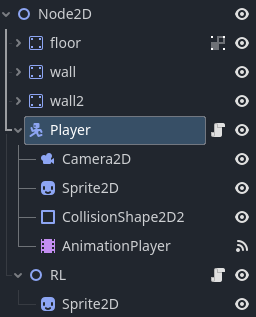
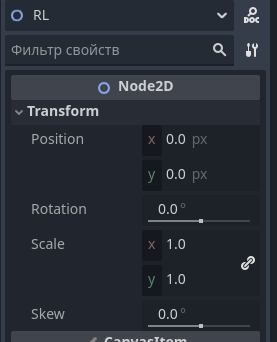
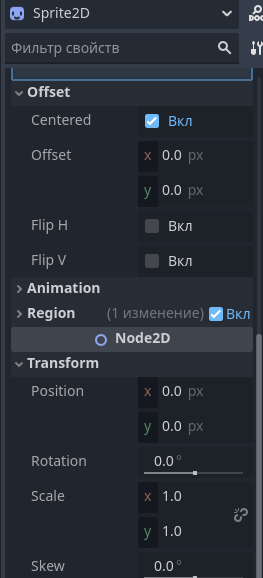
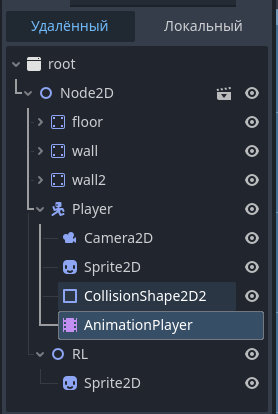
What’s the position of the sprite child in respect to RL node?
0, 0. You can see it on the screenshot
Also post all of the code in both scripts.
RL code:
extends Node2D


# Called when the node enters the scene tree for the first time.
func _ready() -> void:
	pass # Replace with function body.


func _process(delta: float) -> void:
	global_position = get_node("/root/Node2D/Player").global_position
	look_at(get_global_mouse_position())
Player code:
extends CharacterBody2D

const SPEED = 325.0
const ACCELERATION = 15.0
const JUMP_VELOCITY = -500.0
var availible_jumps = 3
var boost_direction = 1
var boosts_available = 3.0
func get_input():
if Input.is_action_pressed(“move_left”) and not Input.is_action_pressed(“move_right”):
velocity.x -= ACCELERATION
boost_direction = -1
if velocity.x < SPEED * -1:
velocity.x = SPEED * -1
if Input.is_action_pressed(“move_right”) and not Input.is_action_pressed(“move_left”):
velocity.x += ACCELERATION
boost_direction = 1
if velocity.x > SPEED:
velocity.x = SPEED
if Input.is_action_just_pressed(“slam”) and not is_on_floor() and not Input.is_action_just_pressed(“jump”):
$AnimationPlayer.play(“slam_start”)
velocity.y = 1500
velocity.x = 0
if Input.is_action_just_pressed(“boost”) and boosts_available >= 1:
velocity.x += 1000 * boost_direction
velocity.y = -100
boosts_available -= 1
if int(Input.is_action_pressed(“move_left”)) == int(Input.is_action_pressed(“move_right”)):
if is_on_floor():
velocity.x *= 0.9

func jump():
if Input.is_action_just_pressed(“jump”) and is_on_floor():
velocity.y += JUMP_VELOCITY
elif Input.is_action_just_pressed(“jump”) and is_on_wall_only() and availible_jumps > 0:
velocity.x = sign(get_wall_normal().x) * 300
velocity.y = -500
availible_jumps -= 1
if is_on_floor():
availible_jumps = 3

func _physics_process(delta: float) → void:
if not is_on_floor(): # gravity wooow
if is_on_wall_only() and velocity.y > 0:
velocity.y += get_gravity().y * delta * 0.1
else:
velocity += get_gravity() * delta
if boosts_available < 3:
boosts_available += 0.5 * delta
print(boosts_available)
get_input()
fall()
move_and_slide()

func _process(delta: float) → void:
jump()

func fall():
if position.y > 600:
position.y = -250
position.x = 250

func animation_finished(anim_name: StringName) → void:
if anim_name == “slam_start”:
$AnimationPlayer.play(“slam_stop”)
#$AnimationPlayer.stop()