Not sure how to set a region for AtlasTexture

Godot Version

4.8.beta1

Question

I’m trying to create a scene that gets instantiated multiple times, but each scene would show a different room, based on what is stored in the Global variable array (which stores just strings, but they dictate what room to populate). I added a CollisionShape as well, because I would like the player to walk around in these rooms, since they will be part of a spaceship. These rooms will eventually populate mini games, looking like one is repairing electricals, etc.

While making this scene however, I get the following error:

“Invalid access to property or key ‘texture’ on a base object of type ‘Nil’.”
My code is the following:

extends Node2D

@onready var room_sprite: Sprite2D = $Room_Sprite
var new_room: String

func place_room(room: String):
	match room:
		"storage": room_sprite.texture.set_region(Rect2(0, 0, 200, 50))
		"water_storage": room_sprite.texture.set_region(Rect2(0, 50, 200, 50))
		"hydroponics": room_sprite.texture.set_region(Rect2(0, 100, 200, 50))
		"miner": room_sprite.texture.set_region(Rect2(0, 150, 200, 50))
		"hydrolysis": room_sprite.texture.set_region(Rect2(0, 200, 200, 50))
		"fuel_cell": room_sprite.texture.set_region(Rect2(0, 250, 200, 50))
		"smelter": room_sprite.texture.set_region(Rect2(0, 300, 200, 50))

Screenshot below shows how I have the scene set up:
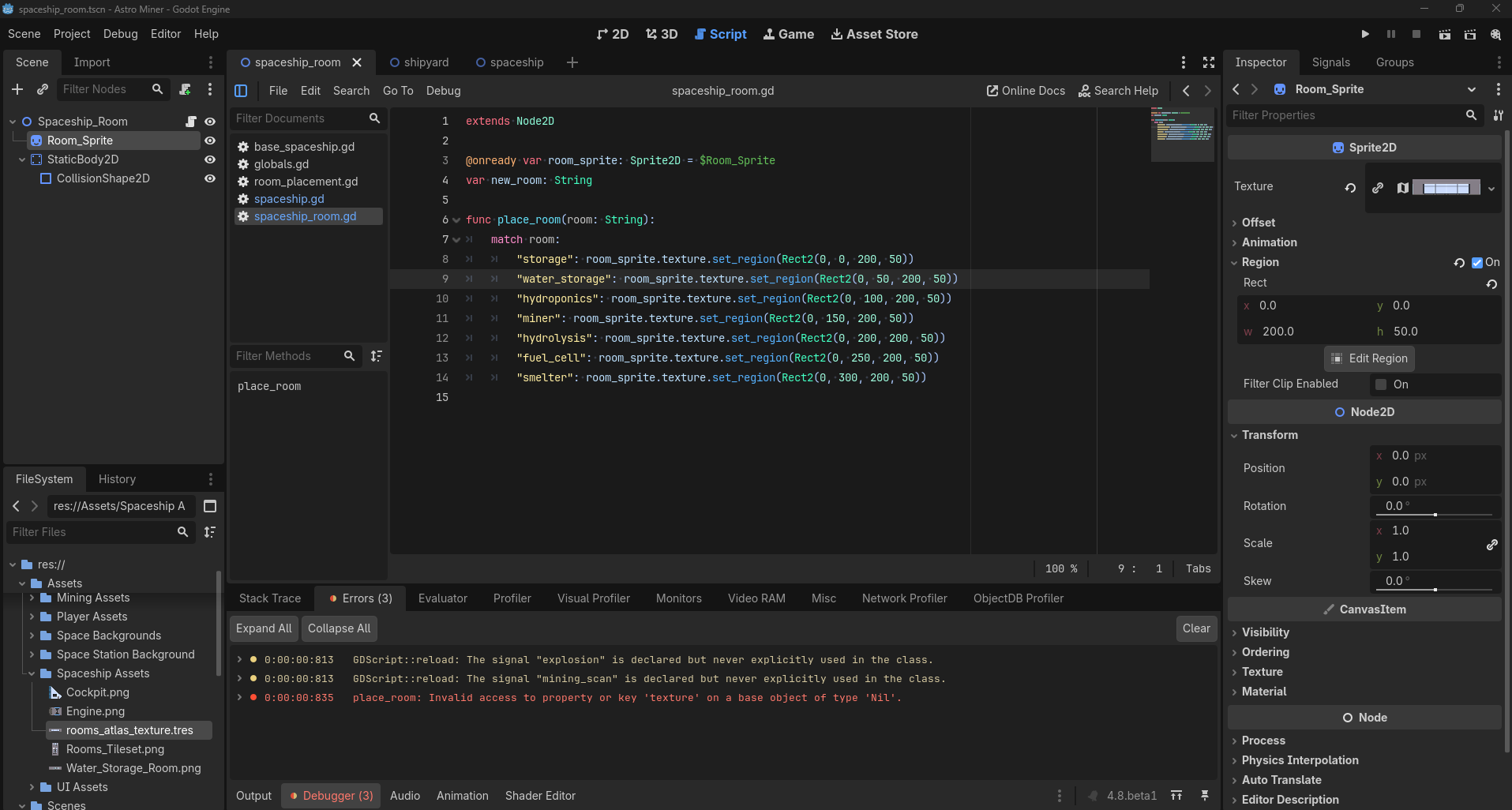
I understand the code is the issue, but I don’t know what the correct code is. Help would be appreciated.

The implication from the error message is that the room_sprite variable is Nil or not ready yet. How are you instantiating this room scene? @onready variables are not available until after the scene has been added to the tree.

If your calling code is something like this:-

var new_room = load("spaceship_room.tscn").instantiate()
new_room.place_room(“storage”)
parent_scene.add_child(new_room)

you will get this error message because the room_sprite variable is not yet ready when you call the place_room function. If you code it as:-

var new_room = load("spaceship_room.tscn").instantiate()
parent_scene.add_child(new_room)
new_room.place_room(“storage”)

then room_sprite will be ready when you need it.

Understood. I instantiate the “spaceship_room” scene in the “spaceship” scene. Code below:

extends Node2D

const SPACESHIP_ROOM = preload(“uid://cva3pelie50he”)

func _ready() → void:
place_rooms()

func place_rooms():
for room in Globals.spaceship_room_array:
var spaceship_room = SPACESHIP_ROOM.instantiate()
spaceship_room.place_room(room)
add_child(spaceship_room)
spaceship_room.position(Vector2(200, 50))

The code is now the following:

extends Node2D

const SPACESHIP_ROOM = preload(“uid://cva3pelie50he”)

func _ready() → void:
place_rooms()

func place_rooms():
for room in Globals.spaceship_room_array:
var spaceship_room = SPACESHIP_ROOM.instantiate()
add_child(spaceship_room)
spaceship_room.place_room(room)
spaceship_room.position(Vector2(200, 50))

I did get an error message from the “spaceship_room.position(Vector2(200, 50))” line, but the scene instantiation seems to be working, thank you.