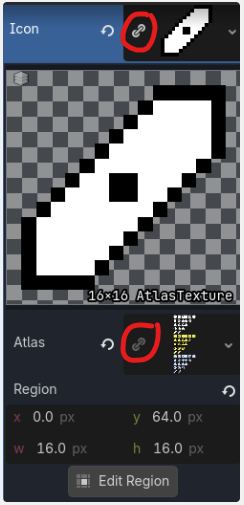
Not sure how to set random atlas coordinates

Godot Version

4.6.2.stable

Question

I have the Atlas set up and I want a random coordinate in the Atlas to be assigned to each button. Below is the code I have so far:

If you share code, please wrap it inside three backticks or replace the code in the next block:

extends Control

@onready var upgrade_canvas_layer: CanvasLayer = $".."

@onready var button_1: Button = $HBoxContainer/Button1
@onready var button_2: Button = $HBoxContainer/Button2
@onready var button_3: Button = $HBoxContainer/Button3
@onready var h_box_container: HBoxContainer = $HBoxContainer

var upgrade_buttons = [button_1, button_2, button_3]
var pick_die

func populate_buttons():
	for i in h_box_container.get_children():
		pick_die = Globals.types_of_die.keys().pick_random()
		i.text = str(pick_die)
		#Insert code that updates the region coordinates from the Atlas
		i.region = Rect2(Globals.types_of_die[pick_die][0], Globals.types_of_die[pick_die][1], 16, 16) #<---doesn't work

This is what I have in Globals:

var types_of_die = {
	"Plastic D2": [0, 64],
	"Plastic D3": [0, 48],
	"Plastic D4": [0, 32],
	"Plastic D5": [0, 16],
	"Plastic D6": [0, 0],
	"Gold D2": [0, 144],
	"Gold D3": [0, 128],
	"Gold D4": [0, 112],
	"Gold D5": [0, 96],
	"Gold D6": [0, 80],
	"Diamond D2": [0, 224],
	"Diamond D3": [0, 208],
	"Diamond D4": [0, 192],
	"Diamond D5": [0, 176],
	"Diamond D6": [0, 160],
}
You need to give more information and clear about what your goal is. Otherwise, it’s really hard to help with what you wrote so far.

  • It’s not clear what you are trying to achieve. What is the expected result, and what result do you get instead?

  • What do you mean by ā€˜doesn’t work’? Does the editor give an error or does it work differently than expected?

  • Button class doesn’t have a property called region. Did you create a custom class that has a ā€˜region’ property?

This doesn’t work:

@onready var button_1: Button = $HBoxContainer/Button1
@onready var button_2: Button = $HBoxContainer/Button2
@onready var button_3: Button = $HBoxContainer/Button3

var upgrade_buttons = [button_1, button_2, button_3]

When the upgrade_buttons array is created, button_1, button_2 and button_3 are still nulls. @onready hasn’t happened yet. You need to populate the array in the _ready function:

var upgrade_buttons: Array[Button]

func _ready() -> void:
	upgrade_buttons = [
		$HBoxContainer/Button1, 
		$HBoxContainer/Button2, 
		$HBoxContainer/Button3]
1 Like

Thank you all for your feedback thus far. I’ll try to be more clear on what I am trying to achieve:
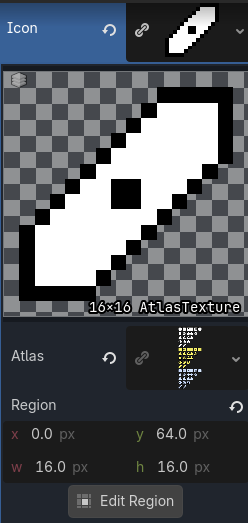
For each button, I have an Atlas set up (shown below:

I’m trying to code the game to where it updates the x and y coordinates of the region, depending on which die is chosen in the Globals dictionary. That way, the AtlasTexture of the die is shown as an icon on the button. I have no idea what code to write that would update the x and y coordinates of the Region tho.

If your regions are consistent sizes then do a random number multiplied by the texture size. Another way would be to use an array of names and coordinates for each die and randomly choose the index. There’s a sample of the code I use for randomising textures at the end of this thread.

The last function in my code randomises the atlas texture.

region is a property of the AtlasTexture, not the button node. So this should be i.icon.region.

You can simplify this by changing the types_of_die dictionary to use Vector2 as values, and then set the button node’s icon.region.position to a Vector2.

Thank you. I tried your approach, and made some progress but not quite what I was hoping for. This is what is happening now:

func populate_buttons():
	for i in h_box_container.get_children():
		pick_die = Globals.types_of_die.keys().pick_random()
		i.text = str(pick_die)
		#Insert code that updates the region coordinates from the Atlas
		i.icon.region.position = Globals.types_of_die[pick_die][0]
		print (i)
		print(Globals.types_of_die[pick_die][0])

The following is printed in the output:

Button1:<Button#29427238406>
(0.0, 160.0)
Button2:<Button#29477570057>
(0.0, 80.0)
Button3:<Button#29527901708>
(0.0, 32.0)

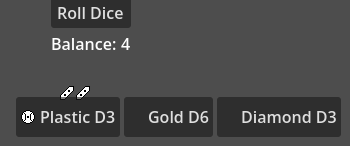
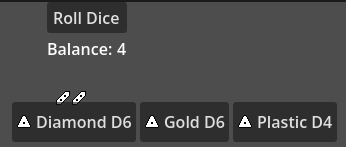
This is the result:

It should be 3 different die icons, but the same one is shown for some reason. Also, I updated my Globals as the following:

var types_of_die = {
	"Plastic D2": [Vector2(0, 64)],
	"Plastic D3": [Vector2(0, 48)],
	"Plastic D4": [Vector2(0, 32)],
	"Plastic D5": [Vector2(0, 16)],
	"Plastic D6": [Vector2(0, 0)],
	"Gold D2": [Vector2(0, 144)],
	"Gold D3": [Vector2(0, 128)],
	"Gold D4": [Vector2(0, 112)],
	"Gold D5": [Vector2(0, 96)],
	"Gold D6": [Vector2(0, 80)],
	"Diamond D2": [Vector2(0, 224)],
	"Diamond D3": [Vector2(0, 208)],
	"Diamond D4": [Vector2(0, 192)],
	"Diamond D5": [Vector2(0, 176)],
	"Diamond D6": [Vector2(0, 160)],
}

If the button has its own scene, set the AtlasTexture to be local_to_scene there. If not, make the AtlasTexture unique on each of the buttons.

Everyone,

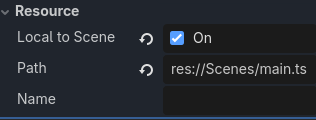
I tried the methods suggested by hyvernox and weaselboy2. I also set the Resource to be local to scene:

The result is this:

The first die icon DOES match the text. However, it doesn’t happen for the next two buttons for some reason.

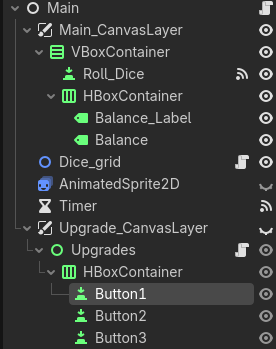
I also realize that I haven’t shared how I have the nodes organized. Please see below:

The populate_buttons() code is in the script assigned to the ā€œUpgradesā€ node.

Also, I tried to save the AtlasTexture as a separate file, but got the following message:

I made the atlas by importing a .png file.

I have a feeling the issue isn’t the code, but I have no idea what it could be.

Regardless of your issue, I think you should change how you are approaching your end-result.

Create an Array[AtlasTexture] that holds all the die texture with the corresponding region. Then assign the array elements to the button.icon depending on which icon you need, instead of setting atlas coordinates of the rect of the atlas texture.

Your code will be cleaner and easier to follow, I believe, if you do so.

1 Like

Holy heck, that worked. For anyone else in the future who sees this, this is what worked:

extends Control

@onready var upgrade_canvas_layer: CanvasLayer = $ā€œ..ā€
@onready var die_faces: TextureRect = $Die_faces
@onready var h_box_container: HBoxContainer = $HBoxContainer

var pick_die
@export var die_texture_array: Array[AtlasTexture]

func populate_buttons():
for i in h_box_container.get_children():
pick_die = Globals.types_of_die.keys().pick_random()
i.text = str(pick_die)
#Assigns AtlasTexture from die_texture_array to button icon
i.icon = die_texture_array[Globals.types_of_die[pick_die]]

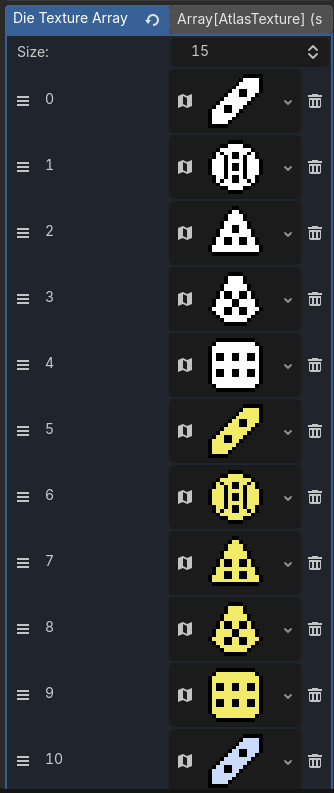
Exporting the Array[AtlasTexture] resulted in this:

I had to made a new AtlasTexture for each entry to prevent all the buttons from having the same icon.

1 Like

Thank you!

I think I actually understand your issue now, or at least part of it, even though it’s solved.

It’s still good you understood what happened, for future reference..

See the link icon next to your texture and atlas?

It means the resource is shared. So if you do any change on any of the button,. it’ll be also applied to all buttons that share the resource. Because you are changing ā€˜one resource’ that all of your button uses.

Easiest way to solve this is clicking on the ā€˜link icon’. So they will be unique resources

You don’t have to create a new file (if that’s what you are saying). Just make sure that you don’t share the resource and they are actually unique as I explained above.

1 Like

Thank you, that helped.

1 Like