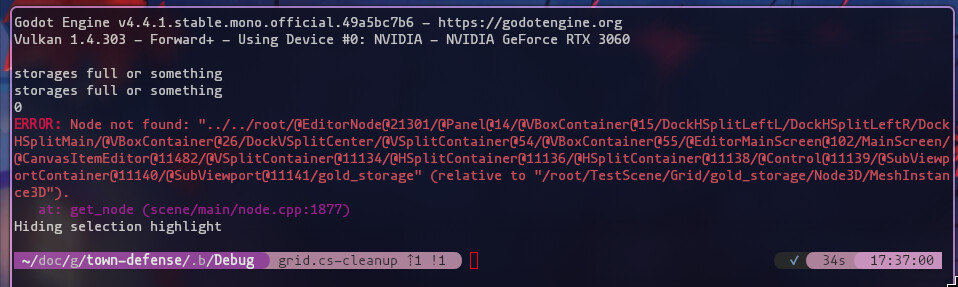
Obscure error message, despite everything working as intended?

Godot Version

Godot 4.4.1.stable.mono

Question

Hi all, I’ve been getting this weird error message which I’ve had some trouble deciphering:

E 0:00:04:524   NativeCalls.cs:7293 @ void Godot.NativeCalls.godot_icall_3_828(nint, nint, nint, Godot.NativeInterop.godot_bool, int): Node not found: "../../root/@EditorNode@21301/@Panel@14/@VBoxContainer@15/DockHSplitLeftL/DockHSplitLeftR/DockHSplitMain/@VBoxContainer@26/DockVSplitCenter/@VSplitContainer@54/@VBoxContainer@55/@EditorMainScreen@102/MainScreen/@CanvasItemEditor@11482/@VSplitContainer@11134/@HSplitContainer@11136/@HSplitContainer@11138/@Control@11139/@SubViewportContainer@11140/@SubViewport@11141/gold_storage" (relative to "/root/TestScene/Grid/gold_storage/Node3D/MeshInstance3D").
  <C++ Error>   Method/function failed. Returning: nullptr
  <C++ Source>  scene/main/node.cpp:1877 @ get_node()
  <Stack Trace> NativeCalls.cs:7293 @ void Godot.NativeCalls.godot_icall_3_828(nint, nint, nint, Godot.NativeInterop.godot_bool, int)
                Node.cs:793 @ void Godot.Node.AddChild(Godot.Node, bool, Godot.Node+InternalMode)
                Grid.cs:42 @ void AstraeSoftware.TownDefence.Core.Grid.PlaceBuilding(Godot.Vector2I, AstraeSoftware.TownDefence.Core.Building)
                TurnManager.cs:51 @ void AstraeSoftware.TownDefence.Core.TurnManager._placeBuilding(AstraeSoftware.TownDefence.Core.BuildingInfo, Godot.Vector2I)
                TurnManager.cs:83 @ bool AstraeSoftware.TownDefence.Core.TurnManager._tryPlace(AstraeSoftware.TownDefence.Core.BuildingInfo)
                TurnManager.cs:174 @ void AstraeSoftware.TownDefence.Core.TurnManager._Process(double)
                Node.cs:2540 @ bool Godot.Node.InvokeGodotClassMethod(Godot.NativeInterop.godot_string_name&, Godot.NativeInterop.NativeVariantPtrArgs, Godot.NativeInterop.godot_variant&)
                AstraeSoftware.TownDefence.Core.TurnManager_ScriptMethods.generated.cs:100 @ bool AstraeSoftware.TownDefence.Core.TurnManager.InvokeGodotClassMethod(Godot.NativeInterop.godot_string_name&, Godot.NativeInterop.NativeVariantPtrArgs, Godot.NativeInterop.godot_variant&)
                CSharpInstanceBridge.cs:24 @ Godot.NativeInterop.godot_bool Godot.Bridge.CSharpInstanceBridge.Call(nint, Godot.NativeInterop.godot_string_name*, Godot.NativeInterop.godot_variant**, int, Godot.NativeInterop.godot_variant_call_error*, Godot.NativeInterop.godot_variant*)

All of my code is working as intended, and nothing in the game is going wrong at all, so I’m not sure why I’m getting this.

Line 42 of Grid.cs is:

    public void PlaceBuilding(Vector2I position, Building building)
    {
        building.Position = _getBuildingMeshPosition(position, building.Size);
        AddChild(building); // line 42
        
        // Register building in grid - probably irrelevant to the error
        Vector2I[] cells = GridState.GetCellsInArea(position, building.Size);
        foreach (Vector2I cell in cells)
        {
            GridState[cell.X, cell.Y] = building;
        }

        // adds to list of buildings
        Buildings.Add(building);

        building._OnPlaced();
    }

Which in turn is called from:

    private void _placeBuilding(BuildingInfo building, Vector2I gpos)
    {
        Building scene = building.Scene.Instantiate<Building>(); // building.Scene is of type PackedScene
        Grid.Instance.PlaceBuilding(gpos, scene); // line 51
    }

I can’t think of anything else that would be relevant here, but do let me know if you need more information.

Any and all help is appreciated, thank you<3
I read Node not found and gold_storage.

I’m lost at what’s not finding it though

The hint you need to follow is in this very first line. I’ve cut it down for you.
Do you have anything with that name gold_storage? Is it not set when it should?

Everything is set how it should be- there is no evidence that something is going wrong other than this error message (I probably don’t even really need to fix it, but I like having my console clean). The error message doesn’t give me any information about where it went wrong, other than my own code (which is working), and some places in the Godot source (NativeCalls.cs, node.cpp). I’m not familiar with the Godot source code so this doesn’t mean anything to me

gold_storage is the scene name of the building that is being placed from the code I have provided, which again, is being placed without incident, and all scripts attached to it are behaving as intended as well

Additionally, in the error message itself, it looks like what’s not being found is a part of the editor? ...Node not found: "../../root/@EditorNode@21301/@Panel@14/... I’m not sure if this is actually the case here, but I’m assuming that editor node is probably a part of the editor, but I can say for sure that I don’t have such a series of UI nodes in the project.

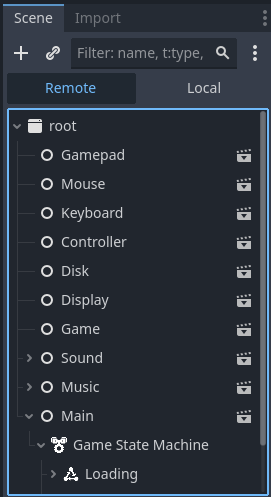
Node paths with @ signs in them are an indication that the name was generated at runtime. You could potentially find them by going to the Remote tab while the game is running.

As for your error, I hate those things. They’re never very helpful. You can close your project, and nuke the .godot folder, then reload your project. See if that fixes it.

You can also delete the object in the scene and re-add it back in. See if that fixes it.

1 Like

Hi, thanks for your reply! I tried deleting the .godot folder, but unfortunately that didn’t help. I also can’t delete and re-add the object in the scene because it’s spawned in during runtime. I’ve also looked through the remote tree and the path of nodes mentioned is, at the very least, not visible (is this why it couldn’t be found perhaps? Or is it not meant to be visible)

Although one thing I have noticed is that where it says “could not find relative to [path that does exist]”, the “root” node is not two steps back (it says Node not found: "../../root...) from the node given by the path. This seems to point to something going wrong in the instantiation stage of the code? Perhaps I’m assigning it as a child of an object at the same time as Godot is trying to do something with it, which is causing it to not find something how it should?

I’ll have more time to play around with this after work today, this is just guesswork

1 Like

Actually this indicates to me it’s a problem with the editor and not your game. Here’s what I would try next:

Export your game with debugging on. In Windows you’ll get two exes. Run the console exe, and all the output will be logged there. What I suspect will happen will be the error will go away if it’s not actually related to your game.

1 Like

If it is an issue with the editor, there’s probably still a way I can fix it, since this issue has only arisen after some refactoring work.

I’ll try the debug build later today when I have time, and I also might have a look through the Godot source code where the errors are given to see if that gives any insights

Thanks again

1 Like

Interesting, so it looks like it may not be an editor thing after all

I suppose that means I’ll be reading the source code then..

edit: It might be a better idea to try to reproduce this error in a new project, before I go down that route

1 Like

Okay, I’ve found the problem, and it was slightly underwhelming. The skeleton property on a MeshInstance3D node was set to something weird, which was causing an error message when the object was spawned in. I overlooked this originally because the skeleton group was collapsed, and I’ve never touched it before so I didn’t think anything of it. I have no idea how or why this was changed, but it’s fixed now so it’s all good. Thank you for your help everyone

3 Likes

Glad you found it!

1 Like

This topic was automatically closed 30 days after the last reply. New replies are no longer allowed.