Opaque Timing of Process, Input, and Physics signals

Godot Version

v4.6.3.stable.mono.official [7d41c59c4]

Question

Hi all, new to the engine so there might be something simple I’m overlooking here.

I’m trying to select the top-most object of a stack of Cards:Area2Dnodes each with a single CollisionShape2Dchild and I’m seeing some quirky behaviour and would love to know where it is coming from. Specifically, I’m seeing a delay of multiple frames before a Mouse Exit signal is being sent once the mouse is no-longer hovering the object.

I’ve registered mouse_entered()and mouse_exited()events on the objects. My intuition and research tells me these signals are emitted after _inputand _processare called on all objects in the scene. These functions register the hovered objects with a manager.

I tried then implementing a drag function in the manager as part of _input. The result was that cards I was no-longer hovering were dragged if I clicked too soon after unhovering the objects. I assumed this was in part because the enter/exit signals had not yet been emitted and I was managing to click within a single frame.

I then tried moving the drag functionality to the _processfunction in the manager (registering the mouse state in the _inputfunction) to ensure that the click wasn’t being processed until after the enter/exit signals, and found the same behaviour.

So I tried logging and found that the mouse_exited()signal was sometimes not being processed until 3 frames after the mouse_entered()signal was being processed by the newly hovered objects. At this point the code is quite simply logging on mouse_exited() and mouse_entered() from the Card, and the _process()of a manager.

Is this a bug or am I missing something?

Edit: Removed a comment about using RayCasting as to not distract from the rest of the question.
Edit2: Clarity

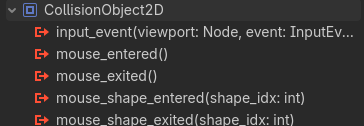
It is not. Anything inheriting from CollisionObject2D can detect the mouse entering and exiting via signals:

This includes Area2D, CharacterBody2D, RigidBody2D, StaticBody2D, and AnimatableBody2D.

If your question is “How do I drag-and-drop cards?”, might I suggest this tutorial?

Hi, thanks for the quick reply.
I’ve removed the comment about RayCasting as to not obfuscate the entire rest of the question.
If you have thoughts on any other part, please let me know! :slight_smile:

Yeah, you’re way too bogged down in the weeds of how signals and the game loop of Godot works. None of that has anything to do with your problem. I strongly recommend you follow that tutorial, because it’s only 5 minutes long and will get you working drag-and-drop functionality. Then you can tweak it. I’ve implemented drag-and-drop a couple times now, and this video is succinct and has a pretty good approach.

Your original post does not include any code. The problems have nothing to do with the overall approaches you are using, and everything to do with your code. Godot works fine, and the fact that you are seeing the things you are seeing are not Godot engine related, but your implementation.

Use control nodes instead of areas.
If you must use areas, make sure to enable pyhsics object picking sorting for the viewport. Otherwise the picking “depth order” of the areas won’t be guaranteed and can change between frames.

Physics picking events are processed the last in the InputEvent stack. More info:

They are also processed each physics frame (_physics_process()) and not each render frame (_process()) as they are part of the physics system. The physics system is updated at a fixed rate so there can be multiple render frames between physics frames.

Hi, I rebuilt a much simpler version of the tutorial just to check that I still have the problem, and I do indeed still have the problem. I can place the two cards next to each other and quite easily pick up both with one click.

As you insist that my code is the problem, here’s the only code I’m using to test the behaviour, with the OnMouseEnter/Exit hooked up to the Area2D events.


public partial class Card : Area2D
{
    public bool isHovered = false;
    public bool isDragging = false;

    public override void _Process(double delta)
    {
        base._Process(delta);

        if (isHovered)
        {
            GD.Print("Process.Hover:" + this.Name);
        }

        if (isHovered && Input.IsActionJustPressed("click"))
        {
            this.isDragging = true;
        }

        if (isDragging && Input.IsActionJustReleased("click"))
        {
            this.isDragging = false;
        }

        if (this.isDragging)
        {
            this.GlobalPosition = GetGlobalMousePosition();
        }
    }

    public void OnMouseEnter()
    {
        GD.Print("MOUSE_ENTER:" + this.Name);
        this.isHovered = true;
    }

    public void OnMouseExit()
    {
        GD.Print("MOUSE_EXIT:" + this.Name);
        this.isHovered = false;
    }
}

For you it’s getting stuck in the weeds, for me it’s understanding the tool I want to use to develop a game :slight_smile:

As you should be able to see, I’m getting the “ENTER” message on the Ace before the “EXIT” on the King, which seems to be the cause of this behaviour.

Yeah I saw this, and in combination with Godot Script Execution Order and Lifecycle – Allen Pestaluky it has been helpful for understanding the way the engine functions under the hood.
I’m still unclear though why a _process can be called in between two physics signals from the same frame - I would assume that the mouse enter and mouse exit signals from multiple objects would be handled in the same physics frame?

Appreciated, but there are times in development where I need the game objects to do things that the Control-based Nodes can’t :slight_smile:
I experimented with the Physics Object Picking Sorting, but it didn’t change anything to do with the signal timing issue I’m having!

I cannot reproduce your bug with GDScript.

code
class_name ShipPart extends Area2D

var draggable := false
var is_inside_droppable := false
var slot: Node2D
var offset: Vector2
var initial_position: Vector2
var starting_position: Vector2
var previous_parent: Node

@onready var rollover_sound: AudioStreamPlayer = $RolloverSound
@onready var pick_up_sound: AudioStreamPlayer = $PickUpSound
@onready var slot_sound: AudioStreamPlayer = $SlotSound
@onready var go_back_sound: AudioStreamPlayer = $GoBackSound
@onready var sprite_2d: Sprite2D = $Sprite2D


func _ready() -> void:
	area_entered.connect(_on_slot_entered)
	area_exited.connect(_on_slot_exited)
	mouse_entered.connect(_on_mouse_entered)
	mouse_exited.connect(_on_mouse_exited)
	starting_position = global_position


func _process(_delta: float) -> void:
	if draggable:
		if Input.is_action_just_pressed("click"):
			pick_up_sound.play()
			initial_position = global_position
			offset = get_global_mouse_position() - global_position
			Global.is_dragging = true
		if Input.is_action_pressed("click"):
			global_position = get_global_mouse_position()
		elif Input.is_action_just_released("click"):
			Global.is_dragging = false
			var tween = create_tween()
			if is_inside_droppable:
				slot_sound.play()
				tween.tween_property(self, "global_position", slot.global_position, 0.2).set_ease(Tween.EASE_OUT)
				previous_parent = get_parent()
				call_deferred("reparent", slot)
			else:
				go_back_sound.play()
				tween.tween_property(self, "global_position", initial_position, 0.2).set_ease(Tween.EASE_OUT)
		if Input.is_action_just_pressed("rotate_left"):
			rotation -= deg_to_rad(90)
			if rad_to_deg(rotation) <= -360:
				rotation = 0
		elif Input.is_action_just_pressed("rotate_right"):
			rotation += deg_to_rad(90)
			if rad_to_deg(rotation) >= 360:
				rotation = 0
		if Input.is_action_just_pressed("flip"):
			sprite_2d.flip_h = !sprite_2d.flip_h


func _on_mouse_entered() -> void:
	print("MOUSE ENTER: %s" % name)
	if not Global.is_dragging:
		rollover_sound.play()
		draggable = true
		scale = Vector2.ONE * 1.05


func _on_mouse_exited() -> void:
	print("MOUSE EXIT: %s" % name)
	if not Global.is_dragging:
		draggable = false
		scale = Vector2.ONE


func _on_slot_entered(area: Area2D) -> void:
	is_inside_droppable = true
	rollover_sound.play()
	slot = area


func _on_slot_exited(_area: Area2D) -> void:
	is_inside_droppable = false
	slot = null


func reset() -> void:
	global_position = starting_position
	call_deferred("reparent", previous_parent)

So then I reproduced your code in GDScript.

@icon("uid://86fn7y83u6mk")
class_name Card extends Area2D

var is_hovered: bool = false
var is_dragging: bool = false


func _ready() -> void:
	mouse_entered.connect(_on_mouse_entered)
	mouse_exited.connect(_on_mouse_exited)


func _process(_delta: float) -> void:
	if is_hovered:
		print("Process.Hover: %s" % name)
		
		if Input.is_action_just_pressed("click"):
			is_dragging = true
	
	if is_dragging and Input.is_action_just_released("click"):
			is_dragging = false
	
	if is_dragging:
		global_position = get_global_mouse_position()


func _on_mouse_entered() -> void:
	print("MOUSE_ENTER: %s" % name)
	is_hovered = true


func _on_mouse_exited() -> void:
	print("MOUSE_EXIT: %s" % name)
	is_hovered = false

And I was able to reproduce your bug if I moved the mouse really fast across both cards.

But if I go at a normal speed (and comment out the hover print statement every frame so I can read the output), I get this every time.

image

I went back and played with my ship part code then, to try and reproduce the problem, and still could not. I think it because the ship part collision shapes are so small that they do not detect fast mouse movements, so I am forced to slow down to get enter and exit signals.

Conclusion

We go back to, I believe you are too deep in the weeds. Specifically, your post appears to be an example of the XY Problem. I went back to read what your problem is, and it is with the current solution which is this:

  1. You create all the cards in a deck and stack them on top of one another.
  2. When you click on the deck, you cannot be sure you will get the top card.
  3. You have dug deep into the engine to solve this problem.
  4. You have posted asking how the engine works.

You need to back up before step 1 and look at that problem. Which is you want the player to be able to take the top card from the deck.

Here’s my suggestion: Create a deck object that displays the top card. When you click it and move the top card, the deck object shows the next card. Once you place the first card, the second card is spawned in.
On re-reading everything, I understand your frustration. I can see that I have done a terrible job of writing the original question. I included superfluous information and left out critical information.

I am entirely interested in understanding how the engine times and processes the _Process(), _Input(), and physics signals for the purposes of understanding, where the exact curiousity I’m encountering is how the engine sends two mouse entered signals in a frame before sending two mouse exit signals, for objects that do not overlap.

I have a working solution involving a PhysicsPointQuery on click which works perfectly for my needs (pasted below).

I will leave this thread for now and ensure to ask my questions more concisely and clearly in future.

PhysicsDirectSpaceState2D spaceState = this.GetWorld2D().DirectSpaceState;
PhysicsPointQueryParameters2D queryParams = new PhysicsPointQueryParameters2D();
queryParams.Position = GetGlobalMousePosition().globalPosition;
queryParams.CollideWithAreas = true;
queryParams.CollideWithBodies = false;

Array<Dictionary> collisionResult = spaceState.IntersectPoint(queryParams);

int hoveredCardIndex = -1;

foreach(var collision in collisionResult)
{
    Area2D collider = collision["collider"].As<Area2D>();
  
    if ((collider is Card card) && card.GetIndex() > hoveredCardIndex)
    {
       hoveredCard = card;
       hoveredCardIndex = card.GetIndex();
    }
    else if (collider is CardZone cardZone)
    {
       hoveredZone = cardZone;
    }
}

Because a single frame defaults to 0.166 seconds in duration. In that time, you are in a loop and enter signals happen before exit signals.

Then there’s likely a bug somewhere in your code or setup. Try to make a minimal reproduction project.