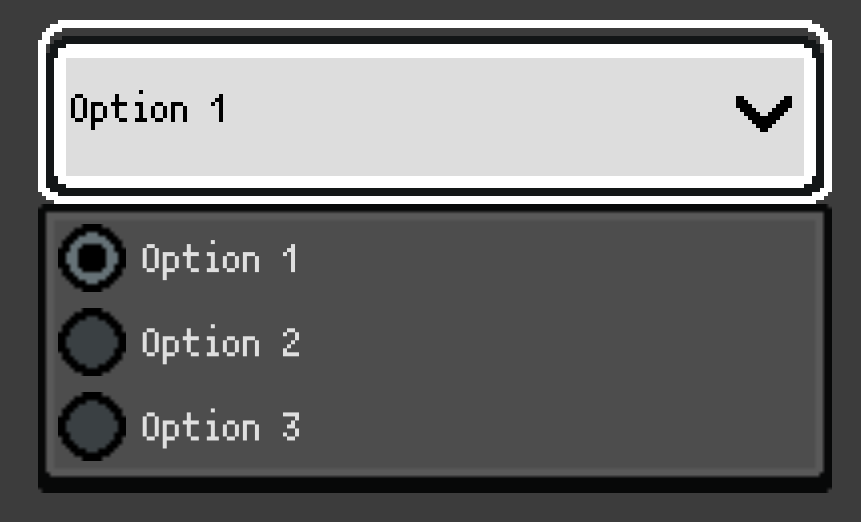
Godot Version
4.4
Question
For some reason, the options of the OptionButton node are using the wrong texture filtering. I think its because it uses PopupMenu for the dropdown options which inherits Viewport and Viewport doesn’t inherit the default texture filtering options set in the Project Settings.
So how can I make it so Viewport is set to Nearest Neighbor instead of Linear by default?
Or maybe there’s some other way to fix this?
It feels like I’m missing some setting or something but I couldn’t find anything.
For anyone else who might have this problem, the best way I’ve found to solve this is just to replace each OptionButton with a custom class that extends it and sets the texture filter manually on ready.
# option_button_pixel.gd
extends OptionButton
class_name PixelOptionButton

func _ready() -> void:
	var popup := get_popup()
	if popup:
		popup.canvas_item_default_texture_filter = Viewport.DEFAULT_CANVAS_ITEM_TEXTURE_FILTER_NEAREST
So you’d create add this script to your project then go to each OptionButton and Right Click > Change Type > PixelOptionButton
This is still feels a bit incorrect but it’s all I could come up with.
Still open to any more proper solutions!
2 Likes