Don’t bother. Unless you are creating something ‘crazy’ in a massive team, there isn’t any point in doing this.
Code should be self explanatory. Take a look at my main game root node:
And in case you were wondering about core:
That is all pretty self explanatory I would guess.
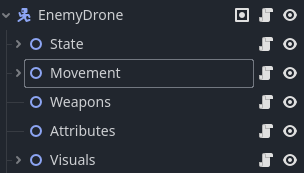
Here is an enemy structure:
Here is the enemy drone main script:
func _process(delta: float) -> void:
	weapons_controller.handle_weapon_firing(delta)
	visuals_manager.update_facing_direction(delta, movement_controller.current_direction)
	visuals_manager.update_damage_sparks(delta, attributes_controller.current_health)
	movement_controller.handle_ground_avoidance()


func _physics_process(delta: float) -> void:
	velocity = movement_controller.calculate_velocity(delta)
	var collision = move_and_collide(velocity * delta)
	movement_controller.handle_collisions(collision)
What documentation do you need?
Even Godot’s very node structure and even it’s file structure is so clean it is all self explanatory.
The only comments I add are todo comments like this:
func generate_machine(new_machine_scene_uid: String, new_machine_position: Vector2) -> void:
	# TODO Should check that "ResourceLoader.load_threaded_get" is available
	var machine_scene: PackedScene = ResourceLoader.load_threaded_get(new_machine_scene_uid)
I used to comment everywhere. I used to write documents about how the code worked. It is all pointless, it gets out of date, it never gets read, it is a whole new job to create/update and read it.
If your code is not self explanatory, you would be better off restructuring it, renaming variables to be more explanatory and reading about single responsibility for functions. Those three things alone will ensure you code is always maintainable.
Folder structures and naming matter. Variable and function naming matters. Take a look at this physics process for an enemy drone:
func _physics_process(delta: float) -> void:
	velocity = movement_controller.calculate_velocity(delta)
	var collision = move_and_collide(velocity * delta)
	movement_controller.handle_collisions(collision)
Or the calculate velocity function in the movement node:
func calculate_velocity(delta: float) -> Vector2:
	apply_chunk_bounds()
	apply_avoidance_direction()
	apply_velocity_changes(delta)
	return current_velocity
Nothing here should be a mystery needing documentation.
The profiler is an amazing tool. But what are you doing writing code that barely runs? The debug monitors you should be checking constantly during coding, or at least every time you finish a section of code. Did it impact performance? Where was the impact? How do I achieve what I wanted in a more efficient way? A section of code is not finished when you look at it on the screen and it works. That is prototyping. It can take almost as long to clarify the code, making it self documenting, and almost as long optimising. For me 60 FPS is the goal. If something brings it down, I am not doing it right.
Anyway, it is also fine to just love coding. Sometimes re-writing a game is a lot of fun, or refactoring messy code is very rewarding. I have just spent two days refactoring a surface renderer. It is now simply beautiful. The game looks and plays exactly the same, but I loved every minute of it.
I spent weeks on my dialogue system. But now it is so simple to use, and change when I get a different demand placed on my dialogue requirements. It was the same with my mission generator. All of the things you learn doing this is amazing. So if perfecting your code is your thing, keep doing it. I know tons of artists that paint, knowing their paintings are not ‘the best in the world’, but they keep doing it anyway. Like a hobby. Not all coding is an exercise in getting a game on steam or itch. Sometimes (and TBH most of the time) it is a way to relax, pour out the creative juices and watch the results splash all over the screen!