I set up my 2D character like this: a CharacterBody2D (Node A) which can be moved by the player and a Rigidbody2D (Node B) for a head which follows the body through a PinJoint2D. After some tweaking everything worked fine.
Then I added a GPUParticles2D to the Rigidbody2D (Node B) and it messed up the PinJoint2D’s physics. If I reparent the particle effect to the CharacterBody2D the issue disappears but then the effect won’t follow the head. Is this a bug? Any help would be appreciated.
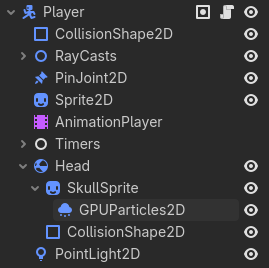
That’s what I’d think. And maybe still think but the GPUParticles2D’s parenting is the only difference. I made two videos which I’m only able to link as a new user:
Uhm, you are right… Just accessing the RigidBody2D.global_transform inside the _physics_process() method in the CharacterBody2D messes up the RigidBody2D (GPUParticles2D does this internally) but only before calling move_and_slide(). Like:
There’s a note in the RigidBody2D documentation about accessing the global transform if the node is a child of another moving node:
Note: Changing the 2D transform or linear_velocity of a RigidBody2D very often may lead to some unpredictable behaviors. This also happens when a RigidBody2D is the descendant of a constantly moving node, like another RigidBody2D, as that will cause its global transform to be set whenever its ancestor moves.
I’m not sure if this is technically a bug or just a limitation but try checking the issue tracker if there’s any issue related to this or open a new one.
As a workaround you can re-parent the GPUParticles2D node to the CharacterBody2D node and do:
Not sure why this happens but if there’s a note about it in the documentation maybe someday someone will fix the cause of these “unpredictable behaviors”.
Your suggestion worked like a charm, thanks again!