Godot Version
4.5
Question
How would I make a function where when the player clicks a button it causes an animation to play and clicking the button again causes the animation to play backwards. For example if the player presses the [E] key an image or tab slides down in the game and stays until the player presses [E] again which will make the animation play backwards like a mask that toggles on and off.
I assumed the code would be:
var anim = 1
if anim == 1 and Input.is_action_just_pressed("play_anim"):
	$AnimationPlayer.play("anim1")
	anim = 2
elif anim == 2 and Input.is_action_just_pressed("play_anim"):
	$AnimationPlayer.play_backwards("anim")
	anim = 1
Thank you in advance 
The code is right, but you should use boolean instead of numbers.
Wait, why are you playing different animations?
2 Likes
No I’m trying to make a mask that is toggleable and when you put it on changes the screen, but there are no tutorials on the internet anywhere so I just assumed to use an animation and edit it there but it’s not working out.
I think we should back up and talk about what you want to accomplish. I take it you want a screen to slide in and then slide out. Here’s what I would suggest:
- Start the screen so it’s off-screen in the editor.
- When the player presses the [E] key, make the screen visible.
- When the player presses the [E] key again, make the screen hidden.
- Use tweens to animate the sliding in and out.
I can write you some code later when I have more time if you want.
2 Likes
you mean a mask anim? what happens how
1 Like
The different animations were by accident and I’ve tried using booleans but it kept switching to the next animation because I was changing it to true after playing the animation which kept making a cycle of up and down or just playing the animation which is not what I’m trying to do.
lemme make a simple prototype
1 Like
When the player clicks [E] the “image" of the mask goes down and when clicked again it goes back up
1 Like
Can you try this code?
extends Node2D

var Is_Opened:bool = false
@onready var Anim: AnimationPlayer = $AnimationPlayer


func _input(event: InputEvent) -> void:
	if Input.is_action_just_pressed("E") and Is_Opened:
		Anim.play_backwards("action")###Closes the door
		Is_Opened = false
	elif Input.is_action_just_pressed("E") and Is_Opened == false:
		Anim.play("action")###Opens the door
		Is_Opened = true
I just made a simple door opening and closing thing,you can replace those
1 Like
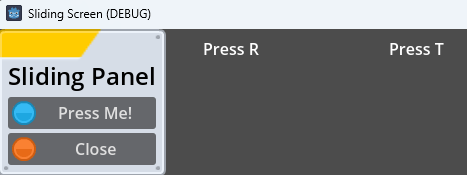
Ok, I went a little overboard and made a little project: GitHub - dragonforge-dev/example-sliding-panel: An example project to show sliding panels that can drop from the top of the screen with animation.
- Script for animating panels to drop down from their initial position. (Note that panels were moved to specific locations and do not use anchors.)
- Button script to close panel.
- Button script to open/close other panels.
- Variable panel open/close times.
- Bouncing animation when panels drop.
- Supports sub panels that close when their parent panel closes.
Code
class_name SlidingPanel extends PanelContainer

signal closing

@export var action_name: String
@export var open_time: float = 0.6
@export var close_time: float = 0.5
@export var parent_panel: SlidingPanel

var tween: Tween

var starting_position: Vector2

func _ready() -> void:
	starting_position = position
	if visible == false:
		position.y = -size.y
	if parent_panel:
		parent_panel.closing.connect(close)


func _input(event: InputEvent) -> void:
	if action_name and event.is_action_pressed(action_name):
		if visible:
			close()
		else:
			open()


func open() -> void:
	show()
	tween = create_tween()
	tween.tween_property(self, "position:y", starting_position.y, open_time).set_trans(Tween.TRANS_BOUNCE).set_ease(Tween.EASE_OUT)


func close() -> void:
	closing.emit()
	tween = create_tween()
	tween.tween_property(self, "position:y", -size.y, close_time).set_ease(Tween.EASE_IN)
	await get_tree().create_timer(close_time).timeout
	hide()
2 Likes
Ah, thank you. I thought I had tried doing this, but I guess I didn’t. Thank you
Edit: I’ve encountered a slight issue when spamming the button; the animation appears to go up and down. I added an “and Anim.animation_finished” to the rest of the if statement, which fixed the clipping. Do you have any ideas on how to fix that?
1 Like
That’s super cool thank you!
It should solve your timing issues too. Tweens are typically more reliable than AnimationPlayers for things like this.
1 Like
I also discovered that in your project it kind of has the same issue but instead if the tab waiting for the animation to finish going up or down it clips and has the same issue as the animation player when spamming the button.
This will fix it. Apologies, I had thought about adding this, but I guess I never added it. Repo updated as well.
class_name SlidingPanel extends PanelContainer

signal closing

@export var action_name: String
@export var open_time: float = 0.6
@export var close_time: float = 0.5
@export var parent_panel: SlidingPanel

var tween: Tween
var starting_position: Vector2
var is_animating = false


func _ready() -> void:
	starting_position = position
	if visible == false:
		position.y = -size.y
	if parent_panel:
		parent_panel.closing.connect(close.bind(true))


func _input(event: InputEvent) -> void:
	if action_name and event.is_action_pressed(action_name):
		if visible:
			close()
		else:
			open()


func open() -> void:
	if is_animating:
		return
	is_animating = true
	show()
	tween = create_tween()
	tween.tween_property(self, "position:y", starting_position.y, open_time).set_trans(Tween.TRANS_BOUNCE).set_ease(Tween.EASE_OUT)
	await get_tree().create_timer(open_time).timeout
	is_animating = false


func close(force: bool = false) -> void:
	if is_animating and not force:
		return
	is_animating = true
	closing.emit()
	tween = create_tween()
	tween.tween_property(self, "position:y", -size.y, close_time).set_ease(Tween.EASE_IN)
	await get_tree().create_timer(close_time).timeout
	hide()
	is_animating = false
2 Likes