Godot 4.4.1
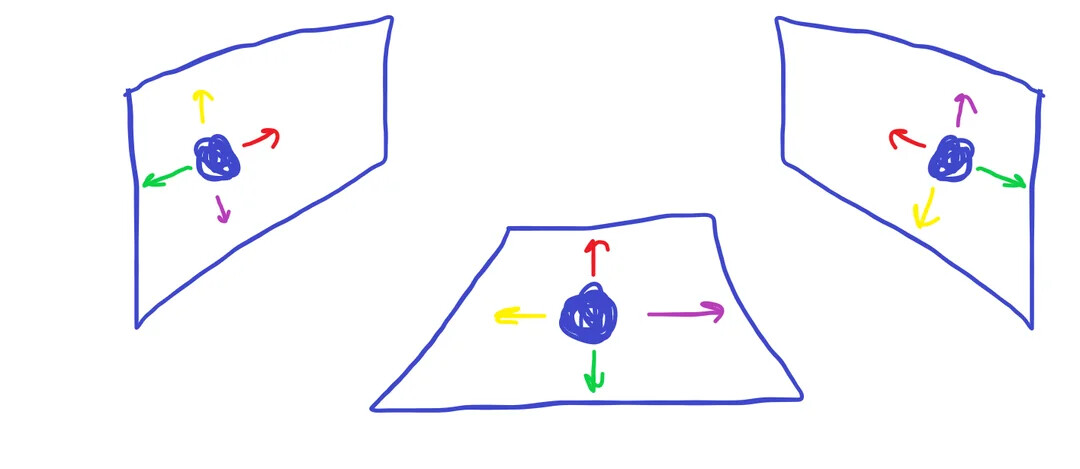
In my game, the player (CharacterBody3d) should be able to walk on walls. The way I plan to do this is by having the vectors associated with controls change relative to the player’s up_direction, which is essentially its orientation. Unfortunately, I haven’t been able to come up with any solutions using the Godot docs, and I’d prefer not to hard code the directions, since that could make the code a little messy for me.
In the rough sketch above, the circle represents the player (for the middle one, assume that the up_direction property is set to Vector3.UP). The arrows correspond to specific arrow keys( red for the ↑ key, green for the ↓ key, yellow for the ← key, and purple for the → key)
Also here’s my code if it helps (note that ‘hopping’ just refers to changing which surface the player will walk on, and I will eventually put code that uses the raycast_down to change the up_direction):
extends CharacterBody3D

@onready var raycast_left: RayCast3D = $RaycastLeft
@onready var raycast_right: RayCast3D = $RaycastRight
@onready var raycast_down: RayCast3D = $RaycastDown

var is_hopping := false

func _physics_process(delta: float) -> void:
	if is_hopping:
		return

	if Input.is_action_just_pressed("hop_right"):
		hop(raycast_right, 90)
	elif Input.is_action_just_pressed("hop_left"):
		hop(raycast_left, -90)

func hop(raycast: RayCast3D, angle: float) -> void:
	var collider = raycast.get_collider()
	if collider == null or not collider.is_in_group("walkable_surfaces"):
		return

	is_hopping = true

	var target_rotation = Vector3(rotation.x, rotation.y, deg_to_rad(rotation_degrees.z + angle))
	var tween = get_tree().create_tween().set_parallel(true)

	tween.tween_property(self, "rotation", target_rotation, 0.75).set_trans(Tween.TRANS_SINE)
	tween.tween_property(self, "position", raycast.get_collision_point(), 0.75).set_trans(Tween.TRANS_SINE)


	tween.finished.connect(func(): is_hopping = false)