Godot Version
4.7 stable
Question
Quick intro to what I’m working on:
I’m currently building out the core gameplay loop for a 3D treasure hunter game. The basic idea is that you fight off skeletons, hunt down keys, and loot treasure chests for crystals to unlock portals to the next level.
To shake things up, you’ll also run into bosses that force you to actually use all those gadgets you’ve been collecting along the way, rather than just letting them sit in your inventory.
I’m currently adapting this from a Godot Character Controller template I bought on GameDev.tv. I’m also using the DragonForge addon, but that shouldn’t be affecting this issue.
What is the issue?
Right now, my current level’s portal scene handles the player’s spawn position for the next level.
Inside the Portal scene (a Node3D), I have a player_spawner variable that passes a Transform3D (global_transform for rotation and position). The problem is, this doesn’t load the transform from the new scene where the portal is instantiated; instead, it keeps taking the transform from the current scene.
I could recalculate these transforms in the previous scene to get the positioning right for the next one, but that feels overcomplicated. Sure, I could just copy-paste the coordinates from an empty Node3D after placing it, but it would be much more elegant to keep the player_spawner inside the Portal scene so I can visually place it right there in the level.
What is the scene looks like ?
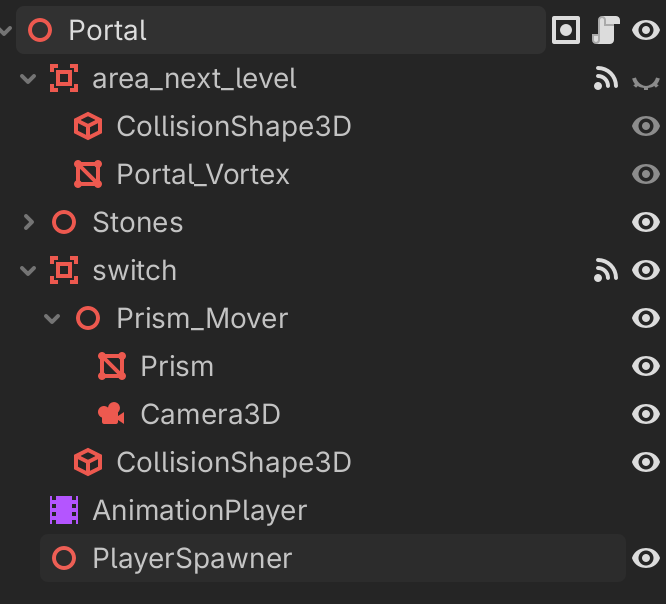
Nothing fancy going on here—it’s just a stone animation and a plane mesh with a shader to make a little bubbly black-hole noise effect.
As for the code responsible for the teleportation (change_scene()):
I haven’t actually touched this part. It lives inside the UI class and came straight out of the package I bought.
func change_scene(next_scene: String, player_transform: Transform3D) -> void:
	# Store a reference to the player to pass its settings onto the next player.
	var player = get_tree().get_first_node_in_group("Player")
	# Stop movement and cache settings.
	player.set_physics_process(false)
	var zoom = player.zoom
	var view = player.view
	var tween = create_tween()
	fade_out(tween)
	tween.tween_callback(func(): get_tree().change_scene_to_file(next_scene))
	# Wait at least one frame for the scene to update and ready.
	tween.tween_interval(0.1)
	tween.tween_callback(func():
		# Apply the cached variable to the new player.
		var new_player = get_tree().get_first_node_in_group("Player")
		# Set the player's position in the new level.
		new_player.global_transform = player_transform
		new_player.view = view
		new_player.zoom = zoom
		)
	fade_in(tween)
inside the portal is simply
@onready var area_next_level: Area3D = $area_next_level
@onready var player_spawner: Node3D = $PlayerSpawner
@export_file("*.scn") var next_level

func _on_area_3d_body_entered(body: Node3D) -> void:
	if body is Player:
		Disk.save_game()
		UserInterface.change_scene(next_level, player_spawner.global_transform)
What be safest way to solve a two issues:
- get player_spawner.global_transfrom from next_level/Portal/player_spawner instead of current portal.
- in case of multiple portals in scene ( one to return to previous level, next to progress to next level) what logic be best to use to avoid wrong spawn of player ?
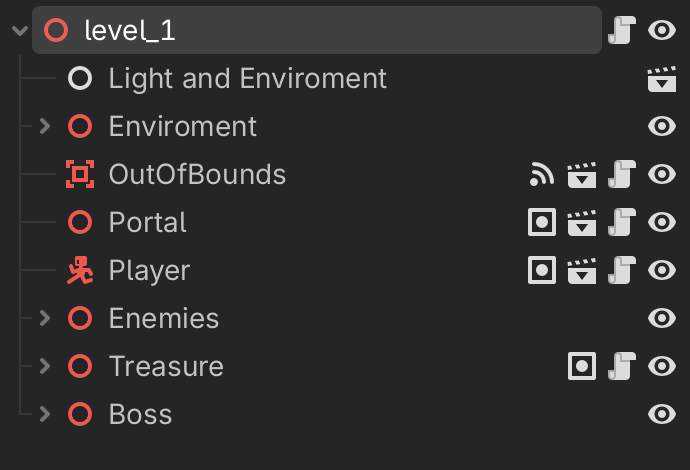
Level scenes are looking like this