Ok so I asked a similar question before but the problem then was that I had accidently marked a line as a breakpoint. Now, it is mostly working but sometimes it seems to randomly decide that the player is null (Invalid access to property or key ‘position’ on a base object of type ‘null instance’). It runs just fine most of the time but it’s to unstable to ignore. the player does have a state name and stuff as well, and seems to work just fine with everything else.
class_name Boss

@onready var player = get_parent().find_child("Player")
@onready var animated_sprite = $AnimatedSprite2D
@onready var progress_bar = $UI/ProgressBar
@onready var ray_cast_2d = $RayCast2D as RayCast2D

var direction : Vector2

var health: = 10:
	set(value):
		health = value
		progress_bar.value = value
		if value <= 0:
			progress_bar.visible = false
			find_child("FiniteStateMachine").change_state("Death")

func _ready():
	set_physics_process(false)
	health = 10


func _process(_delta):
	direction = player.position - position
	if direction.x < 0:
		animated_sprite.flip_h = true
	else:
		animated_sprite.flip_h = false


func _physics_process(delta):
	velocity = direction.normalized() * 40
	move_and_collide(velocity * delta)


func take_damage():
	health -= 2


func _on_forcefield_body_entered(body: Node2D) -> void:
	if body == player:
		print("bodyentered")
This is not a good way of assigning the player. And it’s most likely the reason why player is null sometimes. It’d be hard to figure out if you don’t show us how you create your Boss instance.
In any case, when you create any instance of Boss, assign player in the same script.
something like this
@export var player
@export var boss_parent
@export var boss_instance: PackedScene

func create_boss():
	var boss: Boss = boss_instance.instantiate() #or however you create boss
	boss.player = player #make sure var player is declared and assigned properly
	boss_parent.add_child(boss)
the boss is just automatically instantiated. The whole scene is dedicated to the boss fight so everything is added in the scene tree without adding anything in the code. also the player is supposed to apply globally, but when i just use the class name i assigned i get a similar error. I’m a little confused though, and totally could’ve misunderstood what you meant.
You could try some other method for getting a reference to the player.
One idea would be to make an Area2D that covers the whole boss level/arena (or just the entrance) with the mask layer set to the player layer, and on body_entered you check if it’s the Player. If it is you set the player variable.
And on the boss _process you can check if the player instance is valid before using the variable, so if the player variable hasn’t been set yet you won’t get any errors.
class_name Boss

@onready var player = get_parent().find_child("Player")
@onready var animated_sprite = $AnimatedSprite2D
@onready var progress_bar = $UI/ProgressBar
@onready var ray_cast_2d = $RayCast2D as RayCast2D

var direction : Vector2

var health: = 10:
	set(value):
		health = value
		progress_bar.value = value
		if value <= 0:
			progress_bar.visible = false
			find_child("FiniteStateMachine").change_state("Death")

func _ready():
	set_physics_process(false)
	health = 10


func _process(_delta):
	direction = player.position - position
	if direction.x < 0:
		animated_sprite.flip_h = true
	else:
		animated_sprite.flip_h = false


func _physics_process(delta):
	velocity = direction.normalized() * 40
	move_and_collide(velocity * delta)


func take_damage():
	health -= 2


func _on_forcefield_body_entered(body: Node2D) -> void:
	if body == player:
		print("bodyentered")
If you want your player to be globally accessible you need to add the node as an Autoload in the Project Settings window. Then you can assign a name to it, even if it’s different than the class name you gave it, and call it from anywhere. You won’t need the @onready var player… line afterwards, you can replace all the player parts of your script with whatever global name you give your player scene.
The class name isn’t actually linked to the my_player.tscn (example), it just acts as a descriptor of an object that has the methods and properties you wrote in your player script.
I’ll suggest another method to give your boss reference to the player:
You can hold control and left click your player scene from the file manager and drag it onto your Boss script, similarly to dragging and dropping an @onready var from your scene tree.
Its hard to tell without more information. I need to see the error and where in your the codebase is originating from to determine that. Also a scene tree would be helpful as well.
You said that the error happens every once in a while earlier and seems random.
but we should be able to pinpoint where the error is originating from is it when you do something with the boss, or is it when you don’t move the player, is it a area2D that you signal that you forgot to change? Try to find out how and where it could originate.
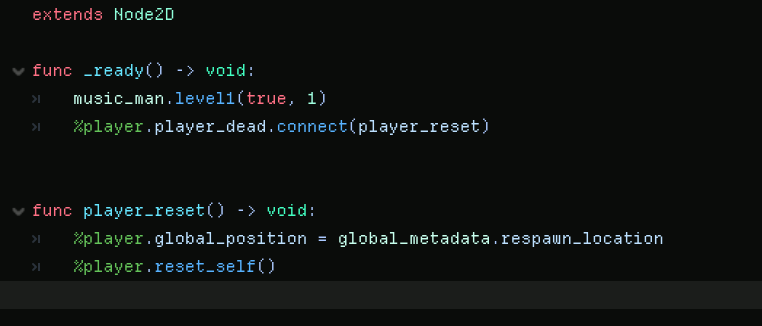
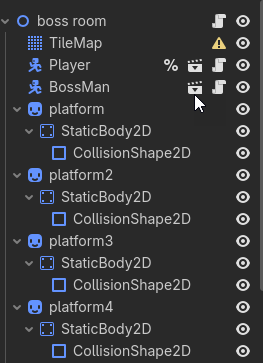
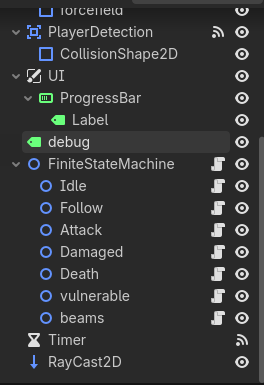
here are some screenshots, I really don’t know what is causing the error because the scene doesn’t load at all. When it does work everything is fine, but when it doesn’t it crashes the whole thing right from the start. I might be referencing the player wrong, but idk since it sort of works??
This is the error you get when loading the boss_room scene?
have you tried removing the boss_man and/or player from the scene and adding him back in and see if it changes things.
Consider putting the logic in a physics_process function instead since maybe it is a weird error between the amount of times the function is pulling in data from the player.