i’m making a hidden object game. It’s simple but it has 1,800 images. i’ve had it running as an online Web app on Itch but no more:
There was a problem loading your project:
Zip contains file that is too large (index.pck)
Please try deleting the ZIP file and uploading another one.
Originally i had too many files and Itch complained so i put everything in a PCK. i just added a level and that pushed it over 200MB, which is the largest one file can be on Itch.
I asked GoogleGPT what to do and it said Godot 4 has the ability to spread files out across multiple auto-generates PCK files but it doesn’t and when i told Google that it apologized but that still doesn’t leave me with an answer.
Anyone have ideas?
If it helps, my game is:
Game zip is 217MB
index.pck is 212MB
56 levels
1,371 PNGs + a handful of other images
No sound or music yet
158 TSCN scenes (half are probably from the Dialogic add-on)
Your pack file being so large means there isn’t much to do other than lower the quality and size of your assets
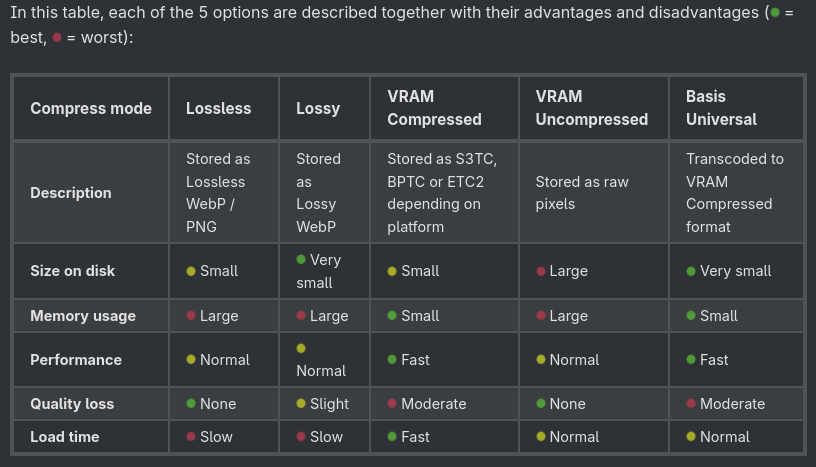
Your image files will be compressed in a different way on import, usually targeting fast load time rather than smaller on-disk size. You could try setting your images to import as “Lossy” or reducing the overall size of the image where possible.
That doesn’t solve the technical problem but it would solve my personal problem. It also suggests i could release multiple versions: Maybe one version where you play levels 1-20 and a second one where you teleport directly to level 21 and play 21-40. It’s awkward but it would be good enough to get my friends to play test it. My game is designed in a way where breaking it into pieces isn’t that hard. If there isn’t a technical solution then this might be the way to go.
Well technical solution could be using placeholders instead of embedding png assets directly .
Then just replacing it with external dependency via API, which would require to make a time for load them as well, so preloading levels or scenes be your challenge .
How would an API work here? i can dynamically load files when playing on my PC (where i also specify the directory) but i’m not sure how it works on a Web app where Godot throws everything into a PCK file.
You may be able to split pack files, though picking which resources go into which pack must be done manually, then load the other packs with ProjectSettings.load_resource_pack. I’m not sure how plausible this is on the Web as well, this technique relies on file access and I’m not sure how browsers will store the extra pack data.
Before trying all that, try using Butler. It’s how you should be uploading your project to itch, because it creates a diff of what you’re uploading and what is already up there, and then only uploads the difference. Since you’re only at 200MB, the problem is unlikely to be your file size. However I noticed this same problem before switching to Butler. Also, once you’ve used Butler once, subsequent uploads will take seconds instead of minutes.
The 200MB limit is real, specifically for web platforms, and specifically a single file (the pack) cannot exceed 200MB
There are a couple of requirements for ZIP files in place to prevent abuse and to ensure a suitable experience
for people running your project in their browser:
The ZIP file should not contain more than 1,000 individual files after extraction.
The maximum length of a file name including path should not be greater than 240 characters long.
The size of all the extracted content should not be greater than 500MB.
The size any single extracted file should not be greater than 200MB.
The filenames are case sensitive and should be encoded as UTF-8
If you read further down you may surmise that Godot converts images from any of those listed formats, it does not store files as they come, instead converting to webp (compressed for disk space), BPTC/ETC2/S3TC (compressed for VRAM), or raw pixel data.
So converting your files into webp will do nothing to reduce the size, and may actually make it larger if Godot thinks the new re-compression artifacts are more data to be stored.
I think I got the 200MB and 500MB limits confused.
I do think though that the 200MB limit does not apply in the same way with Butler though, because it only checks the total size uncompressed, and compares the diff against the 200MB limit.
This would only work if you have art like line drawings or basic shapes, but if you can remake at least some of it (like GUI) to svg files using Inkscape or Krita, you will see an enormous reduction in your package size.
There are also a lot of tutorials about compiling smaller export templates.
Are you doing only 2D? Then all the 3D code can go out the window.. saving about 50MB of compiled source code.
Have to make breakfast now. Let me know if you think this may help.
By default SVGs will also be converted to webp! Similarly will not reduce the pack file size, you could mark all SVG imports as “Keep File” then perform run-time generation with Image.load, this should keep the image size down but removes so many quality of life features such as the global scoped load function, and of course dramatically increases load times.
But if it is a 2D web game OP may want to try the custom export template with .minimal from my codeberg, if only just to see if it will compile and run:
Itch does not make things easy for web game developers. Too many small files is wrong, but one big file is also wrong apparently.
Anyway, the first thing you need to do is determine where the actual space is going. Then you will know where to focus your optimization effort. To do that, you will need to look inside the .pck file, because what’s inside the file isn’t the same as what’s in your project directory. There are tools available on the internet for doing inspecting or unpacking .pck files that you can find with a web search. Then look for the biggest files and the biggest directories in the .pck file and focus on cutting those down to size.
Things to look for:
Files that you don’t actually need to run the game. There include pre-import 3D models, files for features that didn’t make it into the game, tool scripts that are not needed in the final game, and reference material that never belonged in the game.
Files that can be scaled down without hurting the game.
Files that can be compressed better without hurting the game.
you sure you’re actually using all those 1371 PNG files ingame?
Lower resolution of textures and sounds, maybe lower quality webp will give you smaller PCK while still allowing transparency.
If all else fails, split into game chapters.